Preparation of building structure - Without rooms: Difference between revisions
No edit summary |
Pszczolkam (talk | contribs) |
||
| Line 24: | Line 24: | ||
* ''<IS_TS id=InstalacjeWodociagowe/>'' within the basic scope. | * ''<IS_TS id=InstalacjeWodociagowe/>'' within the basic scope. | ||
* ''<IS_TS id=InstalacjeKanalizacyjne/>''. | * ''<IS_TS id=InstalacjeKanalizacyjne/>''. | ||
==Webinars== | |||
'''We encourage you to see the video from our webinars presenting the possibilities of using the function described in this article:''' <br/>{{#ev:youtube|XSqBka9My4E|450||||rel=0}} <br clear="all"/> | |||
==Location in the program== | ==Location in the program== | ||
Revision as of 11:01, 30 June 2022
| Product | InstalSystem 5 |
| Type of article | FUNCTION AND TOOL |
| Source for translation | 2022-02-16 |
Description
The article describes how the basic structure of a building, with no rooms, can be set up. Once the building data, first of all the number of storeys, has been defined, it is possible to work on the actual project scopes. The building structure created in this manner can then be used when working on designs that contain:
- Various systems with radiators of user-specified output and required power, with terminal units of user-defined pressure drop, including cooling systems. For more information, see: Terminal unit.
- Water supply systems within the basic scope.
- Drainage systems.
Webinars
We encourage you to see the video from our webinars presenting the possibilities of using the function described in this article:
Location in the program
Storeys management
- Storeys management is accessible in the General data window, section Building and surroundings.
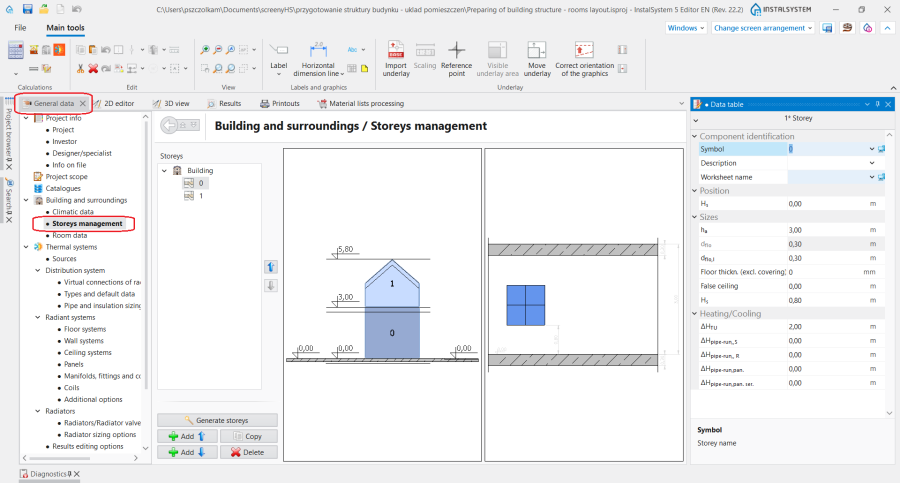
1. Storeys management.

Examples of use
Creating a storey
In the Storeys management section the most important data of the Storey can be specified:
- Storey elevation Hs - the elevation of the lowermost storey in a series of storeys, automatically determines the elevations of all storeys above (using the information on storey height and slab thickness).
- Floor thickn. (excl. covering) - Designed floor thickness, for heating floors - excluding covering. From it, the heights above the floor of all design elements on a given storey are referred, regardless of the value of the corresponding parameter in the rooms. The floor is presented in the model using the Turn on floor/false ceiling area function
For more information, see: Preparation of building structure - storeys.
Loading an underlay
Optionally an Underlay can be transferred onto each of the storeys. Underlay is a two-dimensional (flat) graphical object extracted from an external raster or vector file. Underlay in itself does not provide any components of the building structure, but it displays the plans of the individual storeys, which may facilitate inserting system components in the project.
For more information, see: Import underlay files.