Preparation of building structure - Roof modeling: Difference between revisions
Klintsevicho (talk | contribs) |
Klintsevicho (talk | contribs) (→scope) |
||
| Line 44: | Line 44: | ||
Icons of tools and functions related to the creation of ''<IS_TS id=Roof/>'' are accessible in the ''<IS_TS id=GraphicalEdit/>'' and partly in the ''<IS_TS id=View3D/>'' window on the ''<IS_TS id=NarzedziaGlowne/>'' bar, section ''<IS_TS id=lystrFloors/>'' when ''<IS_TS id=lystrFloors/>'' editing is enabled.<br/>[[File:Creation of roofs Roof tab.png|900 px|left|thumb|3. <IS_TS id=Roof/> elements.]]<br clear="all"/> [[File:Creation of roofs Window tab.png|900 px|left|thumb|4. <IS_TS id=pinNameOknoDachowe/>.]]<br clear="all"/> | Icons of tools and functions related to the creation of ''<IS_TS id=Roof/>'' are accessible in the ''<IS_TS id=GraphicalEdit/>'' and partly in the ''<IS_TS id=View3D/>'' window on the ''<IS_TS id=NarzedziaGlowne/>'' bar, section ''<IS_TS id=lystrFloors/>'' when ''<IS_TS id=lystrFloors/>'' editing is enabled.<br/>[[File:Creation of roofs Roof tab.png|900 px|left|thumb|3. <IS_TS id=Roof/> elements.]]<br clear="all"/> [[File:Creation of roofs Window tab.png|900 px|left|thumb|4. <IS_TS id=pinNameOknoDachowe/>.]]<br clear="all"/> | ||
===<IS_TS id=lystrGraphicBackground/> scope=== | ===<IS_TS id=lystrGraphicBackground/> scope=== | ||
Icons of tools and functions related to the creation of ''<IS_TS id=Roof/>'' and its elements from the IFC file are accessible in | Icons of tools and functions related to the creation of ''<IS_TS id=Roof/>'' and its elements from the IFC file are accessible in ''<IS_TS id=GraphicalEdit/>'' and ''<IS_TS id=View3D/>'' windows on the ''<IS_TS id=NarzedziaGlowne/>'' bar, section ''<IS_TS id=lystrGraphicBackground/>'' when ''<IS_TS id=lystrGraphicBackground/>'' editing is enabled.<br/>[[File:Creation of roofs Interpret IFC tab.png|900 px|left|thumb|5. Create <IS_TS id=Roof/> and its elements from IFC file.]]<br clear="all"/> | ||
===Related operations=== | |||
* ''<IS_TS id=ZmienStropWDach/>'' operation is available in ''<IS_TS id=GraphicalEdit/>'' and ''<IS_TS id=View3D/>'' windows in the right mouse button context menu. Allows to convert ''<IS_TS id=Slab/>'' element into ''<IS_TS id=Roof/>''.<br/>[[File:Creation of roofs Convert to Roof.png|900 px|left|thumb|6. <IS_TS id=ZmienStropWDach/>.]]<br clear="all"/> | |||
* ''<IS_TS id=PartitionsGenerator/>'' operation is available in ''<IS_TS id=GraphicalEdit/>'' and ''<IS_TS id=View3D/>'' windows on the ''<IS_TS id=NarzedziaGlowne/>'' bar, section ''<IS_TS id=lystrFloors/>'' when ''<IS_TS id=lystrFloors/>'' editing is enabled. Allows to automatically generate ''<IS_TS id=Roof/>'' on the basis of previously created ''<IS_TS id=iNameKonstrPomieszczeniePlural/>'' and ''<IS_TS id=ObrysBud/>''.<br/>[[File:Creation of roofs Auto Roofs.png|900 px|left|thumb|7. <IS_TS id=PartitionsGenerator/>.]]<br clear="all"/> | |||
===Computation of building structure=== | ===Computation of building structure=== | ||
Revision as of 13:03, 17 October 2024
| Product | InstalSystem 5 |
| Type of article | FUNCTION AND TOOL |
| Source for translation | 2024-10-17 |
Description
The article describes the possibilities of preparing various kinds of Roof constructions.
Functions and tools related to the creation or modification of the Roof structure and related elements are the following:
- Construction scope, Roof tab:
- Roof,
- Add roof edge,
- Dormer,
- Join roofs,
- Opening in roof;
- Construction scope, Window/Recess tab:
- Roof window;
- Underlay scope, Interpret from IFC file tab:
- Creates roofs from an IFC file. For more information, see: Interpretation of roofs,
- Creates windows, doors, and wall openings from an IFC file (to create Roof window);
- Operations related to the creation of Roof during preparation of Building structure:
- Convert to roof (right mouse button context menu),
- Automatic walls, slabs and roofs.
Note: In order to view the effects of changes made during editing it is necessary to invoke Computation of building structure .
For more information, see: Preparation of building structure
Location in the program
Construction scope
Icons of tools and functions related to the creation of Roof are accessible in the 2D editor and partly in the 3D view window on the Main tools bar, section Construction when Construction editing is enabled.


Underlay scope
Icons of tools and functions related to the creation of Roof and its elements from the IFC file are accessible in 2D editor and 3D view windows on the Main tools bar, section Underlay when Underlay editing is enabled.

Related operations
- Convert to roof operation is available in 2D editor and 3D view windows in the right mouse button context menu. Allows to convert Slab element into Roof.

6. Convert to roof. - Automatic walls, slabs and roofs operation is available in 2D editor and 3D view windows on the Main tools bar, section Construction when Construction editing is enabled. Allows to automatically generate Roof on the basis of previously created Rooms and Building contour.
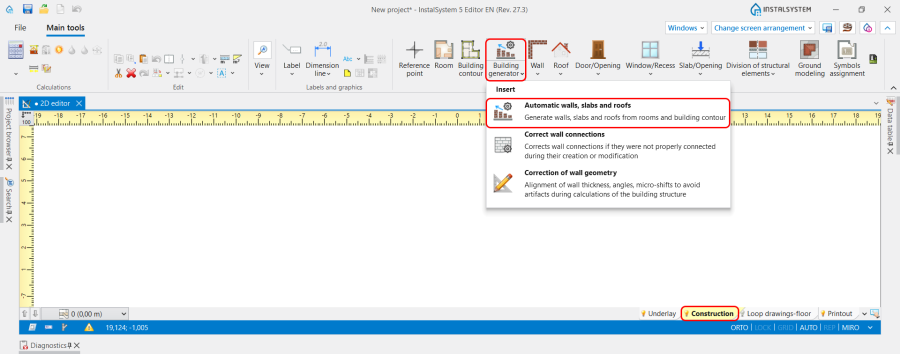
7. Automatic walls, slabs and roofs.


Computation of building structure
- Computation of building structure is available on Main tools bar, section Calculations.
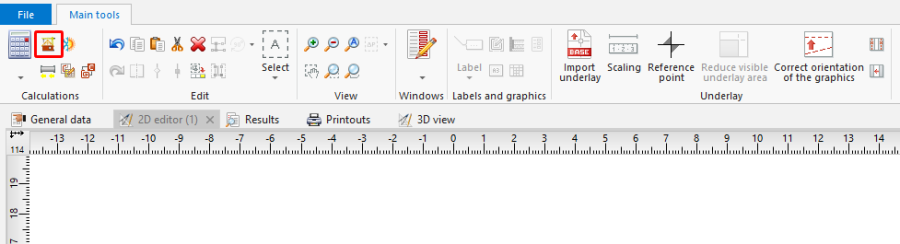
4. Computation of building structure

Example of use
1. Create an outline of the roof cover using the Roof component. Then draw the edges of the roof using Add roof edge and specify the elevations of the characteristic points of the roof.
Roof division lines can be deleted by clicking  .
.
Red roof division lines indicate that the division cannot be effected and the elevations of the points or the division lines need to be adjusted.
- shed roof,
- gable roof,
- hip roof,
- half hip roof,
- gambrel roof,
- multifaceted roof.
2. Create a roof with a dormer using Dormer:
- roof with a shed dormer,
- roof with a gabled dormer.