Linear and point thermal bridges: Difference between revisions
Jump to navigation
Jump to search
Klintsevicho (talk | contribs) |
No edit summary Tag: Manual revert |
||
| (48 intermediate revisions by 5 users not shown) | |||
| Line 1: | Line 1: | ||
<!--Case 304190--> | |||
<IS_HELP id="HS200"/> | |||
{{Article table | {{Article table | ||
|commercial_product1=InstalSystem 5 | |commercial_product1=InstalSystem 5 | ||
| Line 17: | Line 19: | ||
==DESCRIPTION== | ==DESCRIPTION== | ||
This article describes methods of accounting linear and point thermal bridges in | This article describes methods of accounting for linear and point thermal bridges in the [[Calculation_of_design_heat_load_of_rooms|<IS_TS id=ObliczeniaCieplneBudynku/>]]. | ||
==LOCATION IN THE PROGRAM== | ==LOCATION IN THE PROGRAM== | ||
| Line 23: | Line 25: | ||
==EXAMPLE OF USE== | ==EXAMPLE OF USE== | ||
===Scenario I - <IS_TS id=rsEN12831_MetodaUwzglednianiaMostkowCieplnychUproszczona/> method of accounting linear thermal bridges=== | ===Scenario I - <IS_TS id=rsEN12831_MetodaUwzglednianiaMostkowCieplnychUproszczona/> method of accounting linear thermal bridges=== | ||
# Editing the default data: | # Editing the default data: | ||
#* In the ''<IS_TS id=rsDanogi/>'' window, ''<IS_TS id=ObliczeniaCieplneBudynku/>'', ''<IS_TS id=rsDanog_Normy/>'' tab choose ''<IS_TS id=rsEN12831_MetodaUwzglednianiaMostkowCieplnychUproszczona/>'' for the ''<IS_TS id=strs_enumidISFOZCDaneOgolneEN12831_MetodaUwzglednianiaMostkowCieplnych/>'' | #* In the ''<IS_TS id=rsDanogi/>'' window, ''<IS_TS id=ObliczeniaCieplneBudynku/>'', ''<IS_TS id=rsDanog_Normy/>'' tab choose ''<IS_TS id=rsEN12831_MetodaUwzglednianiaMostkowCieplnychUproszczona/>'' for the ''<IS_TS id=strs_enumidISFOZCDaneOgolneEN12831_MetodaUwzglednianiaMostkowCieplnych/>''; | ||
#* (Optionally) ''<IS_TS id=rsUstawMostkiNaAutoCaption/>'' for the ''<IS_TS id=rsEN12831_DaneMostkow/>''. This | #* (Optionally) ''<IS_TS id=rsUstawMostkiNaAutoCaption/>'' for the ''<IS_TS id=rsEN12831_DaneMostkow/>''. This automatically sets the '''''AUTO''''' status to be set for all fields of the ''<IS_TS id=sENPrzegrodadU0_NaMostkiPNEN/>'' (''<IS_TS id=strl_expidISFPrzegrodadU0_NaMostki/>'') column, available on the form ''<IS_TS id=ScopeKonstrukcjaBudynku/>'' / ''<IS_TS id=BuildingRoomsView/>'', with the following default values: | ||
#** ''<IS_TS id=sENPrzegrodadU0_NaMostkiPNEN/> = 0.05 <IS_TS id=_rssWsp_kPowierzchniowyInSI/>'' - for the external partitions (''<IS_TS id=rssTypKonstrukcjiPrzegrodyScianaZewnetrzna/>'', ''<IS_TS id=rssTypKonstrukcjiPrzegrodyOknoZewnetrzne/>'', ''<IS_TS id=rssTypKonstrukcjiPrzegrodyDrzwiZewnetrzne/>'', ''<IS_TS id=rssTypKonstrukcjiPrzegrodyStropNadPrzejazdem/>'', ''<IS_TS id=rssTypKonstrukcjiPrzegrodyStropodach/>'') and for | #** ''<IS_TS id=sENPrzegrodadU0_NaMostkiPNEN/> = 0.05 <IS_TS id=_rssWsp_kPowierzchniowyInSI/>'' - for the external partitions (''<IS_TS id=rssTypKonstrukcjiPrzegrodyScianaZewnetrzna/>'', ''<IS_TS id=rssTypKonstrukcjiPrzegrodyOknoZewnetrzne/>'', ''<IS_TS id=rssTypKonstrukcjiPrzegrodyDrzwiZewnetrzne/>'', ''<IS_TS id=rssTypKonstrukcjiPrzegrodyStropNadPrzejazdem/>'', ''<IS_TS id=rssTypKonstrukcjiPrzegrodyStropodach/>'') and for the partitions in contact with the ground (''<IS_TS id=rssTypKonstrukcjiPrzegrodyScianaPrzyGruncie/>'', ''<IS_TS id=rssTypKonstrukcjiPrzegrodyPodloga/>''); | ||
#** ''<IS_TS id=sENPrzegrodadU0_NaMostkiPNEN/> = 0.00 <IS_TS id=_rssWsp_kPowierzchniowyInSI/>'' - for the internal partitions (''<IS_TS id=rssTypKonstrukcjiPrzegrodyScianaWewnetrzna/>'', ''<IS_TS id=rssTypKonstrukcjiPrzegrodyStropWewnetrzny/>'', ''<IS_TS id=rssTypKonstrukcjiPrzegrodyDrzwiWewnetrzne/>'', ''<IS_TS id=rssTypKonstrukcjiPrzegrodyOknoWewnetrzne/>''). </br>[[File:Thermal bridges auto mode.png|900 px|left|thumb|2. <IS_TS id=sENPrzegrodadU0_NaMostkiPNEN/> column with "auto mode" status.]]<br clear="all"/> | #** ''<IS_TS id=sENPrzegrodadU0_NaMostkiPNEN/> = 0.00 <IS_TS id=_rssWsp_kPowierzchniowyInSI/>'' - for the internal partitions (''<IS_TS id=rssTypKonstrukcjiPrzegrodyScianaWewnetrzna/>'', ''<IS_TS id=rssTypKonstrukcjiPrzegrodyStropWewnetrzny/>'', ''<IS_TS id=rssTypKonstrukcjiPrzegrodyDrzwiWewnetrzne/>'', ''<IS_TS id=rssTypKonstrukcjiPrzegrodyOknoWewnetrzne/>''). </br>[[File:Thermal bridges auto mode.png|900 px|left|thumb|2. <IS_TS id=sENPrzegrodadU0_NaMostkiPNEN/> column with "auto mode" status.]]<br clear="all"/> | ||
#* (Optionally) Introducing ''<IS_TS id=strs_expidISFOZCDaneOgolneEN12831_DomyslnyDodatekNaMostki/>'' - available for the DIN standards. | #* (Optionally) Introducing ''<IS_TS id=strs_expidISFOZCDaneOgolneEN12831_DomyslnyDodatekNaMostki/>'' - available for the DIN standards. | ||
# Editing the ''<IS_TS id=DanePomieszczen/>'': | # Editing the ''<IS_TS id=DanePomieszczen/>'': | ||
#* Select the method of | #* Select the method of determining ''<IS_TS id=sENPrzegrodadU0_NaMostkiPNEN/>'' (''<IS_TS id=strl_expidISFPrzegrodadU0_NaMostki/>'') in the form ''<IS_TS id=ScopeKonstrukcjaBudynku/>'' / ''<IS_TS id=BuildingRoomsView/>'':</br>[[File:Thermal bridges delta U.png|900 px|left|thumb|3. <IS_TS id=strl_expidISFPrzegrodadU0_NaMostki/> <IS_TS id=rsEN12831_MetodaUwzglednianiaMostkowCieplnychUproszczona/> method.]]<br clear="all"/> | ||
#** ''User's'' - allows to set the value of the allowance by yourself; | #** ''User's'' - allows to set the value of the allowance by yourself; | ||
#** '' | #** ''Automatically'' - initialises the default values according to the ''AUTO''; | ||
#** ''<IS_TS id=rsEN12831_DodatekNaMostkiBezUwzglednieniaMostkow/>'' - ''<IS_TS id=sENPrzegrodadU0_NaMostkiPNEN/> = 0.05 <IS_TS id=_rssWsp_kPowierzchniowyInSI/>''; | #** ''<IS_TS id=rsEN12831_DodatekNaMostkiBezUwzglednieniaMostkow/>'' - ''<IS_TS id=sENPrzegrodadU0_NaMostkiPNEN/> = 0.05 <IS_TS id=_rssWsp_kPowierzchniowyInSI/>''; | ||
#** ''<IS_TS id=rsEN12831_DodatekNaMostkiZUwzlednieniemMostkow/>'' - ''<IS_TS id=sENPrzegrodadU0_NaMostkiPNEN/>'' = 0.1 <IS_TS id=_rssWsp_kPowierzchniowyInSI/>''. | #** ''<IS_TS id=rsEN12831_DodatekNaMostkiZUwzlednieniemMostkow/>'' - ''<IS_TS id=sENPrzegrodadU0_NaMostkiPNEN/>'' = 0.1 <IS_TS id=_rssWsp_kPowierzchniowyInSI/>''. | ||
===Scenario II - <IS_TS id=rsEN12831_MetodaUwzglednianiaMostkowCieplnychEN12831/> | |||
===Scenario II - Method of accounting linear thermal bridges <IS_TS id=rsEN12831_MetodaUwzglednianiaMostkowCieplnychEN12831/>=== | |||
# Editing the default data: | # Editing the default data: | ||
#* In the ''<IS_TS id=rsDanogi/>'' window, ''<IS_TS id=ObliczeniaCieplneBudynku/>'', ''<IS_TS id=rsDanog_Normy/>'' tab choose ''<IS_TS id=rsEN12831_MetodaUwzglednianiaMostkowCieplnychEN12831/>'' for the ''<IS_TS id=strs_enumidISFOZCDaneOgolneEN12831_MetodaUwzglednianiaMostkowCieplnych/>'' | #* In the ''<IS_TS id=rsDanogi/>'' window, ''<IS_TS id=ObliczeniaCieplneBudynku/>'', ''<IS_TS id=rsDanog_Normy/>'' tab choose ''<IS_TS id=rsEN12831_MetodaUwzglednianiaMostkowCieplnychEN12831/>'' for the ''<IS_TS id=strs_enumidISFOZCDaneOgolneEN12831_MetodaUwzglednianiaMostkowCieplnych/>''. | ||
# Editing the ''<IS_TS id=DanePomieszczen/>'': | # Editing the ''<IS_TS id=DanePomieszczen/>'': | ||
#* Select the method of | #* Select the method of determining ''<IS_TS id=sENPrzegrodadU0_NaMostkiPNEN/>'' (''<IS_TS id=strl_expidISFPrzegrodadU0_NaMostki/>'') in the form ''<IS_TS id=ScopeKonstrukcjaBudynku/>'' / ''<IS_TS id=BuildingRoomsView/>'':</br>[[File:Thermal bridges allowance EN 12831.png|900 px|left|thumb|4. <IS_TS id=strl_expidISFPrzegrodadU0_NaMostki/> <IS_TS id=rsEN12831_MetodaUwzglednianiaMostkowCieplnychEN12831/>.]]<br clear="all"/> | ||
#** ''User's'' - allows to set the value of the allowance by yourself; | |||
#** The values from the drop-down menu. | |||
===Scenario III - <IS_TS id=rsEN12831_MetodaUwzglednianiaMostkowCieplnychLiniowe/> method of accounting linear thermal bridges=== | ===Scenario III - <IS_TS id=rsEN12831_MetodaUwzglednianiaMostkowCieplnychLiniowe/> method of accounting linear thermal bridges=== | ||
# Editing the default data: | # Editing the default data: | ||
#* In the ''<IS_TS id=rsDanogi/>'' window, ''<IS_TS id=ObliczeniaCieplneBudynku/>'', ''<IS_TS id=rsDanog_Normy/>'' tab choose ''<IS_TS id=rsEN12831_MetodaUwzglednianiaMostkowCieplnychLiniowe/>'' for the ''<IS_TS id=strs_enumidISFOZCDaneOgolneEN12831_MetodaUwzglednianiaMostkowCieplnych/>'' | #* In the ''<IS_TS id=rsDanogi/>'' window, ''<IS_TS id=ObliczeniaCieplneBudynku/>'', ''<IS_TS id=rsDanog_Normy/>'' tab choose ''<IS_TS id=rsEN12831_MetodaUwzglednianiaMostkowCieplnychLiniowe/>'' for the ''<IS_TS id=strs_enumidISFOZCDaneOgolneEN12831_MetodaUwzglednianiaMostkowCieplnych/>''. | ||
# Definition of default types of the linear thermal bridges: | # Definition of default types of the linear thermal bridges: | ||
#* After making ''<IS_TS id=sObliczenie/>'' the ''<IS_TS id= | #* After making ''<IS_TS id=sObliczenie/>'' the ''<IS_TS id=ScopeOZC_MC_Short/>'' (''<IS_TS id=ScopeOZC_MC/>'') scope with the representation of thermal bridges will be available in ''<IS_TS id=GraphicalEdit/>'' and on ''<IS_TS id=View3D/>''; | ||
#* Open ''<IS_TS id=ProjectBrowser/>'', ''<IS_TS id=ObliczeniaCieplneBudynku/>'', ''<IS_TS id=rsDefinicjeMostkow/>''. Select the default definition for each type of linear thermal bridge from the offered visualized variants. '''''Note:''''' One definition per bridge type is available by default. <br/><br/>Once a linear bridge is defined, its description will be available in the working space and in the ''<IS_TS id=DataEditorTable/>'': | |||
#** ''<IS_TS id=strs_stridISFMostekNazwa/>'', | #** ''<IS_TS id=strs_stridISFMostekNazwa/>'', | ||
#** ''<IS_TS id=DefinicjaMostkaTypMostka/>'', | #** ''<IS_TS id=DefinicjaMostkaTypMostka/>'', | ||
#** ''<IS_TS id=sISFDefinicjaMostka/>'' (from the visualized variants), | #** ''<IS_TS id=sISFDefinicjaMostka/>'' (from the visualized variants), | ||
#** ''<IS_TS id=sPsi/>'', ''<IS_TS id=_rssWsp_kLiniowyInSI/>'' (''<IS_TS id=hintDefinicjaMostkaWspolczynnikPsi/>''). <br/><br/> {{#ev:youtube| | #** ''<IS_TS id=sPsi/>'', ''<IS_TS id=_rssWsp_kLiniowyInSI/>'' (''<IS_TS id=hintDefinicjaMostkaWspolczynnikPsi/>''). <br/><br/> {{#ev:youtube|omx8457reV0|900||||rel=0}} <br clear="all"/> | ||
#** (Optionally) Copy an existing thermal bridge definition and modify its data, indicate as default; | #** (Optionally) Copy an existing thermal bridge definition and modify its data, indicate as default; | ||
#** (Optionally) Create a new bridge definition, manually complete its data, select a bridge category from the list and indicate as default; | #** (Optionally) Create a new bridge definition, manually complete its data, select a bridge category from the list and indicate as default; | ||
#** (Optionally) Deletion of selected user | #** (Optionally) Deletion of selected user definitions of bridges. | ||
# Perform ''<IS_TS id=sObliczenie/>'', | # Perform ''<IS_TS id=sObliczenie/>'', and the automatically detected linear thermal bridges will be assigned the corresponding ''<IS_TS id=_rssWsp_kLiniowyInSI/>'' values and taken into account in the ''<IS_TS id=ObliczeniaCieplneBudynku/>''; | ||
# Overview of automatically recognized linear thermal bridges and make manual edits, if necessary: | # Overview of automatically recognized linear thermal bridges and make manual edits, if necessary: | ||
#* Open ''<IS_TS id=ProjectBrowser/>'', ''<IS_TS id=ObliczeniaCieplneBudynku/>'', ''<IS_TS id= | #* Open ''<IS_TS id=ProjectBrowser/>'', ''<IS_TS id=ObliczeniaCieplneBudynku/>'', ''<IS_TS id=BuildingThermalBridgeView/>''. The tree presents the linear bridges within the rooms grouped by type in the related branches. All the bridges of a given type within a room can be selected using the ''<IS_TS id=btnSelectAll/>'' function or by the ''<IS_TS id=btRectSelectType/>''. Multi-selection with CTRL/SHIFT is also possible; | ||
#* The сhosen bridges are presented in the ''<IS_TS id=GraphicalEdit/>'' window and ''<IS_TS id=View3D/>'' on a separate edit scope ''<IS_TS id=ScopeOZC_MC_Short/>''. </br>[[File:Thermal bridges room view.png|900 px|left|thumb|4. <IS_TS id=ThermalBridgeView/>.]]<br clear="all"/> | |||
#* The selection of linear thermal bridges directly in the ''<IS_TS id=GraphicalEdit/>'' window or ''<IS_TS id=View3D/>'' is also possible in the ''<IS_TS id=ScopeOZC_MC_Short/>'' scope by clicking on its graphic representation; | |||
#* The linear thermal bridges of a defined type can be selected with the use of the buttons available at the ''<IS_TS id=rsDefinicjeMostkow/>''; </br>[[File:Thermal bridges select all d type.png|900 px|left|thumb|5. Selection of thermal bridges of a defined type.]]<br clear="all"/> | |||
#* Manual editing of automatically assigned thermal bridges: | |||
#** The operations, available for the selected thermal bridge, are the following: | |||
#*** Manual change of ''<IS_TS id=sISFDefinicjaMostka/>''; | |||
#*** Manual correction of the ''<IS_TS id=strs_expidISFMostekDlugosc/>'' ( ''<IS_TS id=strl_expidISFMostekDlugosc/>'') of a linear thermal bridge. | |||
#*** Unchecking check box ''<IS_TS id=UwzgledniajWObliczeniach/>''; | |||
#*** Change of ''<IS_TS id=strpnDzialkaIDOpisu/>'' and addition of ''<IS_TS id=sOpis/>''. | |||
===Scenario IV - Method of accounting point thermal bridges=== | |||
# Editing the default data: | |||
#* In the ''<IS_TS id=rsDanogi/>'' window, ''<IS_TS id=ObliczeniaCieplneBudynku/>'', ''<IS_TS id=rsDanog_Normy/>'' tab choose ''<IS_TS id=rsEN12831_MetodaUwzglednianiaMostkowCieplnychLiniowe/>'' for the ''<IS_TS id=strs_enumidISFOZCDaneOgolneEN12831_MetodaUwzglednianiaMostkowCieplnych/>''. | |||
# Definition of point thermal bridges: | |||
#* Open ''<IS_TS id=ProjectBrowser/>'', ''<IS_TS id=ObliczeniaCieplneBudynku/>'', ''<IS_TS id=rsDefinicjeMostkow/>'', ''<IS_TS id=rsTypMostka_MostkiPunktowe/>''. Select point thermal bridge type from the offered list. After making ''<IS_TS id=sObliczenie/>'' the ''<IS_TS id=ScopeOZC_MC_Short/>'' (''<IS_TS id=ScopeOZC_MC/>'') scope with the representation of thermal bridges area will be available in ''<IS_TS id=GraphicalEdit/>'' and on ''<IS_TS id=View3D/>''; | |||
#* The data of the selected type will be available in the ''<IS_TS id=DataEditorTable/>'': | |||
#** ''<IS_TS id=sNazwa/>'', | |||
#** ''<IS_TS id=sOpis/>'', | |||
#** ''<IS_TS id=sWspolczynnikChi_pCaption/>'' (''<IS_TS id=sWspolczynnikChi_pHint/>''), | |||
#** ''<IS_TS id=sUwzglednijDlaDefinicjiPrzegrodyCaption/>'' - when opening the field the definition grouped for the partitions will be available. This is possible to select one or more partition definitions, | |||
#** ''<IS_TS id=Field strSposobOkreslaniaIlosciMostkowPunktowychCaption/>'' with two variants to choose from: ''<IS_TS id=strNaM2PrzerodyCieplnej/>'' and ''<IS_TS id=strNaPrzegrodeCieplna/>'', | |||
#** ''<IS_TS id=strIloscMostkowPunktowychCaption/>''. '''''Note:''''' The correction of this field is also possible after making ''<IS_TS id=sObliczenie/>''. <br/> {{#ev:youtube|mDsghDw6kuE|900||||rel=0}} <br clear="all"/> | |||
#* (Optionally) Copying an existing ''<IS_TS id=sISFDefinicjaMostka/>'' and modifying its data as above (e.g. to include the same bridge in different ''<IS_TS id=rssTypKonstrukcjiPrzegrodyScianaZewnetrzna/>'' definitions); | |||
#* (Optionally) Creating a new bridge definition, manually filling in the above data; | |||
#* (Optionally) Deletion of selected user definitions of bridges. | |||
# Perform ''<IS_TS id=sObliczenie/>'', resulting in automatic detection of point thermal bridges and their inclusion in the ''<IS_TS id=ObliczeniaCieplneBudynku/>''; | |||
# Overview of automatically recognized point thermal bridges area and make manual edits, if necessary: | |||
#* Open ''<IS_TS id=ProjectBrowser/>'', ''<IS_TS id=ObliczeniaCieplneBudynku/>'', ''<IS_TS id=ThermalBridgeView/>''. After deploying the tree at the ''<IS_TS id=iNameKonstrPomieszczenie/>'' level, an expandable ''<IS_TS id=rsTypMostka_MostkiPunktowe/>'' branch is available below the branches with linear thermal bridge types, | |||
#* The сhosen bridges areas are presented in the ''<IS_TS id=GraphicalEdit/>'' window and ''<IS_TS id=View3D/>'' on a separate edit scope ''<IS_TS id=ScopeOZC_MC_Short/>''. </br>[[File:Thermal bridges PB point tb.png|900 px|left|thumb|6. <IS_TS id=rsTypMostka_MostkiPunktowe/>.]]<br clear="all"/> | |||
#* Manual editing of the point bridge area data: | |||
#** The operations, available for the selected thermal bridge, are the following: | |||
#*** Change of ''<IS_TS id=strSposobOkreslaniaIlosciMostkowPunktowychCaption/>'', status ''AUTO'' / ''MANUAL'' ([[File:Auto-calculation-ikon.png|20 px]] / [[File:Manual icon.png |20 px]]): | |||
#**** ''AUTO'' allows to determine the ''<IS_TS id=strIloscMostkowPunktowychCaption/>'' according to bridge definition. | |||
#**** ''MANUAL'' gives the possibility to change the default method and to define individually the ''<IS_TS id=strIloscMostkowPunktowychCaption/>'' to be taken into account (via the fields ''<IS_TS id=strNaM2PrzerodyCieplnej/>'' or ''<IS_TS id=strNaPrzegrodeCieplna/>''). | |||
#*** Unchecking check box ''<IS_TS id=UwzgledniajWObliczeniach/>''; | |||
#*** Change of ''<IS_TS id=strpnDzialkaIDOpisu/>'' and addition of ''<IS_TS id=sOpis/>''. | |||
== | {|class="wikitable" style="width: 800px; margin: 0 auto;" | ||
!If you have any comments on this article, please send us a short message at ''info@instalsoft.com''. | |||
|} | |||
[[Category:InstalSystem 5]] | [[Category:InstalSystem 5]] | ||
[[Category:FUNCTION AND TOOL]] | [[Category:FUNCTION AND TOOL]] | ||
<!-- Do not write text below this tag --> | |||
<!-- Do not write text below this tag --> | |||
<br class="iwlinks"/>[[pl:Liniowe i punktowe mostki cieplne|Liniowe i punktowe mostki cieplne]] | |||
Latest revision as of 23:06, 12 June 2026
| Product | InstalSystem 5 |
| Type of article | FUNCTION AND TOOL |
| Source for translation | 2025-04-22 |
DESCRIPTION
This article describes methods of accounting for linear and point thermal bridges in the .
LOCATION IN THE PROGRAM
The selection of the is available in the window, tab.

EXAMPLE OF USE
Scenario I - method of accounting linear thermal bridges
- Editing the default data:
- In the window, , tab choose for the ;
- (Optionally) for the . This automatically sets the AUTO status to be set for all fields of the () column, available on the form / , with the following default values:
- = 0.05 - for the external partitions (, , , , ) and for the partitions in contact with the ground (, );
- = 0.00 - for the internal partitions (, , , ).
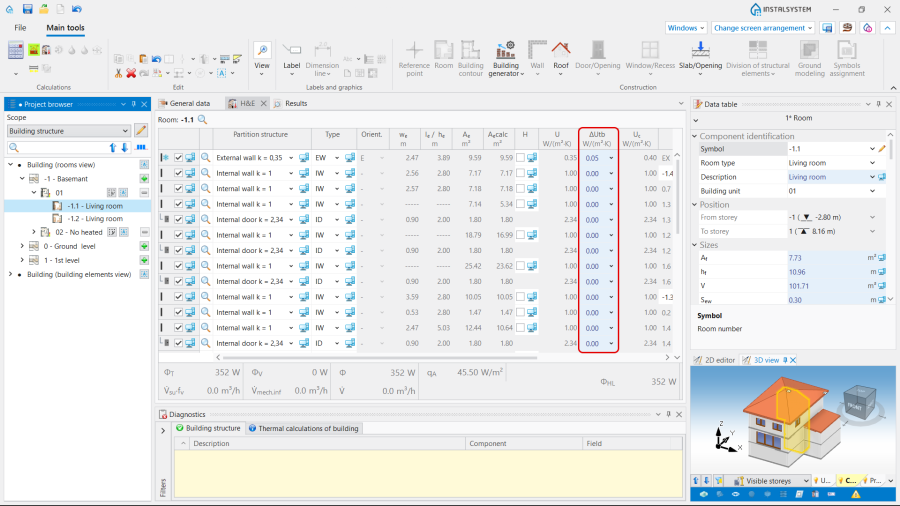
2. column with "auto mode" status.
- (Optionally) Introducing - available for the DIN standards.
- Editing the :
- Select the method of determining () in the form / :
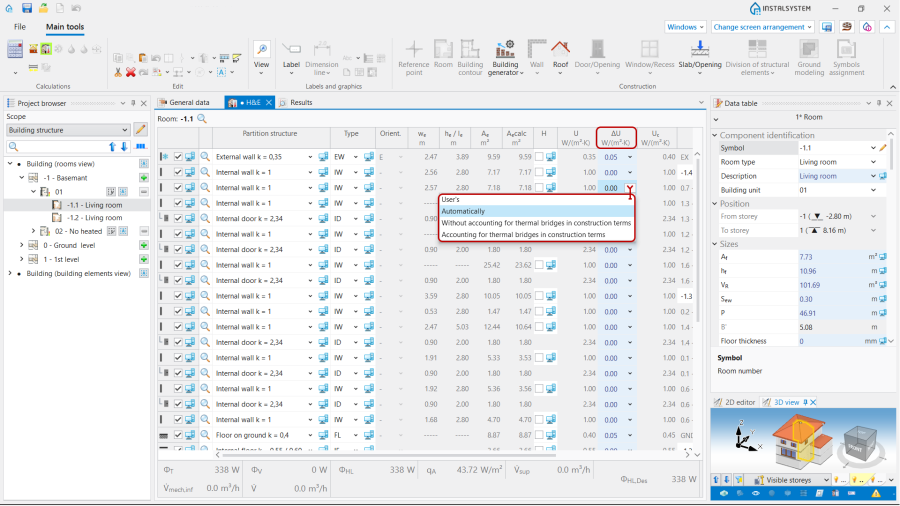
3. method.
- User's - allows to set the value of the allowance by yourself;
- Automatically - initialises the default values according to the AUTO;
- - = 0.05 ;
- - = 0.1 .
- Select the method of determining () in the form / :


Scenario II - Method of accounting linear thermal bridges
- Editing the default data:
- In the window, , tab choose for the .
- Editing the :
- Select the method of determining () in the form / :
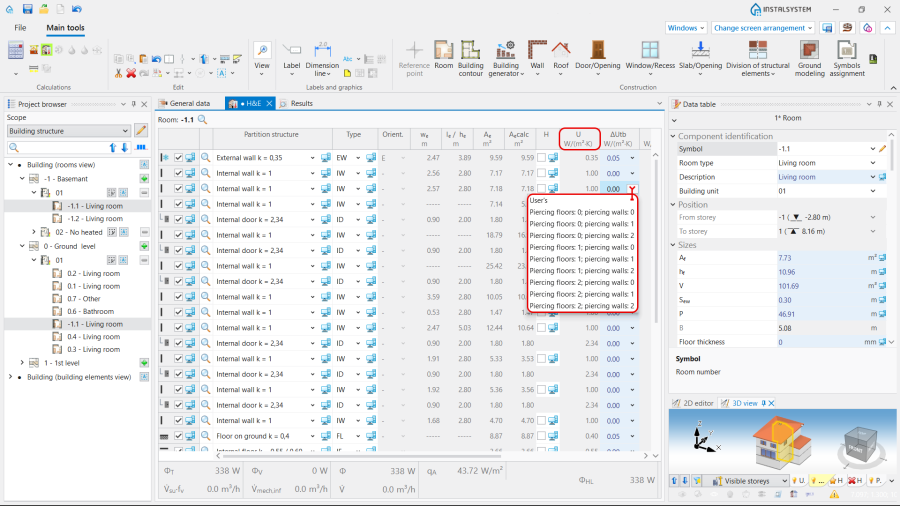
4. .
- User's - allows to set the value of the allowance by yourself;
- The values from the drop-down menu.
- Select the method of determining () in the form / :

Scenario III - method of accounting linear thermal bridges
- Editing the default data:
- In the window, , tab choose for the .
- Definition of default types of the linear thermal bridges:
- After making the () scope with the representation of thermal bridges will be available in and on ;
- Open , , . Select the default definition for each type of linear thermal bridge from the offered visualized variants. Note: One definition per bridge type is available by default.
Once a linear bridge is defined, its description will be available in the working space and in the :- ,
- ,
- (from the visualized variants),
- , ().
- (Optionally) Copy an existing thermal bridge definition and modify its data, indicate as default;
- (Optionally) Create a new bridge definition, manually complete its data, select a bridge category from the list and indicate as default;
- (Optionally) Deletion of selected user definitions of bridges.
- Perform , and the automatically detected linear thermal bridges will be assigned the corresponding values and taken into account in the ;
- Overview of automatically recognized linear thermal bridges and make manual edits, if necessary:
- Open , , . The tree presents the linear bridges within the rooms grouped by type in the related branches. All the bridges of a given type within a room can be selected using the function or by the . Multi-selection with CTRL/SHIFT is also possible;
- The сhosen bridges are presented in the window and on a separate edit scope .
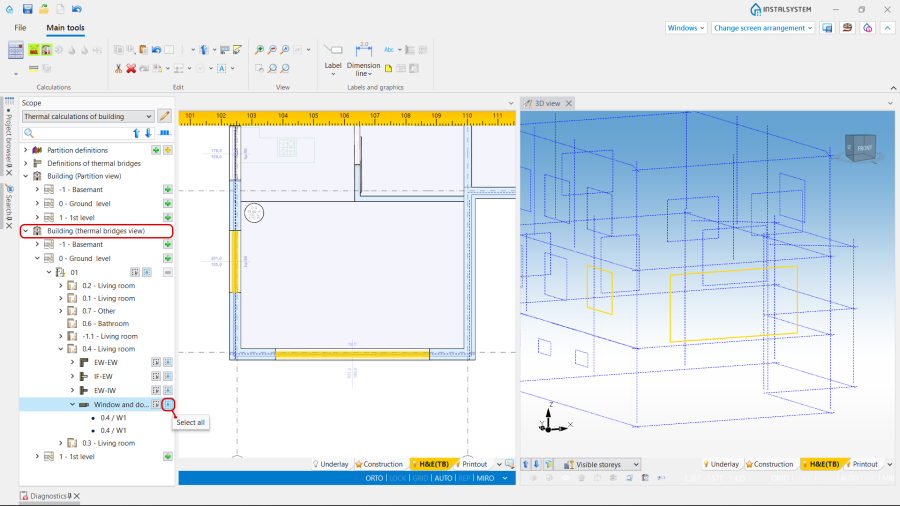
4. . - The selection of linear thermal bridges directly in the window or is also possible in the scope by clicking on its graphic representation;
- The linear thermal bridges of a defined type can be selected with the use of the buttons available at the ;

5. Selection of thermal bridges of a defined type. - Manual editing of automatically assigned thermal bridges:
- The operations, available for the selected thermal bridge, are the following:
- Manual change of ;
- Manual correction of the ( ) of a linear thermal bridge.
- Unchecking check box ;
- Change of and addition of .
- The operations, available for the selected thermal bridge, are the following:


Scenario IV - Method of accounting point thermal bridges
- Editing the default data:
- In the window, , tab choose for the .
- Definition of point thermal bridges:
- Open , , , . Select point thermal bridge type from the offered list. After making the () scope with the representation of thermal bridges area will be available in and on ;
- The data of the selected type will be available in the :
- ,
- ,
- (),
- - when opening the field the definition grouped for the partitions will be available. This is possible to select one or more partition definitions,
- with two variants to choose from: and ,
- . Note: The correction of this field is also possible after making .
- (Optionally) Copying an existing and modifying its data as above (e.g. to include the same bridge in different definitions);
- (Optionally) Creating a new bridge definition, manually filling in the above data;
- (Optionally) Deletion of selected user definitions of bridges.
- Perform , resulting in automatic detection of point thermal bridges and their inclusion in the ;
- Overview of automatically recognized point thermal bridges area and make manual edits, if necessary:
- Open , , . After deploying the tree at the level, an expandable branch is available below the branches with linear thermal bridge types,
- The сhosen bridges areas are presented in the window and on a separate edit scope .
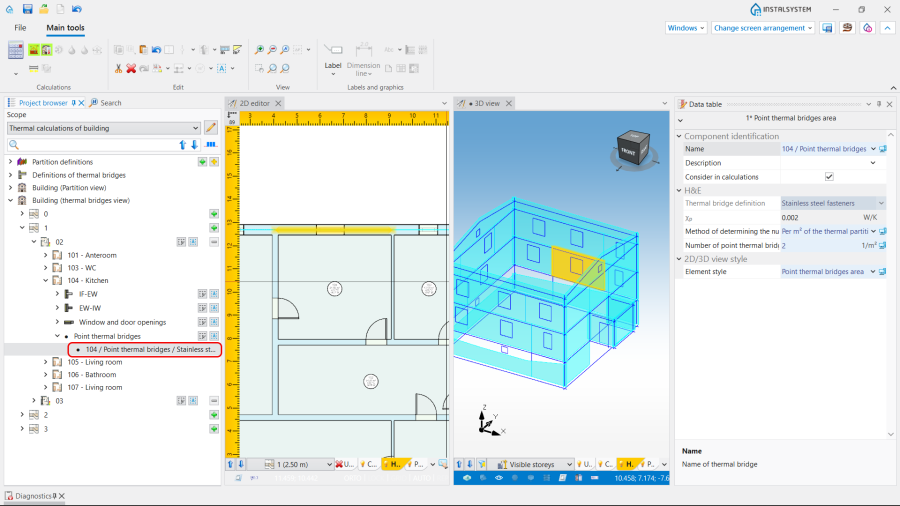
6. . - Manual editing of the point bridge area data:
- The operations, available for the selected thermal bridge, are the following:
- Change of , status AUTO / MANUAL (
 /
/  ):
):
- AUTO allows to determine the according to bridge definition.
- MANUAL gives the possibility to change the default method and to define individually the to be taken into account (via the fields or ).
- Unchecking check box ;
- Change of and addition of .
- Change of , status AUTO / MANUAL (
- The operations, available for the selected thermal bridge, are the following:


| If you have any comments on this article, please send us a short message at info@instalsoft.com. |
|---|