Manifolds, manifold sets and accessories
Revision as of 00:17, 11 April 2016 by Translator EN (talk | contribs)
| Product | InstalSystem 5 |
| Type of article | FUNCTIONALITY |
| Source for translation | IS 5.0 Beta 26 |
Description
The program offers the possibility of automatic selection of manifold accessories defined as Manifold set type. It also enables selecting the proper size of manifold cabinet depending on manifold size and accessories. Selection of control components ensures control over matching actuators installed on manifold valves.
In unusual cases manual selection of manifold accessories and cabinet is possible.
Location in the program
Components associated with the use of a manifold are accessible on the Main tools bar when the following editing scopes are enabled: Rad.-floors,walls, Rad.-ceilings, Convectional. These include:
- Manifold
- Label
- Manifold table
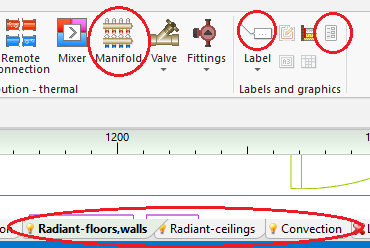
1. Available components on the toolbar

Examples of use
Data enabling automatic selection of manifold and accessories
Manual selection of manifold accessories
- From those available select the Manifold set type with connection points arranged as expected.
- Change Manifold set type to Other.
- Select the remaining manifold accessories as needed.
- When accessories are selected manually, the automatically selected cabinet may not fulfil the needs. Cabinet size must be specified manually!
Label i Manifold table
ADDITIONAL INFORMATION
Manifold boards
- For each manifold used in the project, in the Results window there is a sheet with complete set of calculation results and list of accessories.