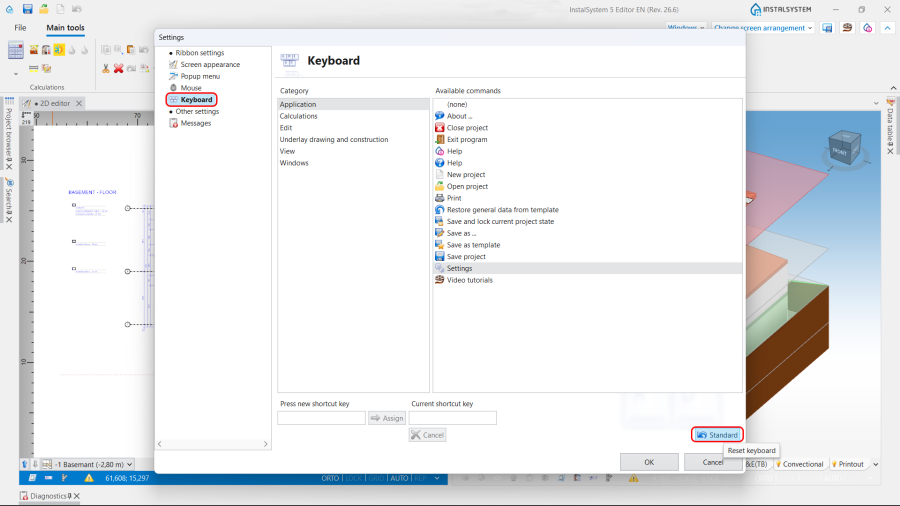
To simplify and speed up the design process, to increase its efficiency and comfort, the software provides the use of key combinations and function keys.
Solution
Key combinations
Default action
Ctrl+A
Select all
Ctrl+C
Copy
Ctrl+E
Export DXF/DWG file
Ctrl+F
Open / close the Search window
Ctrl+G
Import from gbXML
Ctrl+I
Import underlay
Ctrl+M
Move
Ctrl+N
New project
Ctrl+O
Open project
Ctrl+P
Display the circuit to which the selected item belongs
Ctrl+S
Save project
Ctrl+V
Paste
Ctrl+X
Cut
Ctrl+Y
Redo recent undone operation
Ctrl+Z
Undoes last operation
Ctrl+Shift+F10
Open Interactive radiant systems calculations table
Ctrl+F4
Close project
Alt+F4
Exit program
Alt+1
Visible in 3D view
Alt+2
Hide in 3D view
Shift+F1
Open / close the Products window
Shift+F2
Check connections
Shift+F4
Open / close the additional 2D editor window
Shift+F5
Show all from active edit scope
Shift+F11
Open / close the Printouts window
Function keys
Default action
F1
Referring to the HelpSystem
F3
Insert the last element used in the project
F4
Open / close the 2D editor window
F5
Show all
F7
Open / close the General data window
F8
Open / close the Diagnostics window
F9
Open / close the 3D view window
F10
Run Calculations
F11
Open / close the Results window
F12
Open / close the Data table
Delete
Remove marked components
PageDown
Switch to worksheet downwards
PageUp
Switch to worksheet upwards
Note: The shortcuts above are default and can be edited in the program settings. For more information, see:Settings. To restore standard keyboard configuration press Standard.