Import underlay files
| Product | InstalSystem 5 |
| Type of article | FUNCTIONALITY |
| Source for translation | IS 5.0 Beta 34 |
Description
The article describes the functionality of using design underlays (base drawings) by launching underlay import, selecting an external file to be imported, inserting the underlay in the project and appropriate scaling and positioning thereof.
Compatible underlay file formats:
- Vector formats
- - DWG
- - DXF
- Raster formats
- - BMP
- - PNG
- - JPG
- - GIF
Location in the program
- Icons of the components and functions related to importing an underlay are available in the 2D Editor window in the Main tools toolbar, section Underlay, when the Underlay editing scope is enabled.
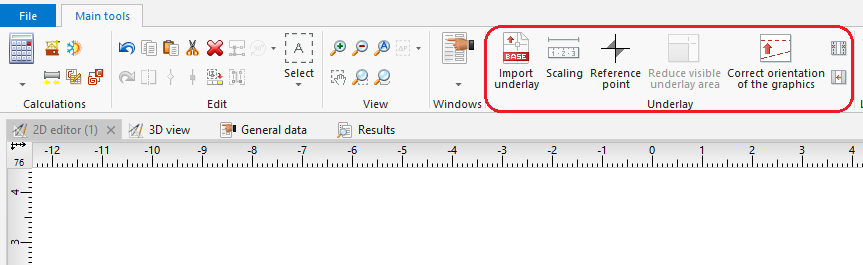
1. Import underlay

Example of use
Import underlay
- Select Import underlay.
- Select the underlay file to be imported.
- Indicate the position of the underlay in the Underlay editing scope.
- Verify that the dimensions of the underlay are adequate.
The size of the underlay can be changed in the component data table or using the Scaling tool, which requires drawing a line segment and specifying its real length. Additionally, in the case of a DWF/DXF file, a conversion factor between a CAD unit and a multiple or sub-multiple of a metre can be selected in the data table. - Verify the underlay save (storage) location option.
The underlay may be stored in the project file *.ISPROJ, in which case the size of that file is increased (identical underlay files placed on multiple worksheets do not inflate the project file in proportion to the number of times the underlay is used), or it may remain in a separate (original) file to which the project will refer. The latter solution requires, when the project file is handed over to another person, that the underlay files are also turned over and the access paths to the files in the computer are specified. - Verify proper mutual alignment of underlays on the individual storeys. To obtain proper structure of a multi-storey building it is advisable to use a Reference point
 , wherein one reference point is placed in each worksheet at a location having identical real coordinates X,Y.

Additional information
- It is particularly advantageous to import an underlay in the DWG format, which enables, when editing the structure, attracting the cursor to components located in the indicated layers of the underlay (snap function).
- If necessary, it is possible to confine (reduce) the visible area for underlays, e.g. underlays that include plans of several storeys on one sheet. The operation of confining the visible area may be cancelled at any stage of project creation.
- If an underlay is divided into several parts (which may, for instance, result from scanning operations), these individual parts can be imported separately and subsequently combined using the Combine base files functionality.