Drawing assistant
Revision as of 10:32, 25 August 2014 by X - JW edytor (talk | contribs)
| Product | InstalSystem 4 NetSystem 4 |
| Type of article | Functionalities |
| Content up-to-date for version | IS 4.13 NS 4.7 |
Description
Drawing assistant is avaiable in the package InstalSystem 4 and NetSystem 4.
It supports system designing, enables drawing or inserting into the project elements at a predetermined distance and at a given angle in addition to an already existing element in the project: imported base, building construction or other. It also allows the imposition of a drawn length of the pipe-run or a section of the network.
Location in the program
Assistant drawing can be triggered by:
- F6 key
- toolbar View / Show / hide drawing assistant
 .
.

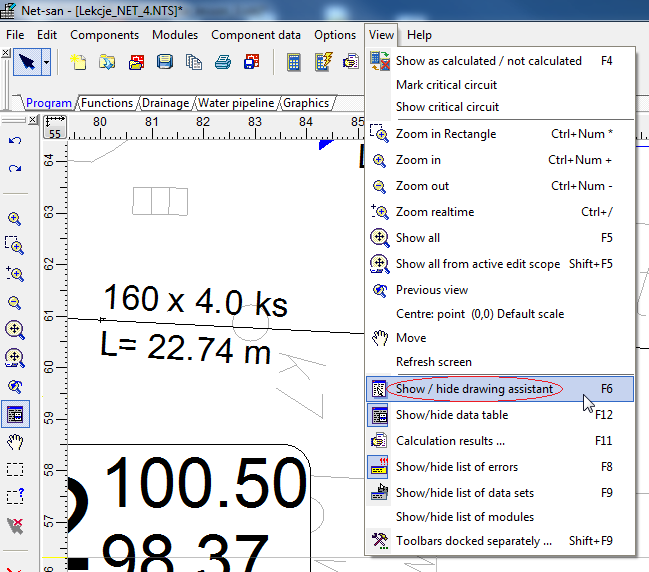
1. Selection drawing assistant from menu

Drawing assistant window will appear, which contains the following information:
- Δx, Δy - increase from the initial section of the network
- L - the current length of the led section
- Angle - the angle of intersection with the x axis
- Help lines - are visible when "Auto" is selected.
Example of use
Insert the network section of the specified length at Net-san
- Turn off AUTO.
- Select the right type of network and start drawing section in selected location.
- To draw a section of example 5 m enter the desired length in Assistant drawing field "L [m]".
- Finish drawing the section.
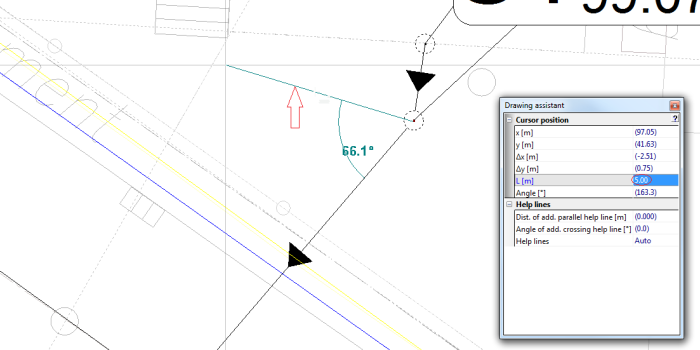
2. Rysowanie odcinka o określonej długości - Attention! To kept section length turn off AUTO.

Insert the section at a given angle to the existing network section at Net-san
- Turn on AUTO.
- Select the right type of network and start drawing section in the selected location.
- To draw a section for example 90º enter the angle in the drawing assistant in the field "Angle of add. crossing help line [º]".
- Using the appearing help lines deflected at a given angle, finish drawing the section.
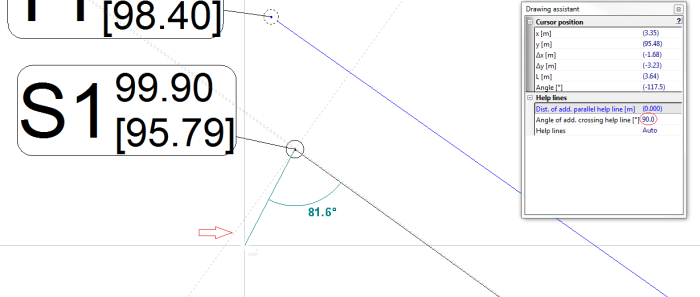
3. Rysowanie odcinka pod zadanym kątem - Attention! To help lines were visible turn on AUTO.

Wstawianie odcinka równoległego do ściany budynku w Instal-therm
- Turn on AUTO.
- W celu narysowania działek równolegle od istniejącej ściany o odległość np. 0,2 m należy wpisać żądaną odległość w Asystencie rysowania w polu „Odl. dod. równoległej linii pomocniczej [m]”.
- Wybieramy odpowiedni rodzaj działki i przed rozpoczęciem rysowania najeżdżamy kursorem na odcinek do którego rysowana działka ma być równoległa (bez zaznaczania).
- Rozpoczynamy rysowanie odcinka w wybranym miejscu, korzystając z wyświetlonych linii pomocniczych.
- Kończymy rysowanie odcinka.
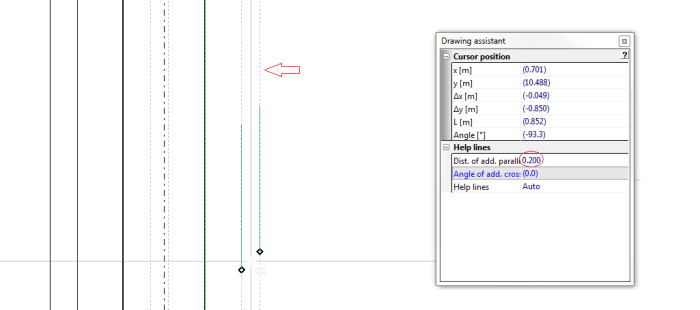
4. Rysowanie działek równolegle do ściany o odpowiednią odległość - Attention! Aby linie pomocnicze były widoczne należy włączyć tryb AUTO.
