How to eliminate diagnostic messages regarding building structure
| Product | InstalSystem 5 |
| Type of article | TIP&TRICK |
| Source for translation | 2021-03-16 |
Problem description
Problems related to the correct creation of a building structure are diagnosed during Computation of building structure through precise diagnostic messages of the rank of error, warning or hint. The most common errors include:
- It has been detected that wall may not be in contact with roof or slab. Probably room was not generated.
This Hint is displayed when:- there is a Wall in the design, which does not contact any Slab/Roof on its top,
- or when a Wall on the lowermost storey does not contact any Slab on its bottom.
- Incorrect wall/slab/roof shape has been detected. Try to correct or remove it and draw again.
This Warning is displayed when:- during Computation of building structure an improper shape of Wall is detected (e.g. a thin fragment of a wall protrudes from a joint between two perpendicular walls).
- Intersecting walls were detected.
This Warning is displayed when:- during Computation of building structure a situation is detected wherein wall axes itersect.
- Such a situation may also arise if the building structure has been imported from the IFC format. For more information, see: Import building model from BIM compatible formats.
- Incorrect wall dimension or shape unables proper connection with other walls.
This Error is displayed when:- during Computation of building structure Wall components of definite shape are detected, while the points representing the start and end of this shape coincide in XY coordinates. The Wall drawn in this way creates problems when combined with other walls.
- Overlapping walls or incorrectly connected walls .
This Error is displayed when:- during Computation of building structure an abnormal shape of a room is detected, e.g. due to an incomplete room edge. The incorrect shape is usually the result of overlapping walls or their incorrect connection.
- There are rooms in the project that have not been generated automatically.
This Warning is displayed when a Room (Automatic) component cannot be identified.
The condition for the formation of a Room (Automatic) component is the creation of a perfectly tight solid with a flawless connection of the walls, covered tightly from above by a Slab/Roof component and from below by a Slab component.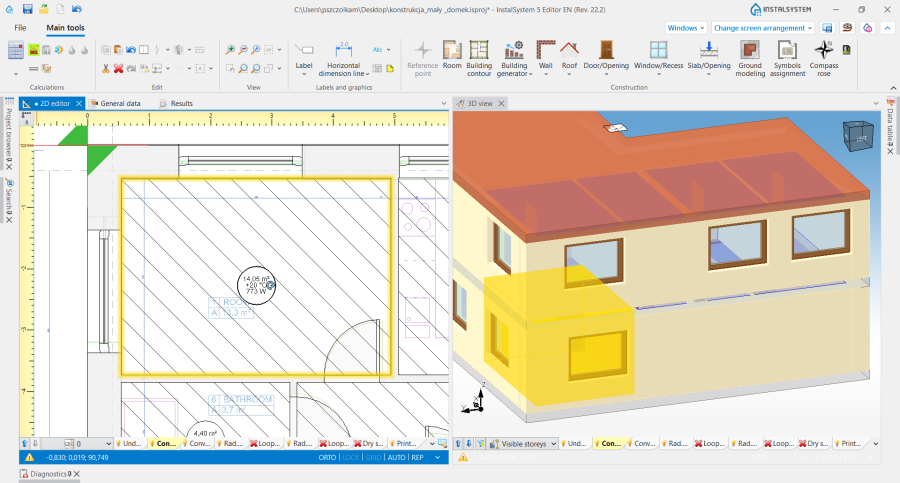
1. Room (Automatic).
The most common problems that make it impossible to create a solid room include situations where:- a Room (Manual) overlaps another Room (Manual),
- Wall components that make up a Room (Automatic) are not joined together,
- a Slab or Roof does not completely cover a Room (Automatic) within its wall faces,
- Wall components are not joined correctly,
- an Opening in slab overlaps a Wall.
- Internal error during calculation phase: %s. Please report the error with the project file to the software producer
- This is an internal code error caused by a problem with executing the calculations correctly. It is displayed without indicating a specific component in the building structure.

Solution
After clicking on the error message in the Diagnostics window, in 2D editor and 3D view the component that causes the problem for Computation of building structure is checked. If the diagnostic message applies to more than one component, these are grouped in the Component field list. The elimination of each error requires a manual modification in the scope of the building structure and then a re-execution of Computation of building structure . Examples of how this can be solved are shown in the videos below.
It has been detected that wall may not be in contact with roof or slab. Probably room was not generated
- Carry out a shape adjustment for the Slab/Roof component so that it covers the and seals the room body tightly.
- Correct the value Height within faces hf for the Wall component to the default value for the storey.
Incorrect wall/slab/roof shape has been detected. Try to correct or remove it and draw again
- Correction of the layout of the components for which an error occurs.
Intersecting walls were detected
- Run Correction of wall geometry with the Correct wall connections option enabled.
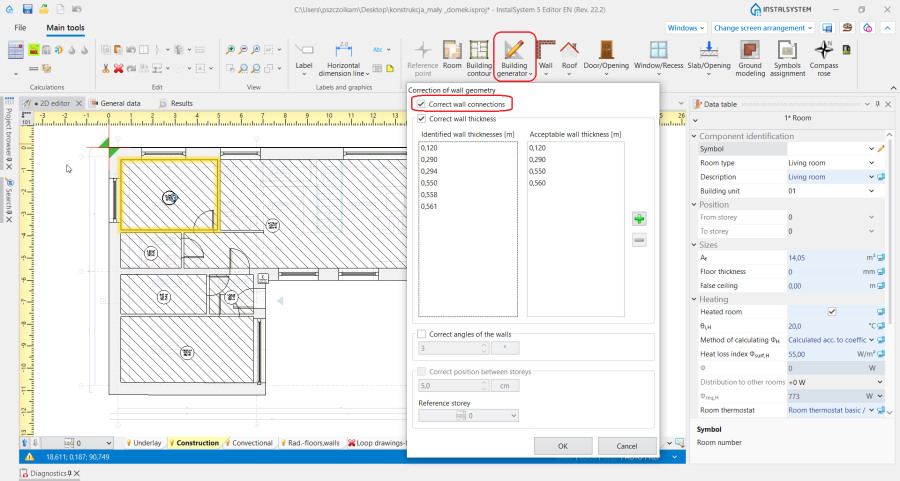
2. Correct wall connections. - Correction of wall layout for which a diagnostic message is displayed.

Incorrect wall dimension or shape unables proper connection with other walls
- Poprawa w miejscu łączenia ścian, dla których wyświetlana jest diagnostyka.
Overlapping walls or incorrectly connected walls
- Poprawa w miejscu połączenia ścian, które zostały wygenerowane w sposób nieprawidłowy.
There are rooms in the project that have not been generated automatically
W zależności od sytuacji projektowej błąd może zostać rozwiązany na wiele sposobów:
- Włączenie funkcji Correction of wall geometry oraz wywołanie operacji Correct wall connections, a następnie wykonanie Computation of building structure .
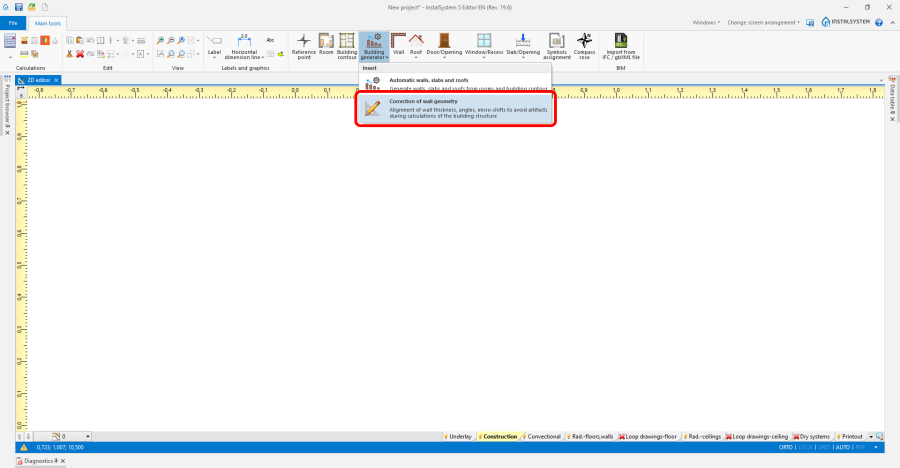
1. Correction of wall geometry - Kontrola poprawności dla elementów Opening in slab.
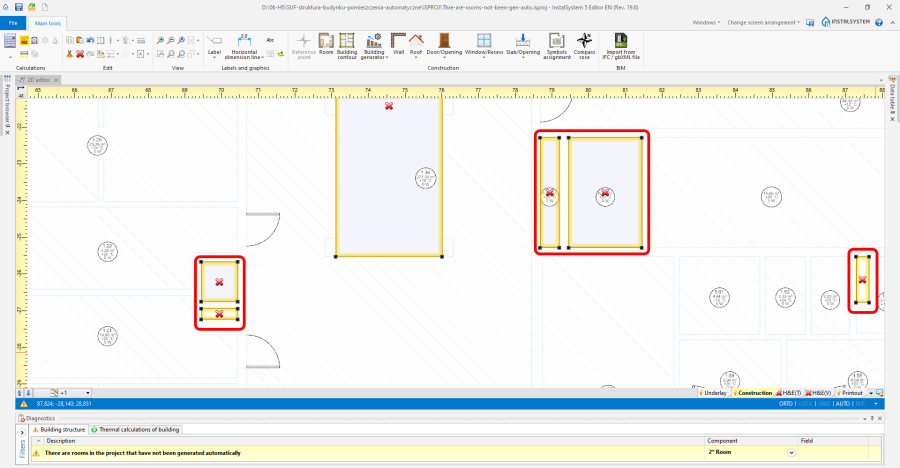
3. Opening in slab
- Odznaczyć w Data table elementu Slab opcję Active slab holes i wykonać Computation of building structure .
- Jeżeli Computation of building structure zakończyły się bez błędów, należy we wszystkich elementach Slab zamykających pomieszczenia usunąć elementy Opening in slab.
- W narzędziu Correction of wall geometry wykonać operację Correct wall connections, a potem ponownie Computation of building structure .
- Wstawić elementy Opening in slab.
- Wykonać Computation of building structure .
- Odwrócenie punktów bazowych elementów Wall.
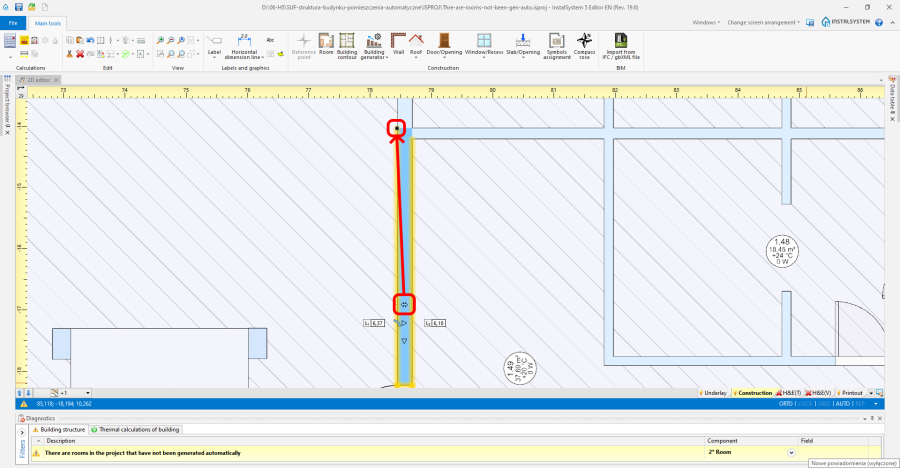
4. Punkt bazowy elementu Wall
- W pomieszczeniu, które jest tworzone z szeregowo połączonych ze sobą elementów Wall należy poodwracać ich punkty bazowe, aby wszystkie były usytuowane w tej samej linii.
- W narzędziu Correction of wall geometry wykonać Correct wall connections.
- Wykonać Computation of building structure .
- Redukcja liczby elementów Wall o jednakowej grubości.
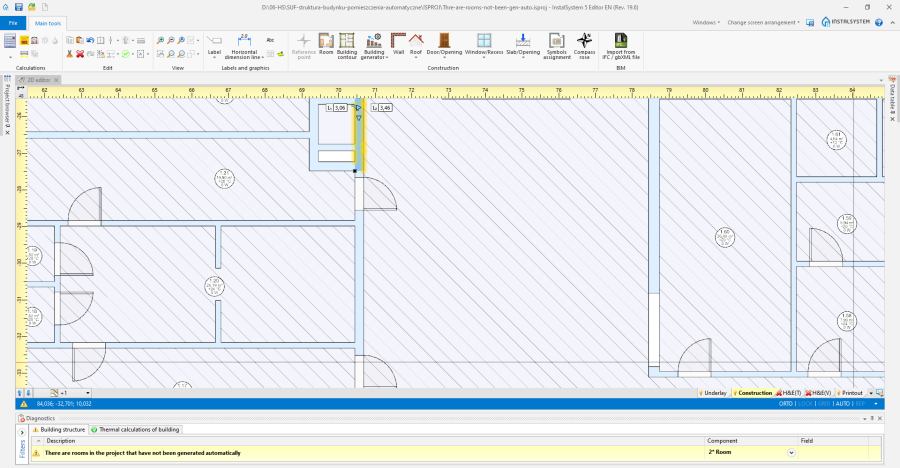
5. Redukcja elementów Wall
- W pomieszczeniu, które jest tworzone z szeregowo połączonych ze sobą ścian jednakowej grubości, należy zredukować ich ilość.
- Skorygować ręcznie połączenia elementów Wall.
- Wykonać Computation of building structure .
- Korekta wysokości elementów Wall na kondygnacji.
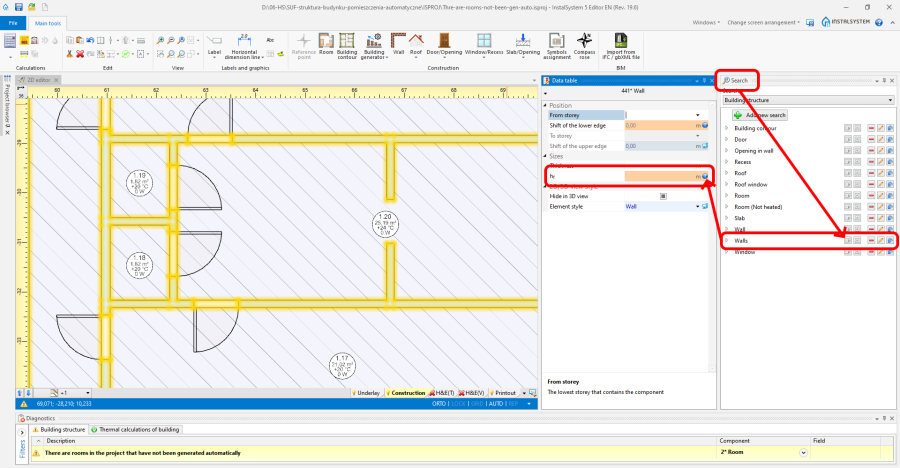
6. Korekta wysokości elementów Wall
- Za pośrednictwem funkcji dostępnych w oknie Search zaznacz wszystkie elementów Wall na kondygnacji.
- W tabeli danych zaznaczonych elementów Wall zresetować ich wysokość do wartości domyślnych na danej kondygnacji poprzez zmianę ze znaku zapytania lub ołówka na komputerek.


Internal error during calculation phase: %s. Please report the error with the project file to the software producer
- Jeżeli w oknie Diagnostics wraz z komunikatem Internal error during calculation phase: %s. Please report the error with the project file to the software producer widoczne są inne komunikaty błędów dotyczące struktury budynku, można w pierwszej kolejności je rozwiązać i ponownie wykonać Computation of building structure dla poprawionego układu elementów konstrukcji.
- Można również spróbować wykonać operację Correction of wall geometry lub usunąć ostatnio edytowane elementy i narysować je na nowo, a potem ponownie wykonać Computation of building structure .
- Jeżeli powyższe działania nie przynoszą rezultatu, należy zgłosić błąd przy pomocy Problem report form.