Design of ring installation: Difference between revisions
No edit summary |
No edit summary |
||
| Line 53: | Line 53: | ||
#* Zamyknąć pierścień instalacji.<br/><span style="color: cornflowerblue">Więcej na temat ''Podłączania odbiorników'': ''[[Podłączanie odbiorników]]<!--Case xxxxx-->''</span>.''<br/> | #* Zamyknąć pierścień instalacji.<br/><span style="color: cornflowerblue">Więcej na temat ''Podłączania odbiorników'': ''[[Podłączanie odbiorników]]<!--Case xxxxx-->''</span>.''<br/> | ||
# | |||
## | |||
### | |||
#### | |||
## | ## | ||
Revision as of 11:23, 27 August 2014
| Product | InstalSystem 4 |
| Type of article | Software application |
| Content up-to-date for version | IS 4.13 |
Range of lesson
The following lesson demonstrates how make installation of the water supply system in Instal-san T, using the ring system.
The installation is located in a two-storey public utility building with basement.
Modules and program configuration
- Instal-san T allows to make a project of the water supply system.
- catalogs containing the most suitable for the ring installations connections systems:
- U-fittings system with direct plugging of a tap to the U-fitting for looping or
- system with direct plugging of a tap to the U-fitting for looping
Inital state
The file in an initial state takes into account the graphical presentation of the ground and the floor, shown in two separate sheets.
More about editing the structure: Graphical presentation of the building structure.
The file also contains a piece of the water supply including inserted receivers and water supply risers. Tips on how to make such a basic file are contained in the article Design of water installation - basics.
- The file in an initial state:File:Instal-san-t-example-file-of-ring-installation-initial-state.ISB
More about hot to download the file: Downloading and calculating file from HelpSystem.
- The file in an initial state:File:Instal-san-t-example-file-of-ring-installation-initial-state.ISB
Steps to perform
Running application and configuration of basic project data
- Run the program Instal-san T.
- Load the file with the prepared structure of the building and fragment of installation including receivers and water supply risers.
Inserting the pipe-runs of utility water
- Put on every storey the pipe-runs of cold tap water and hot tap water in the form of a open ring surrounding powered receivers. The program will allow for the closure of the ring after connecting the receivers.
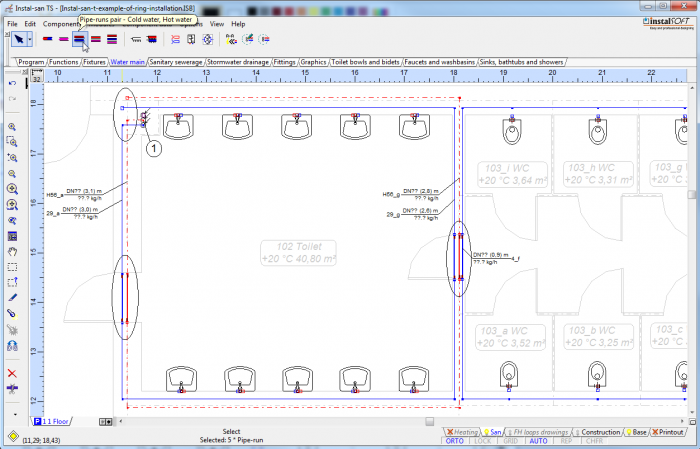
1. Not fully closed ring of utility water pipe-runs

Connecting the receivers
- Connections to the receivers by U-fittings system with direct inclusion tap to the T-fitting:
- Highlight a piece of installation, to take into account the receivers and the sections you want to connect to, and then select the key combination Shift + Ctrl + A or an option "Automatically connect terminal units' available in menu for Components.
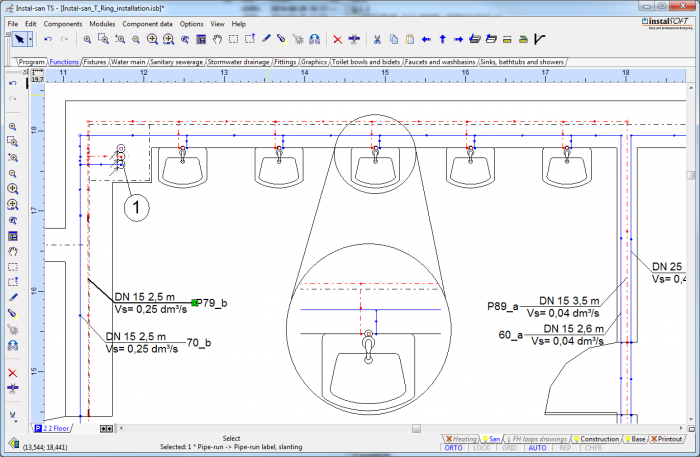
2. Receivers connect by T-fittings 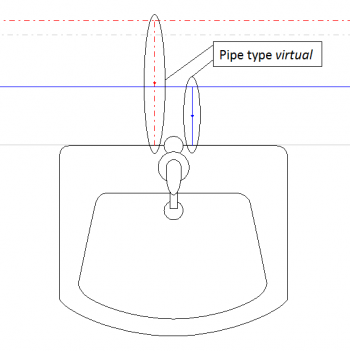
3. Działki wirtualne przy podłączeniach z trójnikami - W systemie trójnikowym, po wybraniu opcji "Automatycznie podłącz odbiorniki", nadać typ rury "wirtualny" dla działek tworzących podejścia do odbiorników.
- Zamyknąć pierścień instalacji.
- Highlight a piece of installation, to take into account the receivers and the sections you want to connect to, and then select the key combination Shift + Ctrl + A or an option "Automatically connect terminal units' available in menu for Components.
- Podłączenie odbiorników w systemie z bezpośrednim włączeniem punktu czerpalnego do U-kształtki:
- Zaznaczyć fragment instalacji, tak by uwzględnić odbiorniki i działki, które chcemy połączyć, a następnie wybrać kombinację przycisków Shift+Ctrl+L lub opcję "Automatycznie podłącz odbiorniki w systemie trójnikowym" udostępnioną w menu Elementy.
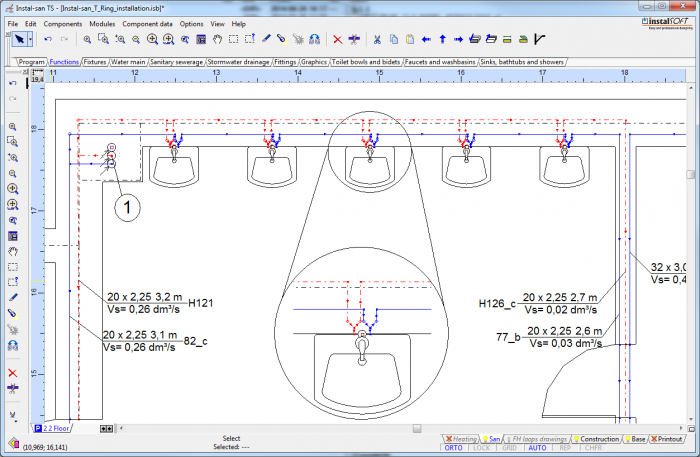
4. Odbiorniki podłączone za pomocą U-kształtek 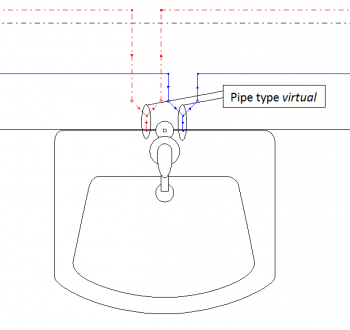
5. Działki wirtualne przy podłączeniach z U-kształtkami - W systemie tworzącym podłączenia za pośrednictwem U-kształtek, program automatycznie nada typ rury "wirtualny" dla działek tworzących podejścia do odbiorników.
- Zamyknąć pierścień instalacji.
Więcej na temat Podłączania odbiorników: Podłączanie odbiorników.
- Zaznaczyć fragment instalacji, tak by uwzględnić odbiorniki i działki, które chcemy połączyć, a następnie wybrać kombinację przycisków Shift+Ctrl+L lub opcję "Automatycznie podłącz odbiorniki w systemie trójnikowym" udostępnioną w menu Elementy.


Utworzenie rozwinięcia instalacji
- Jeżeli w projekcie występuje cyrkulacja, powinna być ona zakończona przed pierścieniem.
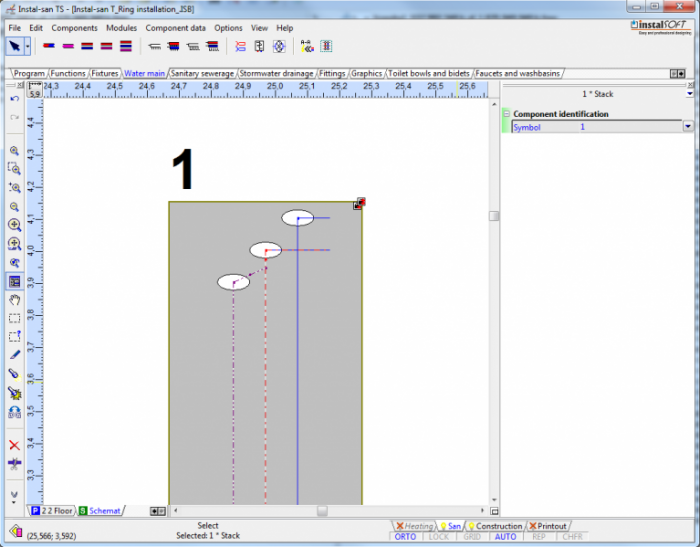
6. Armatura - Pozostałe fragmenty rozwinięcia instalacji utworzyć w sposób standardowy.

Final state
Poniżej załączono plik wynikowy:
Plik projektu, Instal-san T: <br\>Plik:Instal-san-t-example-of-ring-installation.ISB
More about hot to download the file: Downloading and calculating file from HelpSystem.