Drawing assistant: Difference between revisions
Jump to navigation
Jump to search
No edit summary |
No edit summary |
||
| Line 42: | Line 42: | ||
:[[File:Zadany-kat.png|700px|left|thumb|3. Rysowanie odcinka pod zadanym kątem]]<br clear="all"/> | :[[File:Zadany-kat.png|700px|left|thumb|3. Rysowanie odcinka pod zadanym kątem]]<br clear="all"/> | ||
:'''''Attention!''''' To help lines were visible turn on AUTO. | :'''''Attention!''''' To help lines were visible turn on AUTO. | ||
===''' | ==='''Insert the section parallel to the wall of a building in Instal-therm'''=== | ||
# Turn on AUTO. | # Turn on AUTO. | ||
# | # To draw a parallel plots from the existing wall by a distance eg. 0.2 m enter the desired distance in the drawing assistant in the field "Dist. of add. parallel help line [m]". | ||
# | # Select the right type of the section before the beginning of drawing invade the cursor over the wall to which the sectiont is to be drawn parallel (without selecting). | ||
# | # Start drawing section in the desired location using the displayed help lines. | ||
# | # Finish drawing the section. | ||
:[[File:Rownolegly.png|700px|left|thumb|4. Rysowanie działek równolegle do ściany o odpowiednią odległość]]<br clear="all"/> | :[[File:Rownolegly.png|700px|left|thumb|4. Rysowanie działek równolegle do ściany o odpowiednią odległość]]<br clear="all"/> | ||
:'''''Attention!''''' Aby linie pomocnicze były widoczne należy włączyć tryb AUTO. | :'''''Attention!''''' Aby linie pomocnicze były widoczne należy włączyć tryb AUTO. | ||
Revision as of 10:41, 25 August 2014
| Product | InstalSystem 4 NetSystem 4 |
| Type of article | Functionalities |
| Content up-to-date for version | IS 4.13 NS 4.7 |
Description
Drawing assistant is avaiable in the package InstalSystem 4 and NetSystem 4.
It supports system designing, enables drawing or inserting into the project elements at a predetermined distance and at a given angle in addition to an already existing element in the project: imported base, building construction or other. It also allows the imposition of a drawn length of the pipe-run or a section of the network.
Location in the program
Assistant drawing can be triggered by:
- F6 key
- toolbar View / Show / hide drawing assistant
 .
.

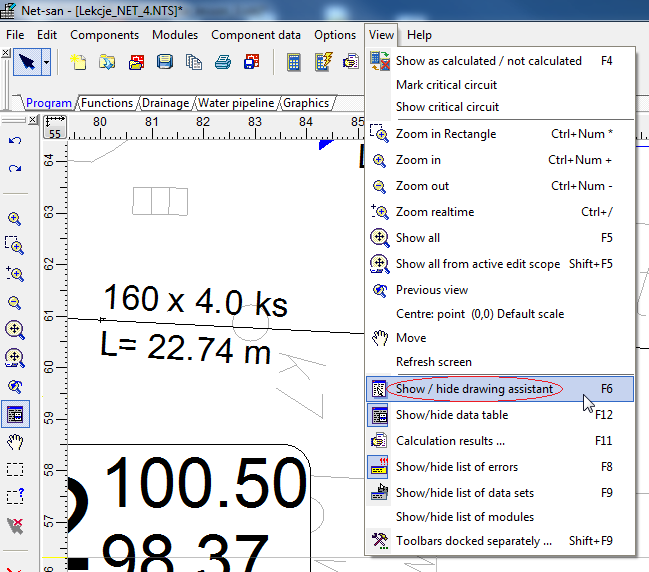
1. Selection drawing assistant from menu

Drawing assistant window will appear, which contains the following information:
- Δx, Δy - increase from the initial section of the network
- L - the current length of the led section
- Angle - the angle of intersection with the x axis
- Help lines - are visible when "Auto" is selected.
Example of use
Insert the network section of the specified length at Net-san
- Turn off AUTO.
- Select the right type of network and start drawing section in selected location.
- To draw a section of example 5 m enter the desired length in Assistant drawing field "L [m]".
- Finish drawing the section.
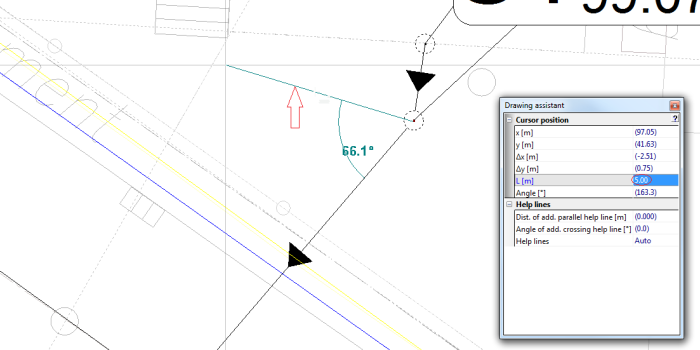
2. Rysowanie odcinka o określonej długości - Attention! To kept section length turn off AUTO.

Insert the section at a given angle to the existing network section at Net-san
- Turn on AUTO.
- Select the right type of network and start drawing section in the selected location.
- To draw a section for example 90º enter the angle in the drawing assistant in the field "Angle of add. crossing help line [º]".
- Using the appearing help lines deflected at a given angle, finish drawing the section.
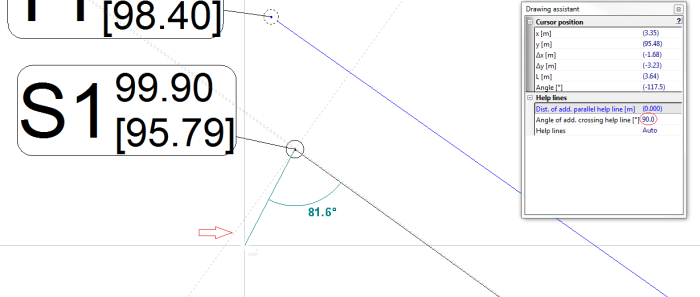
3. Rysowanie odcinka pod zadanym kątem - Attention! To help lines were visible turn on AUTO.

Insert the section parallel to the wall of a building in Instal-therm
- Turn on AUTO.
- To draw a parallel plots from the existing wall by a distance eg. 0.2 m enter the desired distance in the drawing assistant in the field "Dist. of add. parallel help line [m]".
- Select the right type of the section before the beginning of drawing invade the cursor over the wall to which the sectiont is to be drawn parallel (without selecting).
- Start drawing section in the desired location using the displayed help lines.
- Finish drawing the section.
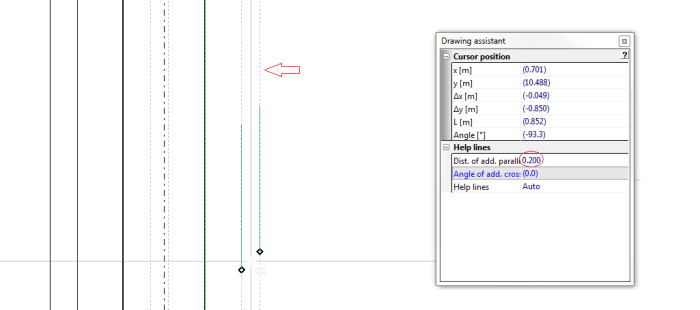
4. Rysowanie działek równolegle do ściany o odpowiednią odległość - Attention! Aby linie pomocnicze były widoczne należy włączyć tryb AUTO.
