Drawing assistant: Difference between revisions
Jump to navigation
Jump to search
No edit summary |
No edit summary |
||
| Line 18: | Line 18: | ||
Assistant drawing can be triggered by: | Assistant drawing can be triggered by: | ||
* F6 key | * F6 key | ||
* toolbar ''View / Show / hide drawing assistant'' [[File:Assistant icon.png]] . | * toolbar ''View / Show / hide drawing assistant'' [[File:Assistant icon.png]] .<br \> | ||
:[[File:Drawing-assistant-menu.png|700px|left|thumb|1. Wybór asystenta rysowania z menu]]<br clear="all"/> | |||
==Example of use== | ==Example of use== | ||
Revision as of 15:19, 22 August 2014
| Produkt | InstalSystem 4 NetSystem 4 |
| Typ artykułu | Funkcjonalność |
| Treść aktualna dla wersji | IS 4.13 NS 4.7 |
Description
Drawing assistant is avaiable in the package InstalSystem 4 and NetSystem 4.
It supports system designing, enables drawing or inserting into the project elements at a predetermined distance and at a given angle in addition to an already existing element in the project: imported base, building construction or other. It also allows the imposition of a drawn length of the pipe-run or a section of the network.
Location in the program
Assistant drawing can be triggered by:
- F6 key
- toolbar View / Show / hide drawing assistant
 .
.

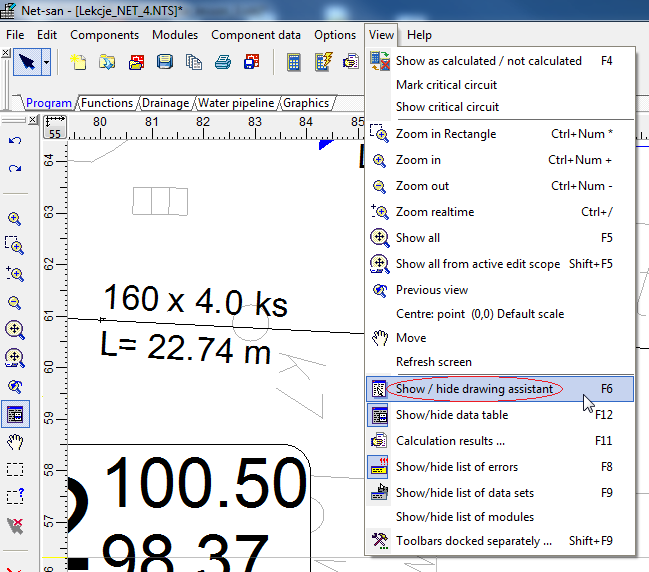
1. Wybór asystenta rysowania z menu

Example of use
Example of using the function of Drawing assistant to perpendicular pipe connection to the network.
