Export / print results and drawings: Difference between revisions
Jump to navigation
Jump to search
| Line 22: | Line 22: | ||
==Location in the program== | ==Location in the program== | ||
* | * The ''<IS_TS id=ExportDXFDWGFile/>'' function is available on the ''<IS_TS id=NarzedziaGlowne/>'' bar when the ''<IS_TS id=lystrPrintPreview/>'' editing scope is enabled. The function enables exporting graphics from the project file to a DXF/DWG file.<br/>[[File:Suf-export-other-extensions5.png|left|thumb|700px|1. <IS_TS id=ExportDXFDWGFile/>]]<br clear="all"/> | ||
* | * Outputting to a printer and to other file formats is effected in the ''<IS_TS id=Printouts/>'' window. The ''<IS_TS id=sBtnPrint/>'' function, available on the ''<IS_TS id=NarzedziaGlowne/>'' bar when the ''<IS_TS id=lystrPrintPreview/>'' editing scope is enabled, switches the program to that window. Alternatively this can be done by calling this window from the ''<IS_TS id=Windows/>'' menu on the ''<IS_TS id=NarzedziaGlowne/>'' bar.<br/>[[File:Suf-export-other-extensions4.png|left|thumb|600px|2. <IS_TS id=sBtnPrint/>]]<br clear="all"/> | ||
* | * The ''<IS_TS id=InsertPageLayout/>'' icon, available on the ''<IS_TS id=NarzedziaGlowne/>'' bar when the ''<IS_TS id=lystrPrintPreview/>'' editing scope is enabled, allows placing a ''<IS_TS id=PrintoutPages_ElementName/>'' component in a drawing. Every such component in the project is a new definition of the scope of printout / export of graphics.<br/>[[File:Suf-export-printout-pages.png|left|thumb|700px|3. <IS_TS id=InsertPageLayout/>]]<br clear="all"/> | ||
==Example of use== | ==Example of use== | ||
Revision as of 18:46, 15 December 2015
| Product | InstalSystem 5 |
| Type of article | FUNCTIONALITY |
| Source for translation | IS 5.0 Beta 22 |
Description
The program enables exporting project drawings and results into a number of file formats (JPG, PDF, DWG, XLS and many more) and printing them. Exporting to DWG/DXF files is effected by means of a dedicated function, whereas exporting to many other file formats is done with functions used for outputting to a printer. It takes on the form of printing to a file of selected type.
Location in the program
- The Export DXF/DWG file function is available on the Main tools bar when the Printout editing scope is enabled. The function enables exporting graphics from the project file to a DXF/DWG file.
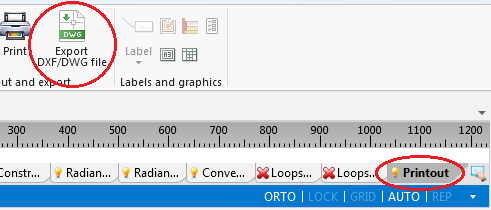
1. Export DXF/DWG file - Outputting to a printer and to other file formats is effected in the Printouts window. The Print function, available on the Main tools bar when the Printout editing scope is enabled, switches the program to that window. Alternatively this can be done by calling this window from the Windows menu on the Main tools bar.
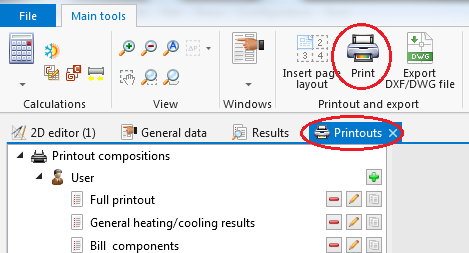
2. Print - The Insert page layout icon, available on the Main tools bar when the Printout editing scope is enabled, allows placing a Printout pages component in a drawing. Every such component in the project is a new definition of the scope of printout / export of graphics.
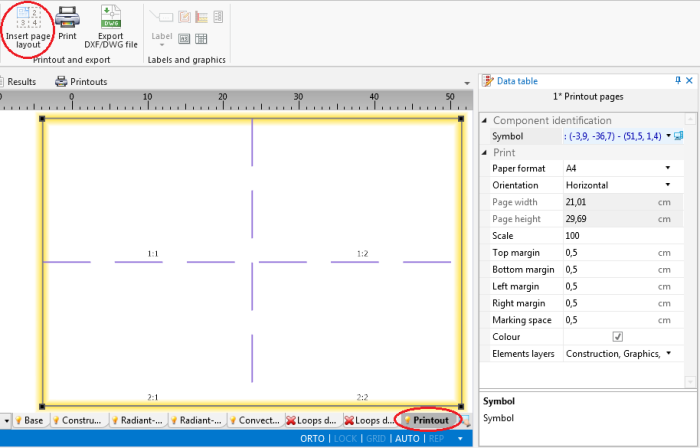
3. Insert page layout


Example of use
Eksport rysunków do formatu DWG
Wydruk / Eksport wyników do pliku XLS
Wydruk / Eksport rysunku wybranej kondygnacji do pliku PDF
Additional information
- W przypadku gdy podkład został zaimportowany z opcją Save underlay drawing -> In external file i oryginalna lokalizacja pliku nie jest dostępna, nie można wykonać eksportu obejmującego warstwy podkładu. W takim przypadku, aby podkład został uwzględniony przy eksporcie lub wydruku, należy wczytać go ponownie.
- Utworzone i zapisane własne kompozycje wydruków będą dostępne, obok kompozycji predefiniowanych, również dla innych projektów.
For more information, see: Kompozycje wydruków.