Linear and point thermal bridges: Difference between revisions
Jump to navigation
Jump to search
Klintsevicho (talk | contribs) |
Klintsevicho (talk | contribs) |
||
| Line 46: | Line 46: | ||
#* In the ''<IS_TS id=rsDanogi/>'' window, ''<IS_TS id=ObliczeniaCieplneBudynku/>'', ''<IS_TS id=rsDanog_Normy/>'' tab choose ''<IS_TS id=rsEN12831_MetodaUwzglednianiaMostkowCieplnychLiniowe/>'' for the ''<IS_TS id=strs_enumidISFOZCDaneOgolneEN12831_MetodaUwzglednianiaMostkowCieplnych/>''. '''''Note:''''' this method is available for the EN standards. | #* In the ''<IS_TS id=rsDanogi/>'' window, ''<IS_TS id=ObliczeniaCieplneBudynku/>'', ''<IS_TS id=rsDanog_Normy/>'' tab choose ''<IS_TS id=rsEN12831_MetodaUwzglednianiaMostkowCieplnychLiniowe/>'' for the ''<IS_TS id=strs_enumidISFOZCDaneOgolneEN12831_MetodaUwzglednianiaMostkowCieplnych/>''. '''''Note:''''' this method is available for the EN standards. | ||
# Definition of default types of the linear thermal bridges: | # Definition of default types of the linear thermal bridges: | ||
#* After making ''<IS_TS id=sObliczenie/>'' the ''<IS_TS id=View3D/>'' of linear thermal bridges will be available in the ''<IS_TS id=ScopeOZC_MC_Short/>'' (''<IS_TS id=ScopeOZC_MC/>'') scope. Open ''<IS_TS id=ProjectBrowser/>'', ''<IS_TS id=ObliczeniaCieplneBudynku/>'' and define the default types in ''<IS_TS id=rsDefinicjeMostkow/>'' for each field choosing from the offered list. '''''Note:''''' One definition per bridge type is available by default. | |||
<br/> {{#ev:youtube|2x937RTh50M|900||||rel=0}} <br clear="all"/> | |||
#* | #* | ||
# Editing the ''<IS_TS id=DanePomieszczen/>'': | # Editing the ''<IS_TS id=DanePomieszczen/>'': | ||
Revision as of 08:45, 29 April 2025
| Product | InstalSystem 5 |
| Type of article | FUNCTION AND TOOL |
| Source for translation | 2025-04-22 |
DESCRIPTION
This article describes methods of accounting linear and point thermal bridges in thermal calculations of partitions and building structures.
LOCATION IN THE PROGRAM
The selection of the is available in the window, tab.

EXAMPLE OF USE
Scenario I - method of accounting linear thermal bridges
- Editing the default data:
- In the window, , tab choose for the . Note: this method is available for the EN standards;
- (Optionally) for the . This causes the auto mode status to be set for all fields of the () column, available on the form / , with the following default values:
- = 0.05 - for the external partitions (, , , , ) and for thr partitions in contact with the ground (, );
- = 0.00 - for the internal partitions (, , , ).
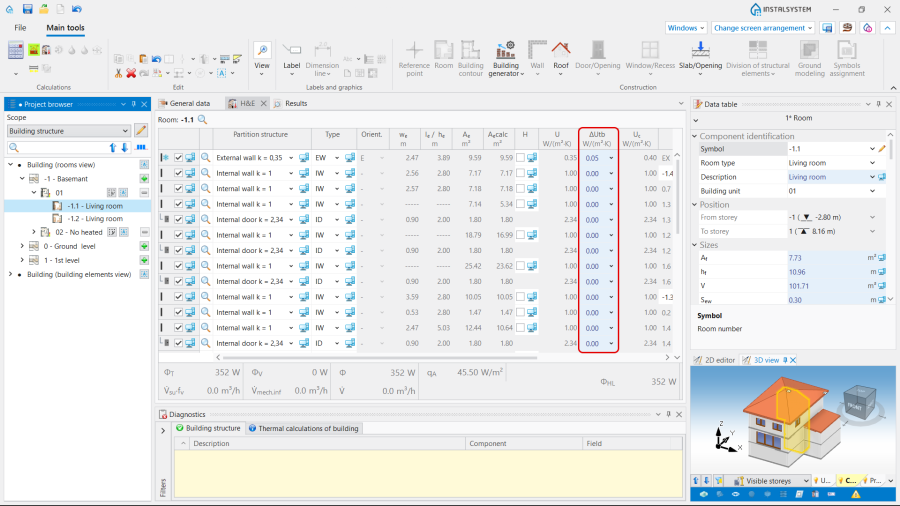
2. column with "auto mode" status.
- (Optionally) Introducing - available for the DIN standards.
- Editing the :
- Select the method of determine () in the form / :
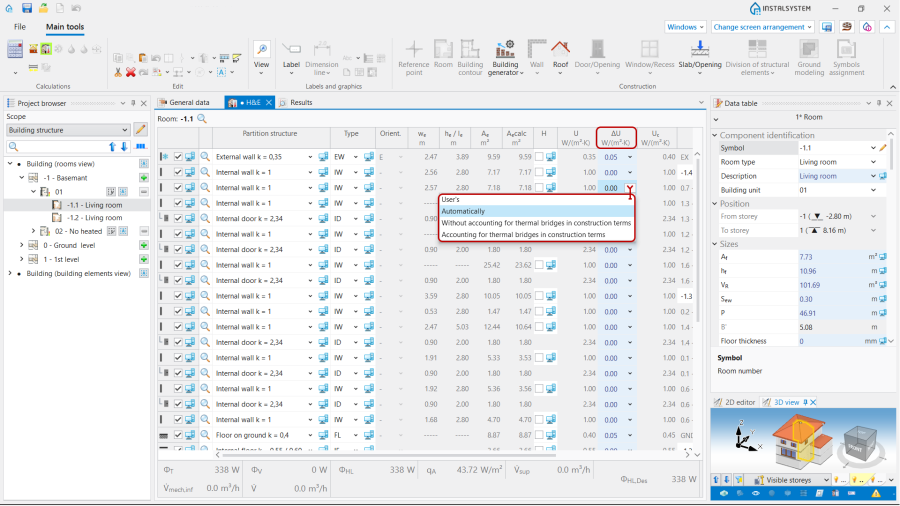
3. .
- User's - allows to set the value of the allowance by yourself;
- Automaticaly - initialises the default values according to the auto mode;
- - = 0.05 ;
- - = 0.1 .
- Select the method of determine () in the form / :


Scenario II - method of accounting linear thermal bridges
- Editing the default data:
- In the window, , tab choose for the . Note: this method is available for the EN standards.
- Editing the :
- Select the method of determine () in the form / , just like in Scenario I - Simplified method of accounting linear thermal bridges.
Scenario III - method of accounting linear thermal bridges
- Editing the default data:
- In the window, , tab choose for the . Note: this method is available for the EN standards.
- Definition of default types of the linear thermal bridges:
- After making the of linear thermal bridges will be available in the () scope. Open , and define the default types in for each field choosing from the offered list. Note: One definition per bridge type is available by default.
- Editing the :
- Select the method of determine () in the form / , just like in Scenario I - Simplified method of accounting linear thermal bridges.