Linear and point thermal bridges: Difference between revisions
Jump to navigation
Jump to search
Klintsevicho (talk | contribs) |
Klintsevicho (talk | contribs) |
||
| Line 26: | Line 26: | ||
# Editing the default data: | # Editing the default data: | ||
#* In the ''<IS_TS id=rsDanogi/>'' window choose ''<IS_TS id=rsEN12831_MetodaUwzglednianiaMostkowCieplnychUproszczona/>'' for the ''<IS_TS id=strs_enumidISFOZCDaneOgolneEN12831_MetodaUwzglednianiaMostkowCieplnych/>''. '''''Note:''''' this method is available for the EN standards; | #* In the ''<IS_TS id=rsDanogi/>'' window choose ''<IS_TS id=rsEN12831_MetodaUwzglednianiaMostkowCieplnychUproszczona/>'' for the ''<IS_TS id=strs_enumidISFOZCDaneOgolneEN12831_MetodaUwzglednianiaMostkowCieplnych/>''. '''''Note:''''' this method is available for the EN standards; | ||
#* (Optionally) ''<IS_TS id=rsUstawMostkiNaAutoCaption/>'' for the ''<IS_TS id=rsEN12831_DaneMostkow/>''. | #* (Optionally) ''<IS_TS id=rsUstawMostkiNaAutoCaption/>'' for the ''<IS_TS id=rsEN12831_DaneMostkow/>''. This causes the '''"auto mode"''' status to be set for all fields of the ''<IS_TS id=sENPrzegrodadU0_NaMostkiPNEN/>'' column available on the form ''<IS_TS id=ScopeKonstrukcjaBudynku/>'' / ''<IS_TS id=BuildingRoomsView/>''. </br>[[File:Thermal bridges auto mode.png|900 px|left|thumb|2. <IS_TS id=sENPrzegrodadU0_NaMostkiPNEN/> column with "auto mode" status.]]<br clear="all"/> | ||
<br | |||
==ADDITIONAL INFORMATION== | ==ADDITIONAL INFORMATION== | ||
Revision as of 12:27, 23 April 2025
| Product | InstalSystem 5 |
| Type of article | FUNCTION AND TOOL |
| Source for translation | 2025-04-22 |
DESCRIPTION
This article describes methods of accounting linear and point thermal bridges in thermal calculations of partitions and building structures.
LOCATION IN THE PROGRAM
The selection of the Thermal bridges calculation method is available in the General data window, Calculation standards and options tab.

EXAMPLE OF USE
Scenario I - Simplified method of accounting linear thermal bridges
- Editing the default data:
- In the General data window choose Simplified for the Thermal bridges calculation method. Note: this method is available for the EN standards;
- (Optionally) Set auto mode for the Manner of making allowance for thermal bridges. This causes the "auto mode" status to be set for all fields of the ΔUtb column available on the form Building structure / Building (rooms view).
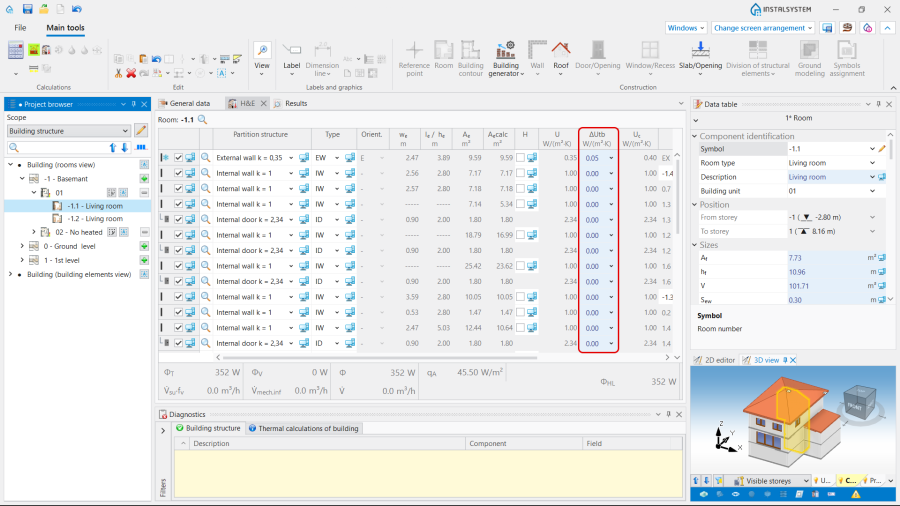
2. ΔUtb column with "auto mode" status.
