Defining your own search criteria: Difference between revisions
Jump to navigation
Jump to search
No edit summary |
No edit summary |
||
| Line 47: | Line 47: | ||
<!-- Do not write text below this tag --> | <!-- Do not write text below this tag --> | ||
<br class="iwlinks"/>[[pl:Wyszukiwanie elementów w projekcie|Wyszukiwanie elementów w projekcie]][[bg:Търсене на елементи в проекта|Търсене на елементи в проекта]][[zh-cn:在项目中查找部件|在项目中查找部件]][[lt:Elementų paieška projekte|Elementų paieška projekte]] | <br class="iwlinks"/>[[pl:Wyszukiwanie elementów w projekcie|Wyszukiwanie elementów w projekcie]][[bg:Търсене на елементи в проекта|Търсене на елементи в проекта]][[zh-cn:在项目中查找部件|在项目中查找部件]][[it:Ricerca degli elementi nel progetto|Ricerca degli elementi nel progetto]][[lt:Elementų paieška projekte|Elementų paieška projekte]] | ||
Revision as of 22:51, 14 September 2023
| Product | InstalSystem 5 |
| Type of article | FUNCTION AND TOOL |
| Source for translation | 2017-11-18 |
Description
The tool enables searching for a component or a group of components within a project. As a result the found components are marked in all active windows, such as: 2D Editor, 3D view, Data table, Results, etc.
Location in the program
- The function forms a separate window and is available in the Main tools toolbar in the Windows section.
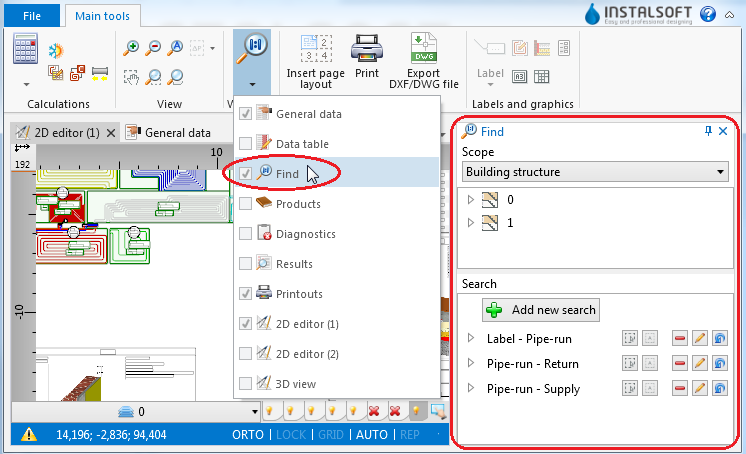
1. function

Example of use
Searching for components of selected type
- Select Scope of search (e.g. Building structure, Heating and cooling installation).
- Select the component in the tree of components.
- Additional buttons on the right side of window enable:
- searching for components of selected type within a drawing indicated by the user,
- searching for all components of selected type.
Searching for components that meet defined criteria
- Select one of the previously defined searches
or - Select Add new search.
- Fill in the Search name field.
- Select the scope of search in the Find field.
- Select from the list the data type to be used in the search.
- Narrow down the range of your search by specifying the values of selected data.