Inserting plates in dry floor heating system: Difference between revisions
Jump to navigation
Jump to search
Pszczolkam (talk | contribs) |
Pszczolkam (talk | contribs) |
||
| Line 48: | Line 48: | ||
* '''Obrót elementu przed wstawieniem'''.</br>Przycisk funkcyjny '''F6''' umożliwia obrót elementu ''<IS_TS id=KlocekDrySysName/>'' jeszcze przed jego wstawieniem, co przyspiesza układanie płyt w odpowiednim kierunku. | * '''Obrót elementu przed wstawieniem'''.</br>Przycisk funkcyjny '''F6''' umożliwia obrót elementu ''<IS_TS id=KlocekDrySysName/>'' jeszcze przed jego wstawieniem, co przyspiesza układanie płyt w odpowiednim kierunku. | ||
* ''' Inserting ''<IS_TS id=KlocekDrySysName/>'' components is supported by the ''<IS_TS id=strAUTOModeName/>'' mode'''. </br>Elementy ''<IS_TS id=KlocekDrySysName/>'' podlegają działaniu trybu ''<IS_TS id=strAUTOModeName/>'', umożliwiając precyzyjne wstawienie płyty zarówno względem krawędzi pomieszczenia jak i względem innej płyty. {{Info}} [[Inserting plates in dry floor heating_system#Additional information|Additional information]].<br/> | * ''' Inserting ''<IS_TS id=KlocekDrySysName/>'' components is supported by the ''<IS_TS id=strAUTOModeName/>'' mode'''. </br>Elementy ''<IS_TS id=KlocekDrySysName/>'' podlegają działaniu trybu ''<IS_TS id=strAUTOModeName/>'', umożliwiając precyzyjne wstawienie płyty zarówno względem krawędzi pomieszczenia jak i względem innej płyty. {{Info}} [[Inserting plates in dry floor heating_system#Additional information|Additional information]].<br/> | ||
* ''' Using cut off pieces of ''<IS_TS id=KlocekDrySysName/>'' components. '''<br> The portion of ''<IS_TS id=KlocekDrySysName/>'' component being inserted that extends beyond ''<IS_TS id=iNameKonstrPomieszczenie/>'' or overlaps the ''<IS_TS id=KlocekDrySysName/>'' inserted before is automatically cut off. The cut off piece can be used in the project and the corresponding number of ''<IS_TS id=KlocekDrySysName/>'' components used is included in the bill of materials. The cut off pieces can be pasted outside of the drawing and reinserted elsewhere within the ''<IS_TS id=iNameOPStrefaPodlogGrzejnych/>'' cut to fit the edge provided that ''<IS_TS id=btWytnijDoSchowka/>'' and ''<IS_TS id=stractEditPasteCaption/>'' functions are used.<br/>{{#ev:youtube|Gp3RjnMctFs|900||||rel=0}} | * ''' Using cut off pieces of ''<IS_TS id=KlocekDrySysName/>'' components. '''<br> The portion of ''<IS_TS id=KlocekDrySysName/>'' component being inserted that extends beyond ''<IS_TS id=iNameKonstrPomieszczenie/>'' or overlaps the ''<IS_TS id=KlocekDrySysName/>'' inserted before is automatically cut off. The cut off piece can be used in the project and the corresponding number of ''<IS_TS id=KlocekDrySysName/>'' components used is included in the bill of materials. The cut off pieces can be pasted outside of the drawing and reinserted elsewhere within the ''<IS_TS id=iNameOPStrefaPodlogGrzejnych/>'' cut to fit the edge provided that ''<IS_TS id=btWytnijDoSchowka/>'' and ''<IS_TS id=stractEditPasteCaption/>'' functions are used.<br/>{{#ev:youtube|aEmzO-fiRx4|900||||rel=0}} | ||
* '''Przesuwanie płyt przy włączonym trybie ''<IS_TS id=strORTOModeName/>''.'''</br>Tryb ''<IS_TS id=strORTOModeName/>'' wraz z aktywnym trybem ''<IS_TS id=strAUTOModeName/>'' umożliwia przesuwanie elementów wzdłuż ich pionowej i poziomej krawędzi, pozwalając na precyzyjne dosunięcie płyty do krawędzi elementu ''<IS_TS id=iNameKonstrPomieszczenie/>'' lub innej płyty ułożonej w strefie. <br/>{{#ev:youtube|Gp3RjnMctFs|900||||rel=0}} | |||
=== Adjusting the line dividing the <IS_TS id=iNameOPStrefaPodlogGrzejnych/> into <IS_TS id=iNameOPGrzejnik/> components=== | === Adjusting the line dividing the <IS_TS id=iNameOPStrefaPodlogGrzejnych/> into <IS_TS id=iNameOPGrzejnik/> components=== | ||
Revision as of 10:36, 19 August 2022
| Product | InstalSystem 5 |
| Type of article | FUNCTION AND TOOL |
| Source for translation | 2022-07-27 |
Description
This functionality enables inserting Dry system plate components to form a base for pipes in dry underfloor heating systems with guide plates.
Dry system plate components can be arranged in any configuration and cut to fit the edge of the room, while the cut away pieces can still be used.
Program dostarcza wiele narzędzi ułatwiających szybkie układanie elementów w projekcie, m.in.: możliwy jest obrót elementu jeszcze przed jego wstawieniem, zmiana punktów snapowania oraz automatyczne wypełnienie wskazanego obszaru pomieszczenia płytami.
After completing calculations a List of radiant heating components is generated specifying the number of plates used in the project.

Location in the program
- Icon: Dry system plate - available jest w oknie 2D editor na pasku Main tools w sekcji Radiant dla aktywnego zakresu edycji Dry systems.
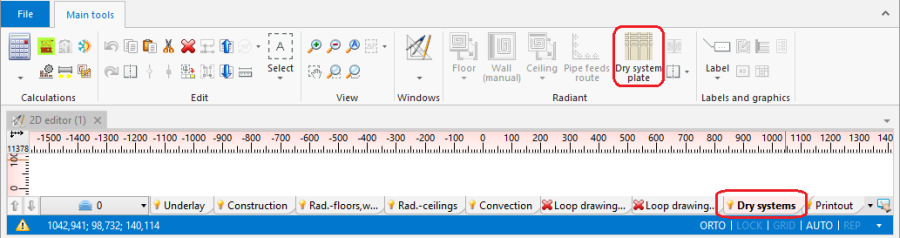
2. Location in program. - Additional dedicated tab with icons of plates with assigned types, depending on the configuration of the package.

Example of use
Manual inserting plates in dry floor heating system
- Dry system plate is inserted within the Heating/Cooling Floor Zone area.
For more information, see: Heating/cooling zone.
Therefore this step has to be preceded by necessary design operations. For more information, see: Design of radiant heating floor and wall installation. Należy również selection in General data in the Floor systems section of Dry system in the Default system / fastening method field. - Wybór typu katalogowego.
When inserting Dry system plate appropriate catalog type should be selected in the Data table window, to take into account the pipe spacing distance determined or specified for the zone.
When the program configuration includes a dedicated toolbar it is possible to select an icon of a plate of defined type. - Obrót elementu przed wstawieniem.
Przycisk funkcyjny F6 umożliwia obrót elementu Dry system plate jeszcze przed jego wstawieniem, co przyspiesza układanie płyt w odpowiednim kierunku. - Inserting Dry system plate components is supported by the AUTO mode.
Elementy Dry system plate podlegają działaniu trybu AUTO, umożliwiając precyzyjne wstawienie płyty zarówno względem krawędzi pomieszczenia jak i względem innej płyty. For more information, see: Additional information. - Using cut off pieces of Dry system plate components.
The portion of Dry system plate component being inserted that extends beyond Room or overlaps the Dry system plate inserted before is automatically cut off. The cut off piece can be used in the project and the corresponding number of Dry system plate components used is included in the bill of materials. The cut off pieces can be pasted outside of the drawing and reinserted elsewhere within the Heating/Cooling Floor Zone cut to fit the edge provided that Cut and Paste functions are used. - Przesuwanie płyt przy włączonym trybie ORTO.
Tryb ORTO wraz z aktywnym trybem AUTO umożliwia przesuwanie elementów wzdłuż ich pionowej i poziomej krawędzi, pozwalając na precyzyjne dosunięcie płyty do krawędzi elementu Room lub innej płyty ułożonej w strefie.
Adjusting the line dividing the Heating/Cooling Floor Zone into Heating/cooling floor components
- The lines dividing the Heating/Cooling Floor Zone into Heating/cooling floor components determined automatically may not match the edges of Dry system plate components inserted manually. In order to match these the dividing line has to be adjusted.
For more information, see: Manual indication of the dividing line.
For more information, see: Modifying the dividing line after automatic division.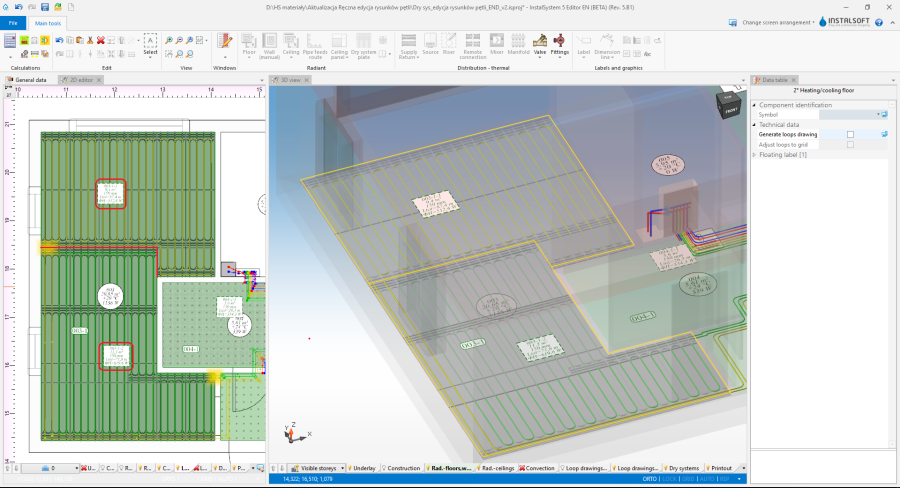
3. Adjustment of the dividing line.

Inserting loop drawings
- Po rozplanowaniu elementów Dry system plate konieczne jest zweryfikowanie przebiegu wygenerowanych automatycznie rysunków pętli względem przebiegu rowków w płytach systemu suchego. W razie konieczności należy ręcznie skorygować przebieg pętli.
Manual editing of loop drawings in dry systems with guide plates.
Additional information
- When inserting and copying/pasting a Dry system plate component it is possible to switch between active edges/snap points:
- TAB - Cursor moves clockwise do kolejnego głównego punktu snapowania: narożnika lub środka boku elementu.
- Ctrl+TAB - Kursor przesuwa się zgodnie z ruchem wskazówek zegarek do pośrednich punktów snapowania.
- Shift+TAB - Cursor moves anticlockwise
- Aktywna krawędź elementu jest podświetlona na zielono.
- If an edge is active on a Dry system plate component being inserted (cursor in the centre of the edge) - then 3 points are activated: 1 in the centre and 2 in corners.
- If individual points are active on a Dry system plate component being inserted, the program switches between edge points of the component grid and snaps onto the grid points of other Dry system plate components.
- Copying of several Dry system plate components: the program switches between subsequent snap points of Dry system plate components that make up the block being copied.
- Moving a Dry system plate component: the active edge or point is selected based on the "grab" location of the component, and changing with the TAB key is disabled.