How to eliminate: "Max. working load %.1f exceeds permissible value %.1f for selected floor construction (insulation). Insulation was not determined": Difference between revisions
Jump to navigation
Jump to search
| Line 29: | Line 29: | ||
==Solution== | ==Solution== | ||
* ''<IS_TS id=DomyslneMaksymalneDopuszczalneObciazenieRoboczeSystemowPodlogowych/>'' | * ''<IS_TS id=DomyslneMaksymalneDopuszczalneObciazenieRoboczeSystemowPodlogowych/>'' is propagated to all ''<IS_TS id=iNameOPStrefaPodlogGrzejnych/>'' components. When the message appears, the value for ''<IS_TS id=strMaxDopObciazenie/>'' can be changed in the ''<IS_TS id=rsDanogi/>'' window in the ''<IS_TS id=DaneInstalacjiPodlogowych/>'' section. <br/>[[File:Max._working_load_General_Date.png|900 px|left|thumb|1. Settings in the <IS_TS id=strMaxDopObciazenie/> field in the <IS_TS id=DaneInstalacjiPodlogowych/> tab.]]<br clear="all"/> | ||
* | * Changes (decreases in value) can also be made only for selected ''<IS_TS id=iNameOPStrefaPodlogGrzejnych/>'' components in the ''<IS_TS id=strMaxDopObciazenie/>'' field in the ''<IS_TS id=strpnPGKonstrukcjaPodlogi/>'' editor, launched from the ''<IS_TS id=DataEditorTable/>'' window. <br/>[[File:Max._working_load.png|900 px|left|thumb|2. Setting values in the <IS_TS id=strMaxDopObciazenie/> field.]]<br clear="all"/> | ||
[[Category:InstalSystem 5]] | [[Category:InstalSystem 5]] | ||
[[Category:TIP&TRICK]] | [[Category:TIP&TRICK]] | ||
Revision as of 11:08, 29 June 2022
| Product | InstalSystem 5 |
| Type of article | TIP&TRICK |
| Source for translation | 2022-03-30 |
Problem description
Problems related to the design of the heating/cooling floor construction are indicated with the following message:
- Max. working load %.1f exceeds permissible value %.1f for selected floor construction (insulation). Insulation was not determined.
Instead of the %.1f parameter, the load value in kN/m2 is displayed. The maximum value depends on the selected system, while the working load arises from the design data.
The diagnostic message is displayed when:
- the default Max. working load specified in General data on the Floor systems tab exceeds the permissible load value listed in the catalogue for the given floor system;
- Max. working load declared in Floor build-up ... for the selected Heating/Cooling Floor Zone exceeds the permissible load value listed in the catalogue for the given floor system.
Solution
- Default maximum permissible operational load for underfloor systems is propagated to all Heating/Cooling Floor Zone components. When the message appears, the value for Max. working load can be changed in the General data window in the Floor systems section.

1. Settings in the Max. working load field in the Floor systems tab. - Changes (decreases in value) can also be made only for selected Heating/Cooling Floor Zone components in the Max. working load field in the Floor build-up ... editor, launched from the Data table window.
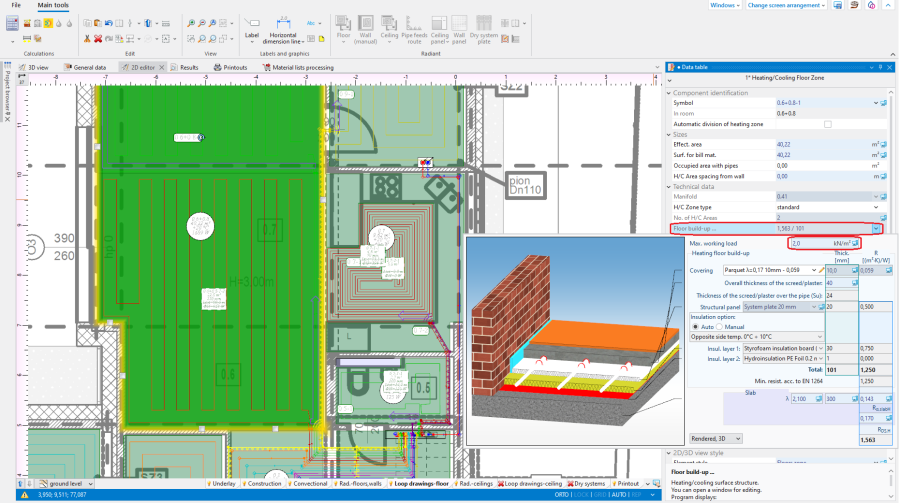
2. Setting values in the Max. working load field.

