How to make the program run faster: Difference between revisions
Jump to navigation
Jump to search
m (JW edytor moved page Jak przyspieszyć pracę programu to How to make the program run faster) |
No edit summary |
||
| Line 23: | Line 23: | ||
* Exit all applications and services running in the background that are not used at the moment. | * Exit all applications and services running in the background that are not used at the moment. | ||
* Verify that the computer meets [[Technical specifications of InstalSystem 5 package|Hardware requirements]]. | * Verify that the computer meets [[Technical specifications of InstalSystem 5 package|Hardware requirements]]. | ||
[[pl:Jak przyspieszyć pracę programu]] | |||
[[Category:InstalSystem 5]] | [[Category:InstalSystem 5]] | ||
[[Category:TYPICAL PROBLEM]] | [[Category:TYPICAL PROBLEM]] | ||
Revision as of 10:54, 12 November 2015
| Product | InstalSystem 5 |
| Type of article | TYPICAL PROBLEM |
| Source for translation | IS 5.0 Beta 22 |
Problem description
InstalSystem version 5 requires hardware of relatively high computing performance. The software tends to be slower on lower end machines. This is particularly apparent when large files are processed or when other applications run simultaneously. The scale of the problem also depends on the program functions and windows used.
Solution
- Close all windows that are not needed (particularly the resource-intensive module 3D view).
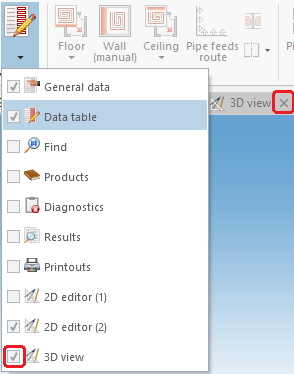
1. 3D Editor - Exit all applications and services running in the background that are not used at the moment.
- Verify that the computer meets Hardware requirements.
