Buffer tank: Difference between revisions
Klintsevicho (talk | contribs) No edit summary |
Klintsevicho (talk | contribs) No edit summary |
||
| Line 37: | Line 37: | ||
After running calculations the information on the type of the ''<IS_TS id=iNameCOZbiornikBuforowySystemowMieszkaniowychWezlowCWU/>'' and the ''<IS_TS id=pinNamePompa/>'' can be found in the ''<IS_TS id=ResultModuleTitle/>'' window. <br/>[[File:Buffer tank results table.png |900 px|left|thumb|3. <IS_TS id=ResultModuleTitle/> window.]]<br clear="all"/> | After running calculations the information on the type of the ''<IS_TS id=iNameCOZbiornikBuforowySystemowMieszkaniowychWezlowCWU/>'' and the ''<IS_TS id=pinNamePompa/>'' can be found in the ''<IS_TS id=ResultModuleTitle/>'' window. <br/>[[File:Buffer tank results table.png |900 px|left|thumb|3. <IS_TS id=ResultModuleTitle/> window.]]<br clear="all"/> | ||
<br/> | <br/> | ||
<!--Specify the list of categories of commercial products, which the article concerns--> | |||
<pre>[[Category:<specify the category from [http://en.help.instalsoft.com/Categories]>]]</pre> | |||
Revision as of 11:56, 18 January 2023
| Product | InstalSystem 5 |
| Type of article | FUNCTION AND TOOL |
| Source for translation | 2023-01-17 |
Description
The article describes the usage of the Buffer tank - the element of Heating systems, Cooling systems and Water supply systems that is used in to accumulate heating energy and distribute it evenly. The introduction of a Buffer tank into a building's engineering installations allows significant savings in energy resources.
In the program, the Buffer tank is represented as a free-standing item. When using it, it is important to remember to include a pump in the secondary circuit.
Location in the program
The Buffer tank icon can be found in the 2D Editor window on the Main tools toolbar in Convectional and Rad.-floors,walls sections:

Example of use
Placing the component
After placing the Buffer tank at the desired location on the drawing the following data should be entered in the Data table window:
- Distance from floor (set in storey data)
- Type (Important: for the Fittings not from catalogue indicate Orientation, Connection diam. and the value of Water capacity (V))
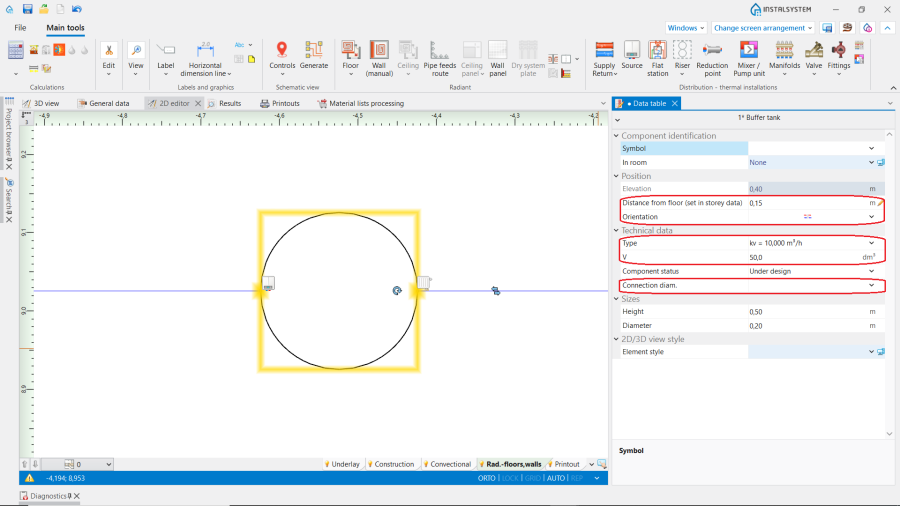
2. Data table.

Connecting the component
- After all system components have been placed on the drawing the Buffer tank should be connected to the source on one side (primary circuit) and to the system on the other side (secondary circuit). Connection to the Buffer tank is made by using Supply and Return pipelines.
- A Pump needs to be installed on the secondary side.
Additional information
After running calculations the information on the type of the Buffer tank and the Pump can be found in the Results window.

[[Category:<specify the category from [http://en.help.instalsoft.com/Categories]>]]