How to shorten calculation time: Difference between revisions
| Line 20: | Line 20: | ||
==Solution== | ==Solution== | ||
=== | === Running selected calculations only=== | ||
Clicking the [[File:Ikonka5.png|49 px|]] button results in all project scopes being calculated by default. The calculation time can be shortened by doing one of the following: | |||
# | # Disabling indicated calculation scopes by unchecking checkboxes adjacent to the relevant module icons upon expanding the [[File:Ikonka5.png|49 px|]] button. | ||
##[[File:Ikonka2.png|49 px|]]''<IS_TS id=ObliczeniaCieplneBudynku/>'' | ##[[File:Ikonka2.png|49 px|]]''<IS_TS id=ObliczeniaCieplneBudynku/>'' | ||
##[[File:Ikonka1.png|49 px|]]''<IS_TS id=BuildingStructureCalculation/>'' | ##[[File:Ikonka1.png|49 px|]]''<IS_TS id=BuildingStructureCalculation/>'' | ||
##[[File:Heating_and_cooling_systems.png|49 px|]] | ##[[File:Heating_and_cooling_systems.png|49 px|]]Calculations of ''<IS_TS id=InstalacjeGrzewczeIChlodnicze/>'' | ||
##[[File:Ikonka4.png|49 px|]] | ##[[File:Ikonka4.png|49 px|]]Calculations of ''<IS_TS id=InstalacjeWodociagowe/>'' | ||
##[[File:Tap-drainage-Calculator.png|49 px]] | ##[[File:Tap-drainage-Calculator.png|49 px]] Calculations of ''<IS_TS id=InstalacjeKanalizacyjne/>'' | ||
# | # Running calculations of a selected project scope only by clicking the relevant icon [[File:Checkbox-Calculations.png|150 px]] | ||
# | # Excluding selected modules from the project scope in the ''<IS_TS id=rsDanogi/>'' window | ||
<br/>[[File:How_to_shorten_the_duration_of_calculations.png|700px|left|thumb|1. | <br/>[[File:How_to_shorten_the_duration_of_calculations.png|700px|left|thumb|1.Running selected calculation scopes only.]]<br clear="all"/> | ||
<br/>{{Info}} [[Introduction to the work with the package InstalSystem 5#Calculations and diagnostics|Calculations and diagnostics]] | <br/>{{Info}} [[Introduction to the work with the package InstalSystem 5#Calculations and diagnostics|Calculations and diagnostics]] | ||
Revision as of 13:28, 30 December 2021
| Product | InstalSystem 5 |
| Type of article | TIP&TRICK |
| Source for translation | 2021-12-08 |
Problem description
In the case of elaborate projects the time of completing calculations for all active calculation modules can extend to several tens of seconds or even several minutes. However, it is possible to control what scope of the project is being calculated and what actions are to be performed by the program during their duration.
Solution
Running selected calculations only
Clicking the  button results in all project scopes being calculated by default. The calculation time can be shortened by doing one of the following:
- Disabling indicated calculation scopes by unchecking checkboxes adjacent to the relevant module icons upon expanding the
 button.
 Thermal calculations of building
 Computation of building structure
  Calculations of Heating and cooling systems
 Calculations of Water supply systems
 Calculations of Drainage systems
- Running calculations of a selected project scope only by clicking the relevant icon
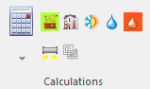
- Excluding selected modules from the project scope in the General data window


For more information, see: Calculations and diagnostics
Zmiana ustawień programu
Nie włączać automatycznego przełączania do okna Results po wykonaniu obliczeń. Takie ustawienie programu pozwoli na redukcję czasu obliczeń o czas potrzebny na każdorazowe przełączenie zakładki na zakres Results oraz na odświeżenia stron wydruku.

Wyłączenie okna 3D
W przypadku pracy na słabszych kartach graficznych odczuwalne skrócenie czasu obliczeń, związane z odświeżeniem rysunku modelu budynku i instalacji po obliczeniach, może nastąpić po wyłączeniu okna 3D view.

Wyłączenie funkcji Generate loops drawings
Dotyczy modułu Radiant systems. Jeśli rysunki pętli nie są wymagane lub jeśli zostały już wygenerowanu i uzyskano zadowalające efekty można wyłączyć ich generowanie zgodnie z:
For more information, see: Manual editing of loop drawings.

Wyłączenie automatycznego podziału elementu Heating/Cooling Zone i rysowania przyłączy
Dotyczy modułu Radiant systems. Z uwagi na konieczność uwzględnienia wielu parametrów, algorytm podziału elementu Heating/Cooling Zone i rysowania przyłączy mogą w znaczący sposób wydłużyć czas obliczeń projektu dla zakresu Heating and cooling systems. Po uzyskaniu zadowalających wyników (hydraulicznych, cieplnych i graficznych) możliwe jest wyłączenie tych algorytmów.
For more information, see: Dividing a Heating/Cooling Zone into Heating-cooling surface components
Inne
Jeśli w projekcie użyto różnych systemów rur i kształtek, dobór połączeń między systemami może trwać dłużej przy pierwszym przeliczeniu projektu.