Checklist for verifying thermal partitions: Difference between revisions
Jump to navigation
Jump to search
Switalskia (talk | contribs) |
No edit summary |
||
| (One intermediate revision by one other user not shown) | |||
| Line 12: | Line 12: | ||
|c3 =<!--Jest kategoria -> zamienić na: "category3=" i uzupełnić link do sekcji kategorii na stronie głównej produktu--> | |c3 =<!--Jest kategoria -> zamienić na: "category3=" i uzupełnić link do sekcji kategorii na stronie głównej produktu--> | ||
|category_name3 =<!--podać nazwę kategorii "ZASTOSOWANIE"/"FUNKCJONALNOŚĆ"/...--> | |category_name3 =<!--podać nazwę kategorii "ZASTOSOWANIE"/"FUNKCJONALNOŚĆ"/...--> | ||
|version1 =2026- | |version1 =2026-04-07 | ||
|v2 =<!--Jest wersja -> zamienić na: "version2=" i uzupełnić link do sekcji RN danego produktu--> | |v2 =<!--Jest wersja -> zamienić na: "version2=" i uzupełnić link do sekcji RN danego produktu--> | ||
|v3 =<!--Jest wersja -> zamienić na: "version2=" i uzupełnić link do sekcji RN danego produktu--> | |v3 =<!--Jest wersja -> zamienić na: "version2=" i uzupełnić link do sekcji RN danego produktu--> | ||
| Line 36: | Line 36: | ||
[[Category:InstalSystem 5]] | [[Category:InstalSystem 5]] | ||
[[Category:TIP&TRICK]] | [[Category:TIP&TRICK]] | ||
<!-- Do not write text below this tag --> | |||
<br class="iwlinks"/>[[pl:Lista kontrolna do weryfikacji przegród termicznych|Lista kontrolna do weryfikacji przegród termicznych]] | |||
Latest revision as of 12:26, 21 April 2026
| Product | InstalSystem 5 |
| Type of article | TIP&TRICK |
| Source for translation | 2026-04-07 |
Problem description
For the precise Thermal calculations of building and generating of the Thermal model of a building (For more information, see: Calculation of design heat load of rooms), it's very important to verify automatic thermal partitions, created based on structural elements and automatically recognized Rooms, especially in cases of complex geometry (multi-pitched Roof, Dormer).
Solution
- On 3D view in the H&E(T) (Thermal partitions in heat transmission calculations) scope analyze the completeness of partitions in the thermal model. For the best result turn the visibility of the H&E(T) scope to the The only one visible when active using the right mouse button context menu;
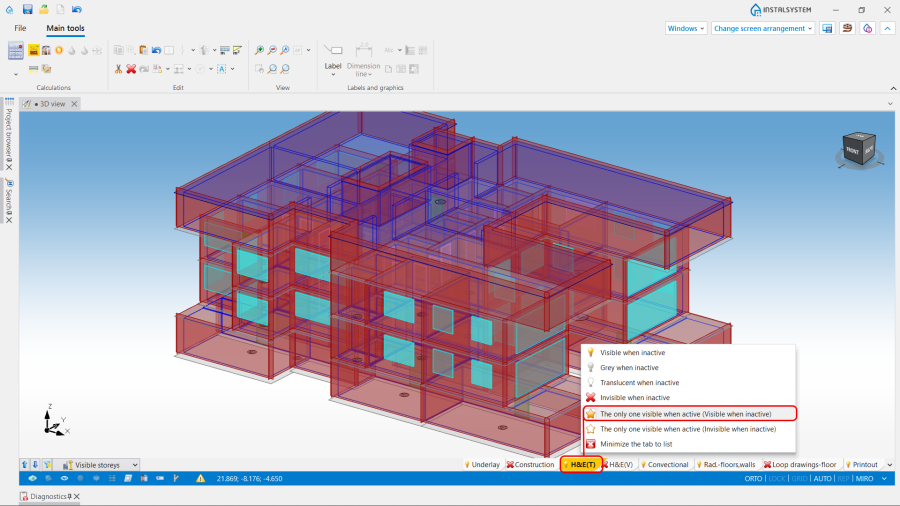
1. Verifying thermal partitions / H&E(T) visibility. - If fragments are missing, check if the corresponding Rooms are automatic and whether they have closed contours;
- If a thermal partition is not created where you expect it, check whether there is a zero-thickness wall between the rooms.;
- For Roof and Dormer: ensure that the Roof covers the Building contour and is modeled correctly (roof edges, sections, levels). Improve, if necessary, and run the Computation of building structure ;
- For Building embedded below ground level when using the Ground element, check the boundary between the External wall and Wall near the ground partition types, which is indicated by the ground contour around the Building;
- For more precise verification of the created thermal model, the section Partitions visibility, located on the working menu and on the status bar for the H&E(T) scope, can be used. The functions operate simultaneously in 2D editor and on 3D view.
The following selection of partition visibility, grouped by their location in the building, is available:- Show horizontal partitions only,
- Show vertical partitions only,
- Show external partitions only,
- Show internal partitions only,
- Show all partitions.

2. Partitions visibility.
_visibility.png)
