Interactive calculations of radiant systems
| Product | InstalSystem 5 |
| Type of article | FUNCTION AND TOOL |
| Source for translation | 2022-08-25 |
Description
Interactive radiant systems calculations enables fast manual adjustment of selected parameters of a radiant system in given application (Heating/Cooling). In the Interactive radiant systems calculations window the following can be adjusted:
- the value of Pipe spacing,
- the value of Temp. diff. supply-return
- the value of No. of H/C Areas,
- wartości θs,H rad dla wybranych obwodów regulacji dla instalacji ogrzewania,
- wartości θs,C rad dla wybranych obwodów regulacji dla instalacji chłodzenia.


After modifying the value of:
- Pipe spacing
- No. of H/C Areas
- θs,H rad / θs,C rad
konieczne jest wciśnięcie przycisku Calculate dla weryfikacji wpływu wprowadzonych zmian na wyniki obliczeń. Obliczenia wówczas wykonywane są częściowo w zakresie obejmującym wyłącznie systemy płaszczyznowe. W fazie obliczeń interaktywnych spadki ciśnienia i nastawy na zaworach regulacyjnych/rotametrach na rozdzielaczu są wyznaczane przy założeniu, że ciśnienie przed rozdzielaczem ma wartość wymaganego minimalnego ciśnienia dyspozycyjnego dla tego rozdzielacza. Po zamknięciu okna i wykonaniu pełnych obliczeń instalacji cieplnych, spadki ciśnienia i nastawy są wyznaczane ponownie ponieważ wykonywane są obliczenia hydrauliczne całej instalacji, wskutek czego ciśnienie przed danym rozdzielaczem może być wyższe od wymaganego minimalnego.
In the case of change the Temp. diff. supply-return value it is not necessary to click the Calculate button, parametry aktualizowane są na bieżąco.
Po zamknięciu okna Interactive radiant systems calculations należy wykonać pełne obliczenia instalacji cieplnych ponieważ projekt ma status nieobliczonego, o czym m.in. informuje komunikat na pasku stanu:
Attention! The project has not been calculated or data have been modifed since last calculation.
Location in the program
- The Interactive radiant systems calculations icon is available in the Main tools bar in section Calculations.
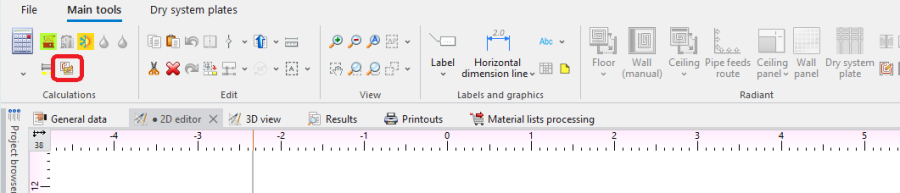
3. Interactive radiant systems calculations. - Keyboard shortcut: Ctrl + Shift + F10.

Examples of use
Which scopes are available for Interactive radiant systems calculations and which windows are editable depends on the selected use of source.
- Heating use - in the Interactive radiant systems calculations window it is possible to modify parameters in the Heating tab, the Cooling tab is empty.
- Heating and cooling efficiency use - in the Interactive radiant systems calculations window it is possible to modify parameters in the tab Heating, the Cooling tab displays all values, but these cannot be modified.
- Cooling use - in the Interactive radiant systems calculations window it is possible to modify parameters in the Cooling tab, the Heating tab is empty.
Other possibilities in the Interactive radiant systems calculations window
- Filtering Heating/Cooling Zone connected to given manifold.
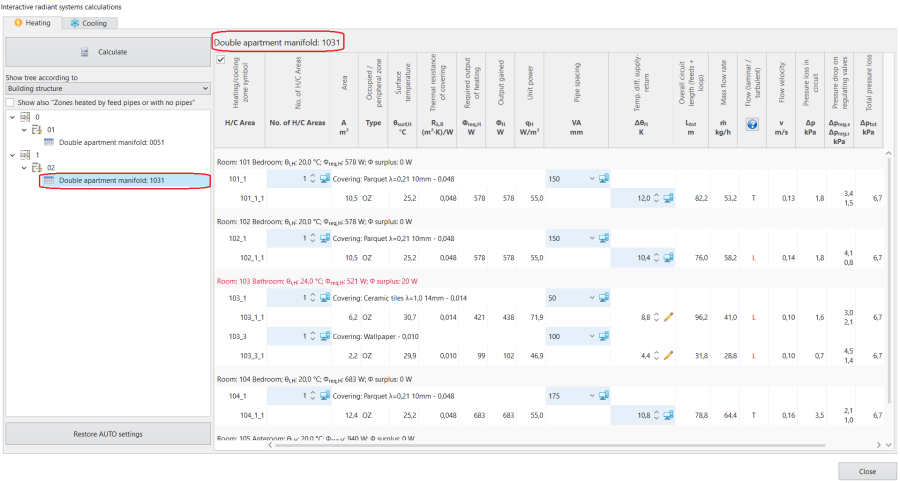
4. Filtrowanie Heating/Cooling Zone podpiętych do danego rozdzielacza. - Możliwość sterowania widocznością elementów Heating/cooling floor typu Heated/cooled by pipe feeds i Without pipes przy pomocy checkboxa Show also "Zones heated by feed pipes or with no pipes".

5. Show also "Zones heated by feed pipes or with no pipes". - Restoration of automatic calculation settings - Restore AUTO settings.
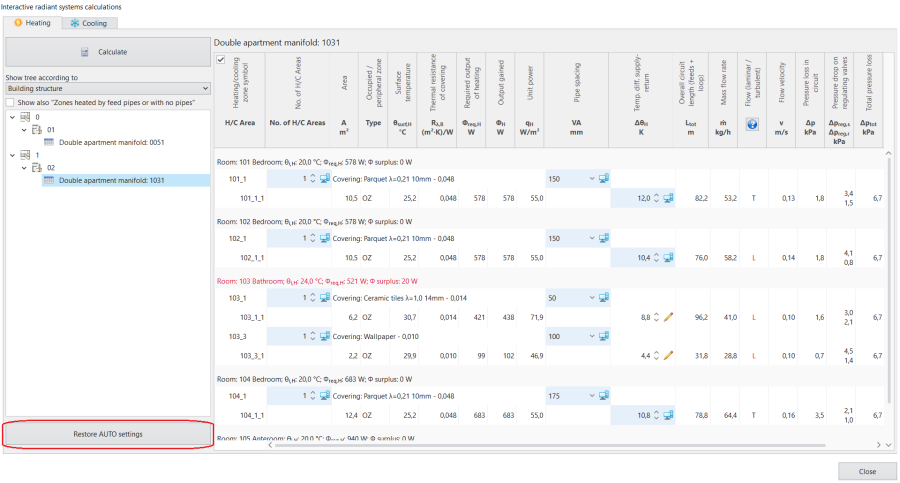
6. Restore AUTO settings.


Wybór sposobu prezentacji rozdzielaczy
Pole Show tree according to pozwala na zarządzanie sposobami prezentacji rozdzielaczy z dostępnymi opcjami:
- Building structure - elementy Double apartment manifold są prezentowane w drzewie według ich występowania na kolejnych kondygnacjach i w ramach jednostek budynku, do których przynależą.
- Control circuits - elementy Double apartment manifold są pogrupowane według obwodów regulacji o tej samej temperaturze zasilania.

7. Wybór sposobu prezentacji rozdzielaczy w polu: Show tree according to.

Korekta temperatury zasilania dla obwodu regulacji
Aby zmienić temperaturę zasilania dla wybranego obwodu regulacji należy (alternatywnie):
- Narzucić wartość w polu θs,H rad dla analizowanego obwodu.
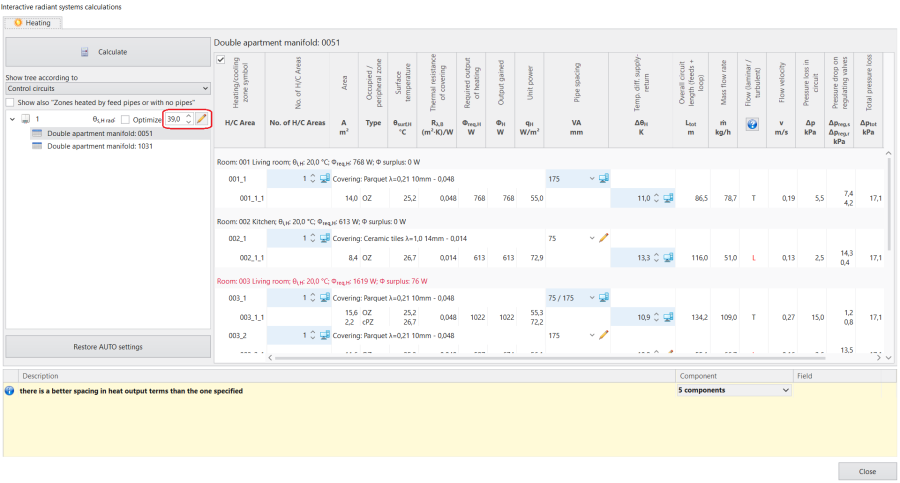
8. Ustawienie temperatury zasilania dla obwodów regulacji w oknie Interactive radiant systems calculations. - Zaznaczyć checkbox Optimize.
- Przełączyć stan pola w tryb AUTO (ikonka kalkulatora), aby sposób ustalania wartości dla θs,H rad był zgodny z ustawieniami z okna General data z sekcji Thermal systems/ Sources a następnie wcisnąć przycisk Calculate.
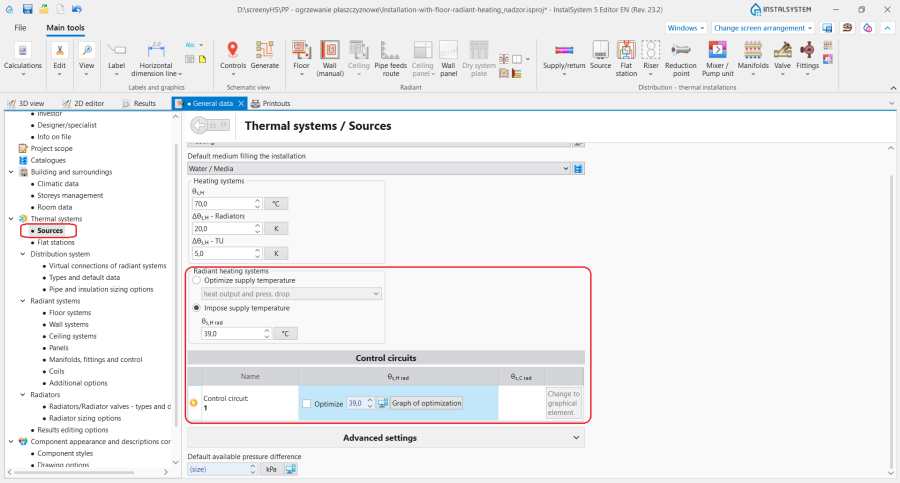
9. Ustawienie temperatury zasilania dla obwodów regulacji w oknie General data.


Adjustment of the number of Heating/Cooling Areas
- When the number of H/C Areas is changed manually, the default values of Temp. diff. supply-return (computer status) are restored for all H/C Areas belonging to given H/C Areas Zone.
Adjustment value of Pipe spacing
- As a result of manual adjustment of Pipe spacing the program can change the value of Heating-cooling surface, but the automatic mode of Heating/Cooling Zone division is not disabled.
Change in the value of Pipe spacing in a single Heating-cooling surface changes that parameter in all H/C Area elements present within the common Heating/Cooling Zone.
Display of the balancing valve setting and of the covering
- The selected covering is displayed in the Interactive radiant systems calculations window.
- The field Valve setting is displayed with a value in the Interactive radiant systems calculations window.
Adjustment of Temp. diff. supply-return
- Modification of this value may, among other things, have an effect on the elimination of the diagnostics message:
- water velocity in pipe not sufficient for self-venting.
If the Temp. diff. supply-return value is modified, it is not necessary to click the Calculate button.
Take vmin into account
Program może uwzględnić w obliczeniach cieplnych wymaganą minimalną prędkość przepływu w rurze (v_min) po zaznaczeniu checkboxa Minimum velocity na odpowiedniej zakładce w oknie General data (Floor systems / Wall systems / Ceiling systems). W trybie AUTO wartość inicjacyjna dla wybranego typu rury pochodzi z katalogu wybranego systemu.
Additional information
The consequence of adjusting parameters in Interactive radiant systems calculations is the rejection of the option of optimum supply temperature determination in a radiant system according to the criterion selected in General data:
- heat output and press. drop,
- min. investment costs.
This rejection is indicated by the program with diagnostics messages at the hint level:
- there is a better spacing in heat output terms than the one specified,
- there is a better spacing in cost terms than the one specified,
- there is a better spacing in heat output and flow terms than the one specified.
The list of diagnostics messages in the Interactive radiant systems calculations window may differ from that in the Diagnostics window. Any adjustments in the design should be based on the list of messages created after calculations are made for the appropriate scope of the design, e.g. Heating and cooling systems, that is in the Diagnostics window.
Rules of highlighting the fields which are editable in the calculations window:
- Changing a value in a field causes the cell to be highlighted with another colour and presentation of that value.

10. Presentation of a field with a manually entered value immediately after editing - No colour highlighting after completed calculation.
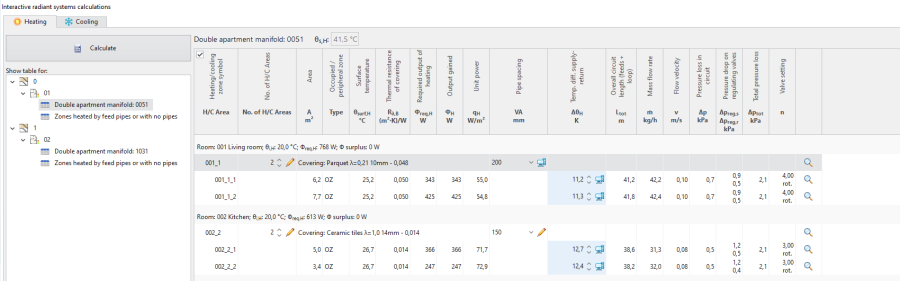
11. Presentation of a field with manually entered value after calculation

