Import of building model from BIM compatible formats: Difference between revisions
Jump to navigation
Jump to search
| Line 45: | Line 45: | ||
==Location in the program== | ==Location in the program== | ||
===Viewing and handling diagnostic messages=== | ===Viewing and handling diagnostic messages=== | ||
* The icon of the import of building model from BIM compatible formats is accessible in the 2D Editor window in the ''<IS_TS id=NarzedziaGlowne/>'' bar, section ''<IS_TS id=lystrFloors/>'' when ''<IS_TS id=lystrFloors/>'' is enabled.<br/>[[File:TB-BIM-data-exchange-location.png|900 px|left|thumb|1. ''<IS_TS id=ImportgbXMLName/>'']]<br clear="all"/> | * The icon of the import of building model from BIM compatible formats is accessible in the 2D Editor window in the ''<IS_TS id=NarzedziaGlowne/>'' bar, section ''<IS_TS id=lystrFloors/>'' when ''<IS_TS id=lystrFloors/>'' editing scope is enabled.<br/>[[File:TB-BIM-data-exchange-location.png|900 px|left|thumb|1. ''<IS_TS id=ImportgbXMLName/>'']]<br clear="all"/> | ||
==Example of use== | ==Example of use== | ||
Revision as of 11:52, 12 August 2017
| Product | InstalSystem 5 |
| Type of article | FUNCTIONALITY |
| Source for translation | BETA REV. 2.0.B6 |
Description
The article describes how to import data on building structure from the following file formats:
- IFC,
- gbXML.
The following elements of building structure included in the IFC format are recognized and supported:
- storeys,
- vertical partitions: walls and related components - windows, doors, openings, etc.,
- horizontal partitions: roofs and related components - roof windows,
- dormers, etc.,
- floor slabs and openings,
- columns,
- beams,
- stairs.
The following elements of building structure included in the gbXML format are recognized and supported:
- storeys,
- vertical partitions: walls and related components - windows, doors, openings, etc.,
- dormers, etc.,
- columns,
- beams,
- stairs.
Location in the program
Viewing and handling diagnostic messages
- The icon of the import of building model from BIM compatible formats is accessible in the 2D Editor window in the Main tools bar, section Construction when Construction editing scope is enabled.
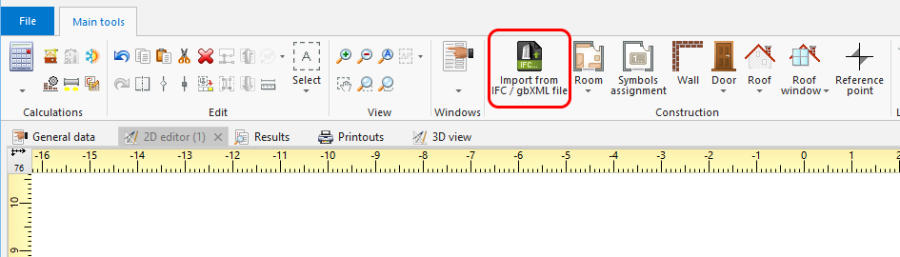
1. Import from gbXML

Example of use
Import modelu budynku z formatu IFC
- Wybrać zakres importu w oknie importu, jeśli w pliku IFC znajduje się więcej niż jeden budynek.
Import modelu budynku z formatu gbXML
- Import modelu budynku z formatu gbXML wykonuje się analogicznie do importu z formatu IFC.