How to eliminate: "Maximum air flow velocity exceeded": Difference between revisions
Jump to navigation
Jump to search
(→Solution: tr) |
No edit summary |
||
| Line 34: | Line 34: | ||
[[Category:InstalSystem 5]] | [[Category:InstalSystem 5]] | ||
[[Category:TIP&TRICK]] | [[Category:TIP&TRICK]] | ||
<!-- Do not write text below this tag --> | |||
<br class="iwlinks"/>[[pl:Jak wyeliminować: "Przekroczona maksymalna prędkość przepływu powietrza"|Jak wyeliminować: "Przekroczona maksymalna prędkość przepływu powietrza"]][[zh-cn:如何删除: "超过最大空气流速"警告信息|如何删除: "超过最大空气流速"警告信息]] | |||
Revision as of 16:01, 23 February 2026
| Product | InstalSystem 5 |
| Type of article | TIP&TRICK |
| Source for translation | 2025-01-10 |
Problem description
The problem may occur after the project calculation on the scope Ventilation systems and is reported in the Diagnostics window with the Warning message:
- Maximum air flow velocity exceeded (%s m/s > %s m/s).
Solution
If a message about exceeding the vmax value in the ducts appears, the following steps can be taken to correct this issue:
- select the duct types with larger diameters as default, for a specific location, in the General data/Ventilation systems/Types and default data window;
- select the larger diameter type for individual ducts in the Data table after first selecting the ducts (a two-click on the diagnostic message selects the problematic ducts);
- make the distribution with a greater number of ducts;
- insert additional air diffusers/extractors;
- increase the value in the Maximum air flow velocity, vmax box as default in the General data/Ventilation systems/Types and default data window or in the Data table window for particular ducts.
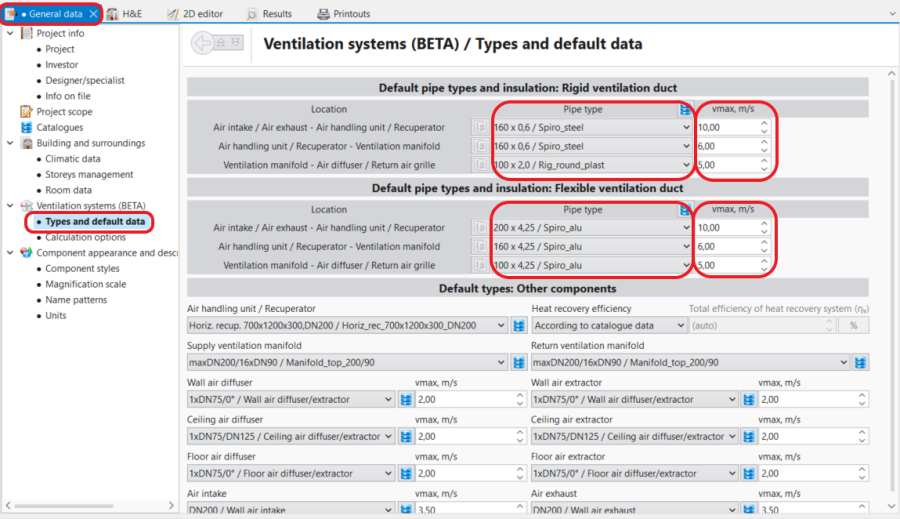
1. General data/Ventilation systems/Types and default data. 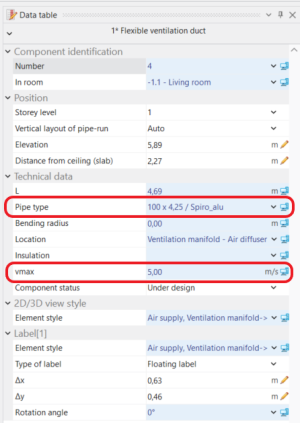
2. Ventilation duct - Data table.

