How to eliminate: "Maximum air flow velocity exceeded": Difference between revisions
Jump to navigation
Jump to search
(→Solution: tr) |
|||
| Line 24: | Line 24: | ||
==Solution== | ==Solution== | ||
If a message about exceeding the vmax value in the ducts appears, the following steps can be taken to correct this issue: | |||
* | |||
* | * select the duct types with larger diameters as default, for a specific location, in the ''<IS_TS id=rsDanogi/>''/''<IS_TS id=strInstalacjeWentylacyjneGdm/>''/''<IS_TS id=DaneInstalacjiRozprowadzajacejCzynnikGrzewczyChlodniczy/>'' window; | ||
* | * select the larger diameter type for individual ducts in the '' <IS_TS id=DataEditorTable/>'' after first selecting the ducts (a two-click on the diagnostic message selects the problematic ducts); | ||
* | * make the distribution with a greater number of ducts; | ||
* | * insert additional air diffusers/extractors; | ||
* increase the value in the ''<IS_TS id=strVmaxHint/>'', ''<IS_TS id=strWmax/>'' box as default in the ''<IS_TS id=rsDanogi/>''/''<IS_TS id=strInstalacjeWentylacyjneGdm/>''/''<IS_TS id=DaneInstalacjiRozprowadzajacejCzynnikGrzewczyChlodniczy/>'' window or in the ''<IS_TS id=DataEditorTable/>'' window for particular ducts.</br>[[File:Ventilation systems - Types and default data.png|900 px|left|thumb|1. <IS_TS id=rsDanogi/>/<IS_TS id=strInstalacjeWentylacyjneGdm/>/<IS_TS id=DaneInstalacjiRozprowadzajacejCzynnikGrzewczyChlodniczy/>.]]</br>[[File:Ventilation duct - data table.png|300 px|left|thumb|2. Ventilation duct - <IS_TS id=DataEditorTable/>.]]<br clear="all"/> | |||
[[Category:InstalSystem 5]] | [[Category:InstalSystem 5]] | ||
[[Category:TIP&TRICK]] | [[Category:TIP&TRICK]] | ||
Revision as of 20:04, 10 January 2025
| Product | InstalSystem 5 |
| Type of article | TIP&TRICK |
| Source for translation | 2025-01-10 |
Problem description
The problem may occur after the project calculation on the scope Ventilation systems and is reported in the Diagnostics window with the Warning message:
- Maximum air flow velocity exceeded (%s m/s > %s m/s).
Solution
If a message about exceeding the vmax value in the ducts appears, the following steps can be taken to correct this issue:
- select the duct types with larger diameters as default, for a specific location, in the General data/Ventilation systems/Types and default data window;
- select the larger diameter type for individual ducts in the Data table after first selecting the ducts (a two-click on the diagnostic message selects the problematic ducts);
- make the distribution with a greater number of ducts;
- insert additional air diffusers/extractors;
- increase the value in the Maximum air flow velocity, vmax box as default in the General data/Ventilation systems/Types and default data window or in the Data table window for particular ducts.
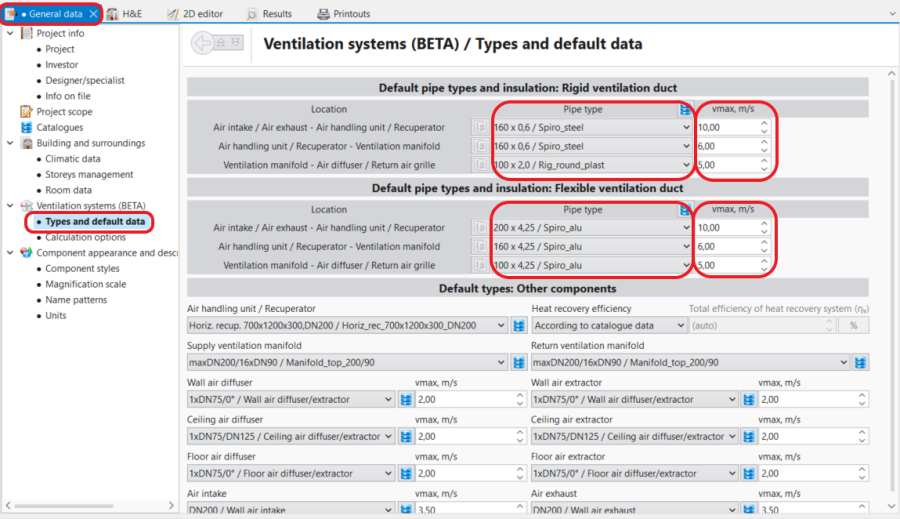
1. General data/Ventilation systems/Types and default data. 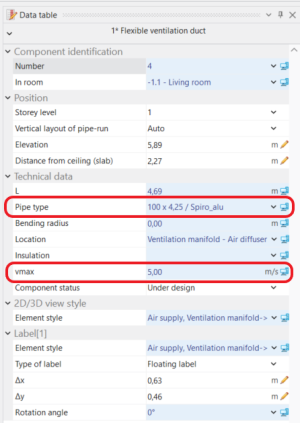
2. Ventilation duct - Data table.

