How to eliminate: "Maximum air flow velocity exceeded": Difference between revisions
Jump to navigation
Jump to search
(→Problem description: Problem description) |
|||
| Line 20: | Line 20: | ||
==Problem description== | ==Problem description== | ||
The problem may occur after the project calculation on the scope ''<IS_TS id=InstalacjeWentylacyjne/>'' and is reported in the | The problem may occur after the project calculation on the scope ''<IS_TS id=InstalacjeWentylacyjne/>'' and is reported in the ''<IS_TS id=ErrorModuleTitle/>'' window with the ''<IS_TS id=cWarningString/>'' message: | ||
*'''''<IS_TS id=errAirFlowSpeedOutOfRange/>'''''. | *'''''<IS_TS id=errAirFlowSpeedOutOfRange/>'''''. | ||
Revision as of 19:25, 10 January 2025
| Product | InstalSystem 5 |
| Type of article | TIP&TRICK |
| Source for translation | 2025-01-10 |
Problem description
The problem may occur after the project calculation on the scope Ventilation systems and is reported in the Diagnostics window with the Warning message:
- Maximum air flow velocity exceeded (%s m/s > %s m/s).
Solution
W przypadku pojawienia się komunikatu o przekroczeniu wartości vmax w kanałach, można wykonać następujące kroki w celu zniwelowania tego przekroczenia:
- wybrać domyślnie, dla określonego umiejscowienia, typy kanałów o większych średnicach w oknie General data/Ventilation systems/Types and default data;
- wybrać typ o większej średnicy dla poszczególnych kanałów w oknie Data table po wcześniejszym zaznaczeniu kanałów (dwkuklik na komunikat diagnostki zaznacza problematyczne kanały);
- wykonać rozprowadzenie większą ilością kanałów;
- wstawić dodatkowe nawiewniki/wywiewniki;
- zwiększyć wartość w polu Maximum air flow velocity vmax domyślnie w oknie General data/Ventilation systems/Types and default data lub w oknieData table dla poszczególnych kanałów.
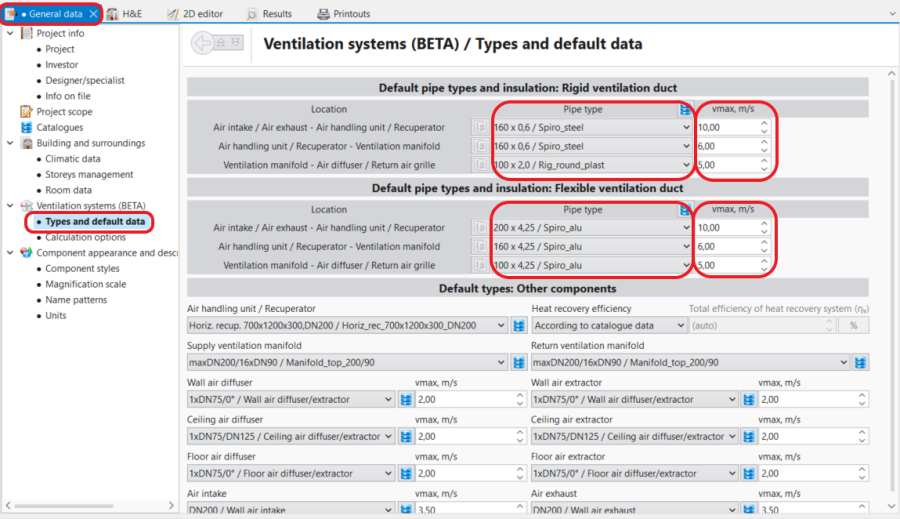
1. General data/Ventilation systems/Types and default data. 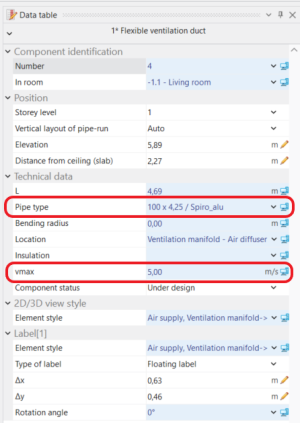
2. Kanał wentylacyjny -Data table.

