Pipe-run: Difference between revisions
| Line 82: | Line 82: | ||
* The ''<IS_TS id=PiperunElevationOptions/>'' function enables full control over the alignment of a pipe-run, which, together with the possibility of marking points on a component, makes it possible to draw inclined pipe-runs and to design the connections of systems located on inclined attic elements. <br/> {{#ev:youtube|gSRjLRaQCaM|900||||rel=0}} <br clear="all"/> | * The ''<IS_TS id=PiperunElevationOptions/>'' function enables full control over the alignment of a pipe-run, which, together with the possibility of marking points on a component, makes it possible to draw inclined pipe-runs and to design the connections of systems located on inclined attic elements. <br/> {{#ev:youtube|gSRjLRaQCaM|900||||rel=0}} <br clear="all"/> | ||
=== | ===Basic rules of connecting pipe-runs to other system components=== | ||
The ''<IS_TS id=NarzedziaGlowne/>'' bar in the ''<IS_TS id=ctgstringEdycja/>'' group offers three methods of automatic connecting of terminal units to the pipe-run arrangement drawn beforehand:</br>[[File:Automatically-connect.png|900 px|left|thumb|10. Connecting panels in an attic.]]<br clear="all"/> | |||
* ''<IS_TS id=btPodlaczGrzejnikiDoLinii/>'' - | * ''<IS_TS id=btPodlaczGrzejnikiDoLinii/>'' - connects selected ''<IS_TS id=iNameDzialka/>'' components and terminal units within the following scopes: ''<IS_TS id=InstalacjeGrzewcze/>'', ''<IS_TS id=InstalacjeChlodnicze/>'' and ''<IS_TS id=InstalacjeWodociagowe/>''. | ||
* ''<IS_TS id=btPodlaczGrzejnikiDoLiniiLooping/>'' - | * ''<IS_TS id=btPodlaczGrzejnikiDoLiniiLooping/>'' - connects selected ''<IS_TS id=iNameDzialka/>'' components and terminal units of a water supply system in a tee joint system. | ||
* ''<IS_TS id=PolaczPaneleSzeregowo/>'' - | * ''<IS_TS id=PolaczPaneleSzeregowo/>'' - connects ''<IS_TS id=iNameCOPanelSufitowy/>'' or ''<IS_TS id=PanelScienny/>'' components selected beforehand using a ''<IS_TS id=rpDzialkaSzeregowa/>'' type pipe-run. {{Info}} [[Designing panel (ceiling, wall) heating/cooling systems]].<br/> {{#ev:youtube|O2hpngkDlZA|900||||rel=0}} <br clear="all"/> | ||
For all components connected to a system (e.g. ''<IS_TS id=iNameCOElementONarzOporze/>'', ''<IS_TS id=rpMieszacz/>'', ''<IS_TS id=iNameRozdzielaczPure/>''), a horizontal pipe-run section 5cm long is drawn, followed by a bend to arrive at the defined elevation of the ''<IS_TS id=iNameDzialka/>''. | |||
Exceptions from this rule: | |||
* | * Connection of a ''<IS_TS id=iNameCOGrzejnik/>'' with an integrated angled valve - a horizontal pipe-run section is drawn of a length of: ''<IS_TS id=strOdlOdSciany/>'' + 5cm, followed by a bend to arrive at the defined elevation of the ''<IS_TS id=iNameDzialka/>''. | ||
* | * Connection of a ''<IS_TS id=iNameBateriaCzerpalna/>'' - a horizontal pipe-run section 1cm long is drawn, followed by a bend to arrive at the defined elevation of the ''<IS_TS id=iNameDzialka/>''. </br>[[File:Connections.png|900 px|left|thumb|11. Connection of a <IS_TS id=iNameBateriaCzerpalna/>.]]<br clear="all"/> | ||
* | * Connection of a ''<IS_TS id=iNamePion/>'' - if the pipe-run connection is made directly, with no midpoints, the pipe-run elevation adopted corresponds to the actual value in accordance with the data given in the ''<IS_TS id=DataEditorTable/>'' window of the ''<IS_TS id=iNameDzialka/>''. | ||
* | * Connection of a ''<IS_TS id=rpMieszacz/>''/''<IS_TS id=rpWezel/>'' - the ''<IS_TS id=btPodlaczGrzejnikiDoLinii/>'' operation results in connecting only the points that are on the primary side of the ''<IS_TS id=rpMieszacz/>''. | ||
===Działka w trybie auto=== | ===Działka w trybie auto=== | ||
Revision as of 17:08, 16 January 2023
| Product | InstalSystem 5 |
| Type of article | FUNCTIONS AND TOOLS |
| Source for translation | 2022-03-24 |
Description
Pipe-run is a component that is available within all design scopes, it forms a fragment of the piping system between two junctions where the flow can be changed. Within the following scopes: Heating systems, Cooling systems and Water supply systems a Pipe-run may consist of multiple segments (vertical and horizontal), separated by pipe-run division points. It can be drawn as a single pipe-run or as a Pipe-runs pair/ Three pipe-runs. Within the Sanitary drainage systems scope a Pipe-run of the Gravity sewerage or Ventilation conduit type always consists of a single segment.
It is possible to specify default values for Distance from floor (set in storey data). In addition, the user has full control over the arrangement of the pipe-runs using dedicated editors available in the 2D editor and 3D view windows.
Location in the program
Inserting pipe-runs
- Icons associated with Pipe-run, with Project scope: Heating systems or Cooling systems activated, are available in the 2D editor window in the Main tools bar, section Distribution - thermal installations when the following editing scopes are enabled: Convectional, Rad.-floors,walls or Rad.-ceilings.
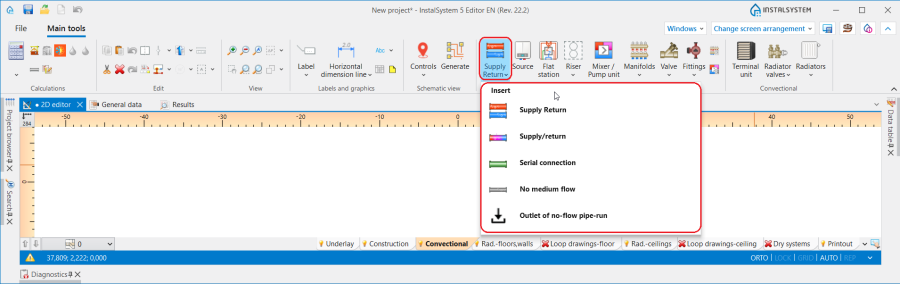
1. Pipe-run - Heating systems or Cooling systems. - Icons associated with Pipe-run, with Water supply systems activated, are available in the 2D editor window in the Main tools bar, section Distribution - Water supply when the Water supply editing scope is enabled.
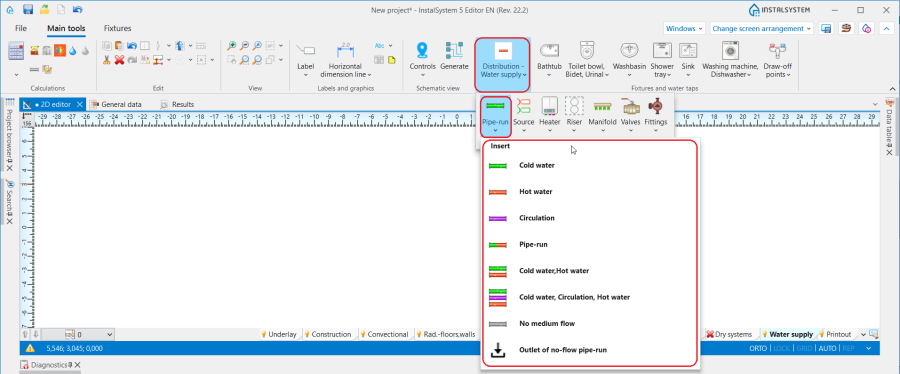
2. Pipe-run - Water supply systems. - Icons associated with Pipe-run, with Sanitary drainage systems activated, are available in the 2D editor window in the Main tools bar, section Sanitary drainage when the Drainage (S) editing scope is enabled.
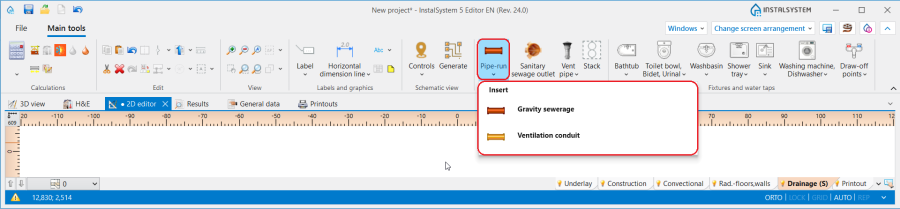
3. Pipe-run - Sanitary drainage systems.


Examples of use
Pipe-run dividing point and midpoint
- One Pipe-run may consist of several sections connected by means of midpoints.
- Two Pipe-run are separated by a pipe-run dividing point - a junction/node.
- Any number of additional points can be placed on a Pipe-run using the context menu and functions available there: Insert midpoint and Insert dividing point.
- Midpoints can be changed into dividing points and vice versa:
Default distances between pipe-run and floor and between pipe-run and ceiling
In the Data table window it is possible to specify for a Storey the default distance from the floor separately for each Pipe-run type component and the default distance from the ceiling (for arranging ceiling panels) in the following fields:
- for Heating systems:
- ΔHpipe-run,,S and ΔHpipe-run,, R - Default distance of pipe-runs (except for supplying ceiling panels) from the floor specified in storey data: S - supply, R - return.
- ΔHpipe-run,pan. - Pipe-run to ceiling distance - ceiling panel distribution.
- for Water supply systems:
- ΔHpipe-run,,HW - Default pipe-run distance from the floor (set in storey data) for Pipe-run: Hot water.
- ΔHpipe-run,,CW - Default pipe-run distance from the floor (set in storey data) for Pipe-run: Cold water.
- ΔHpipe-run,,Circ - Default pipe-run distance from the floor (set in storey data) for Pipe-run: Circulation.
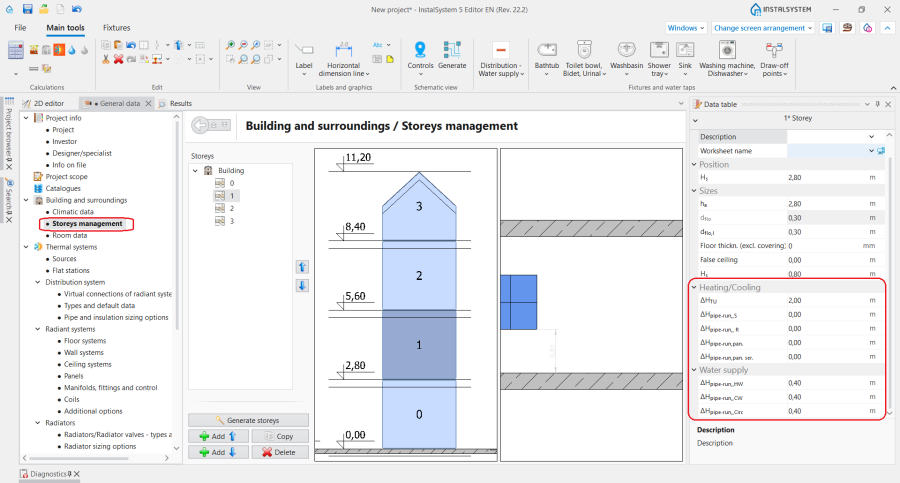
4. Default pipe-run distance.

Pipe-run laying distance
- The Distance between pipe-runs can be specified for Pipe-runs pair/Three pipe-runs in the Data table window. After each component inserted, the last specified Distance is memorized.
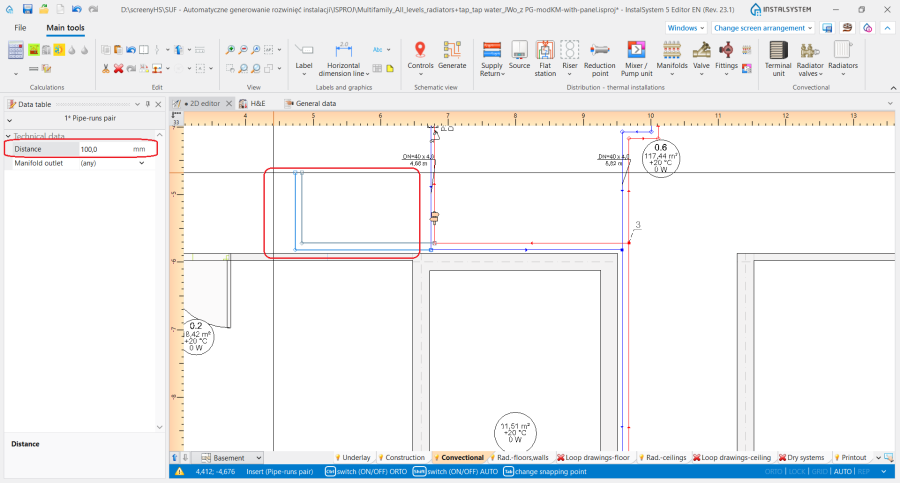
5. Distance for Pipe-runs pair.

Determining the vertical alignment of the pipe-runs - Heating systems, Cooling systems and Water supply systems
The alignment and elevations of a pipe-run can be managed using dedicated editors that are displayed after selecting a component in the 2D editor and 3D view window:
 - shows the elevation of the pipe-run end.
 - shows the elevation of the section.
 - shows the distance between pipe-run point/section and floor.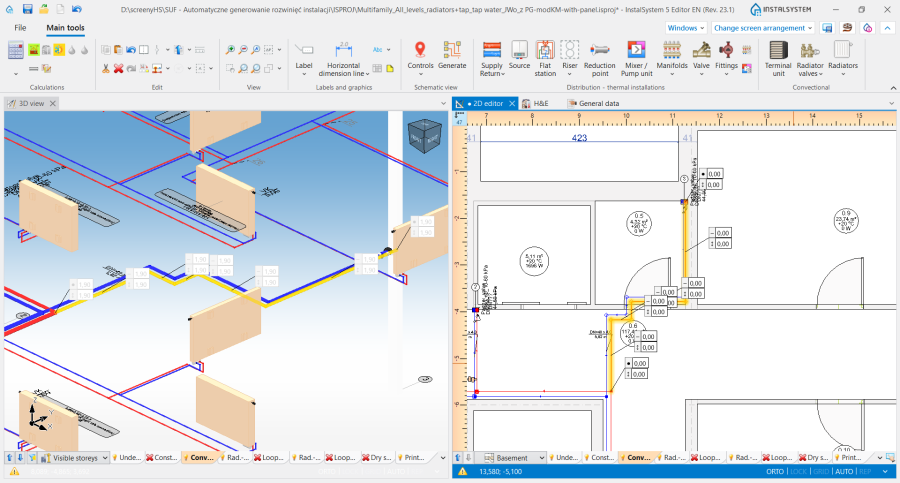
6. Display of the elevations of a Pipe-run in the 2D editor and 3D view window.


InstalSystem 5 offers three methods of managing the alignment of a distribution system that allow the most convenient method to be selected to suit the individual design context. The method should be selected in the Vertical layout of pipe-run editor in the Data table window for the Pipe-run:
- Auto mode:
- Editors showing the elevation of pipe-run ends and distance from the floor are greyed out and the values presented cannot be modified.
- The value of Elevation can be modified in the Data table window for the Pipe-run and this change automatically modifies the values in all editors for the selected component.
- Manual elevations of sections mode:
- In the editors available in the 2D editor and 3D view window it is possible to specify the elevation and distance from the floor of a pipe-run section.
- Based on the difference between the specified section elevations, vertical pipe-runs are automatically created.
- Editors of pipe-runs connected on one end to terminal units are greyed out and these cannot be edited.
- The 2D editor and 3D view windows do not display editors with elevations of vertical sections of pipe-runs.
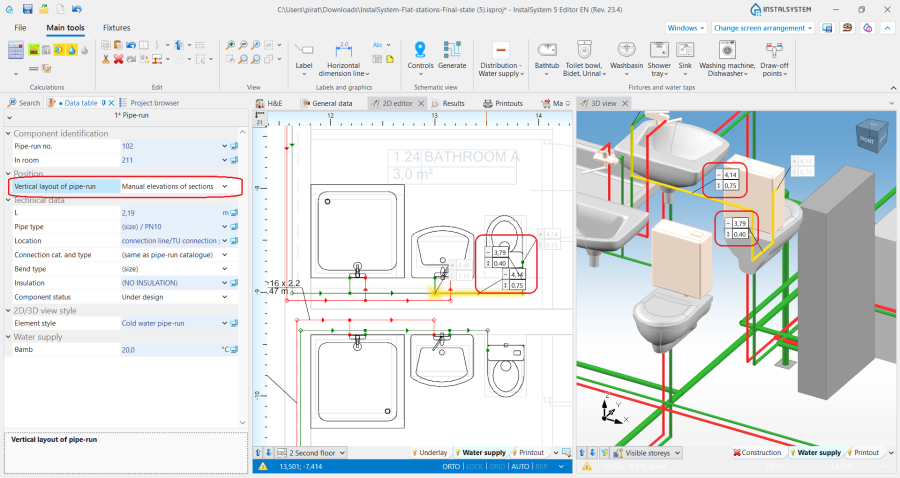
7. Vertical layout of pipe-run - Manual elevations of sections.
- Manual elevations of nodes:
- Editors in the 2D editor and 3D view window enable specifying the elevations and distance from the floor of the ends of a Pipe-run section.
- Vertical sections of pipe-runs are NOT automatically created - the entire pipe-run layout is controlled by the user.
- Editors of pipe-runs connected on one end to terminal units are greyed out and these cannot be edited.
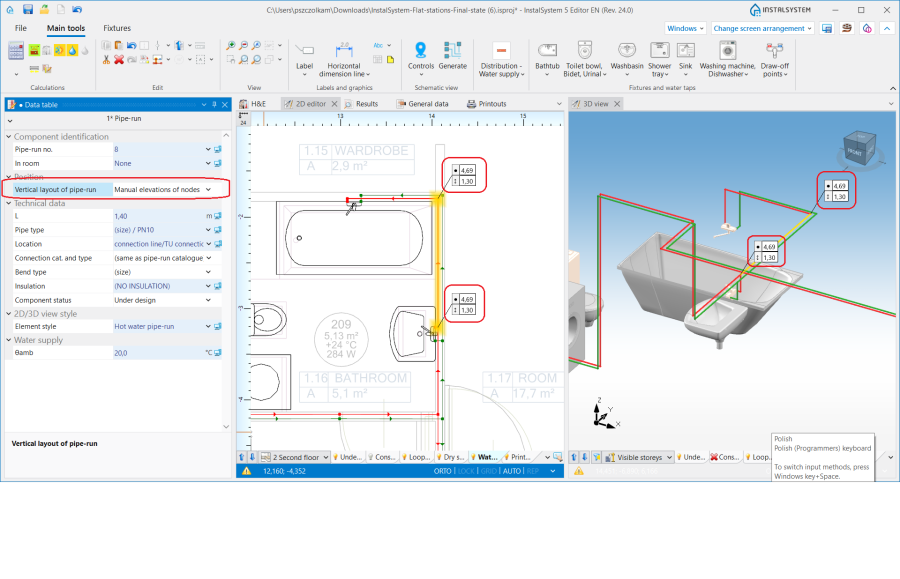
8. Vertical layout of pipe-run - Manual elevations of nodes.


Attention! Every change of elevations and modification of Pipe-run layout requires running a Check connections operation available on the Main tools bar in section Calculations.
Determining the vertical alignment of pipe-runs - Sanitary drainage systems
The elevations and gradient of a pipe-run can be managed using dedicated editors that are displayed after selecting a component in the 2D editor and 3D view window:
 - shows the elevation of pipe-run sections, values presented in the editors correspond to the fields: Elevation of first node and Elevation of second node available in the Data table window of the component.
 - shows the gradient of the pipe-run and corresponds to the Real gradient field available in the Data table window of the component.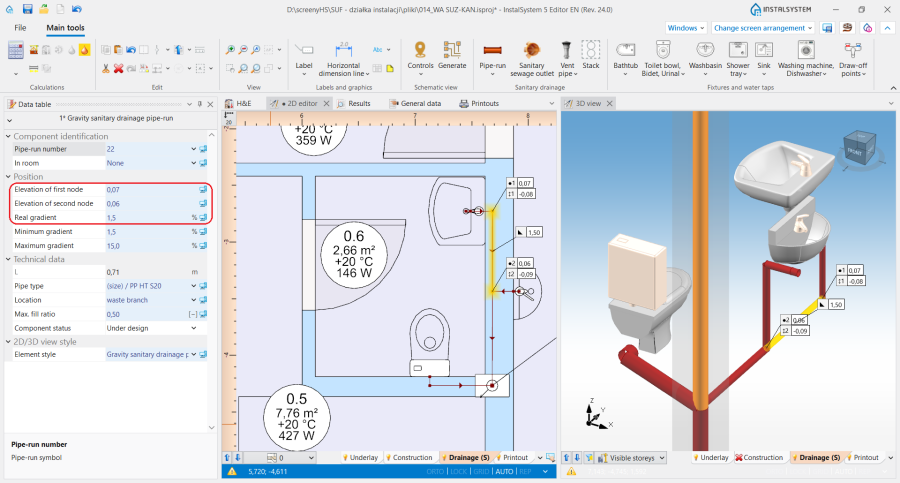
5. Display of elevations and gradient of a Pipe-run in the 2D editor and 3D view window.


When laying the pipe-runs, they adopt a gradient according to the direction of flow to the sewage outlet, taking into account the settings made in the General data window on the Sanitary drainage systems/ Calculation standards and options tab:
- The default minimum gradients specified for the selected component locations are adopted. In addition, the pipe-run laying algorithm takes into account the elevation and gradient values specified by the user in the editors described above.
- The Method of conducting of branches is taken into account:
- for the towards the floor setting - pipe-runs are arranged towards the terminal units with minimum gradient. If necessary, vertical pipe-runs at the terminal units are added taking into account the value specified in Distance from the floor of the connection points to the stack field,
- for the towards the wall setting - pipe-runs are arranged downstream of the terminal unit with the gradients specified in the General data window, and they are then connected to the collective branch by means of a vertical pipe-run (if drawing it is necessary for the continuity of the system).
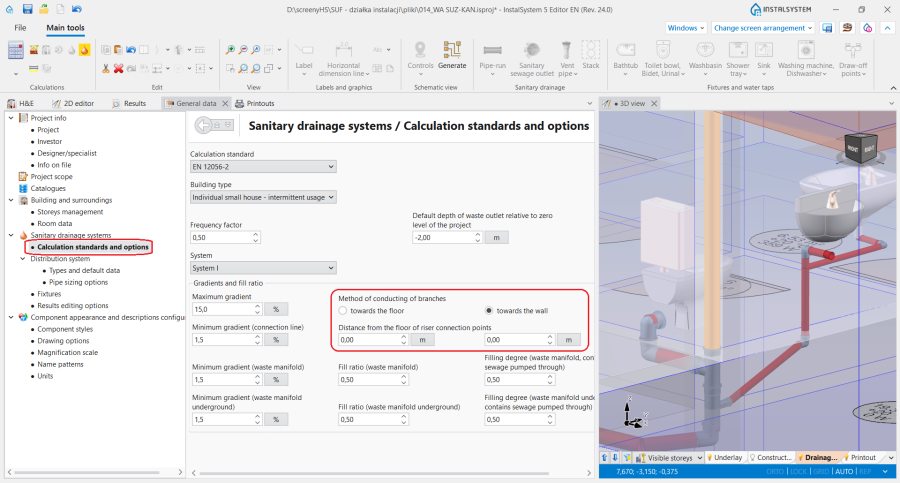
9. Alignment of pipe-runs - Sanitary drainage systems.

Laying pipe-runs in a single vertical plane
- Appropriate setting of elevation values of individual types of pipe-runs in the Data table window for a Storey in sections: Heating/Cooling or Water supply and specifying the minimum value in the Distance field in the Data table window of a Pipe-runs pair/ Three pipe-runs, enable aligning pipe-runs in one vertical plane, e.g. in a wall one over the other.
Inclined pipe-runs
- The Vertical layout of pipe-run function enables full control over the alignment of a pipe-run, which, together with the possibility of marking points on a component, makes it possible to draw inclined pipe-runs and to design the connections of systems located on inclined attic elements.
Basic rules of connecting pipe-runs to other system components
The Main tools bar in the Edit group offers three methods of automatic connecting of terminal units to the pipe-run arrangement drawn beforehand:

- Automatically connect terminal units - connects selected Pipe-run components and terminal units within the following scopes: Heating systems, Cooling systems and Water supply systems.
- Automatically connect terminal units in tee system - connects selected Pipe-run components and terminal units of a water supply system in a tee joint system.
- Connect in series - connects Ceiling panel or Wall panel components selected beforehand using a Serial connection type pipe-run. For more information, see: Designing panel (ceiling, wall) heating/cooling systems.
For all components connected to a system (e.g. Terminal unit, Mixer, Manifold), a horizontal pipe-run section 5cm long is drawn, followed by a bend to arrive at the defined elevation of the Pipe-run. Exceptions from this rule:
- Connection of a Radiator with an integrated angled valve - a horizontal pipe-run section is drawn of a length of: Distance from wall + 5cm, followed by a bend to arrive at the defined elevation of the Pipe-run.
- Connection of a Water supply faucet - a horizontal pipe-run section 1cm long is drawn, followed by a bend to arrive at the defined elevation of the Pipe-run.
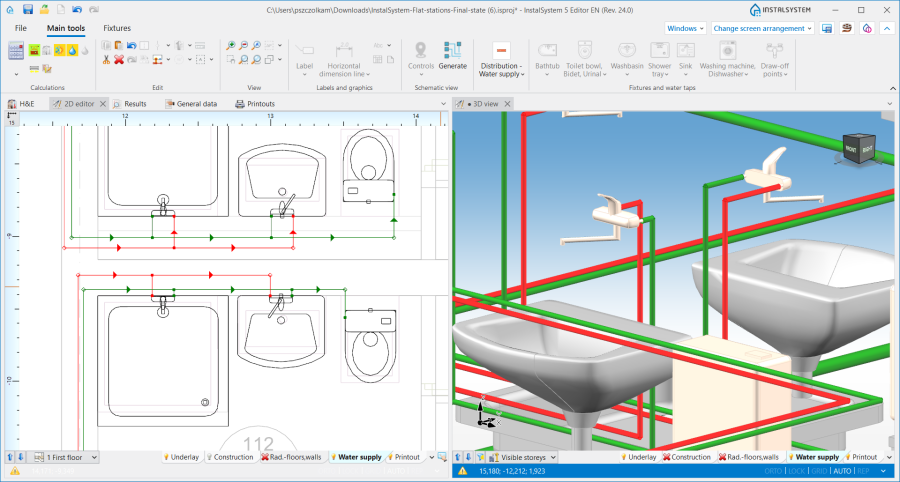
11. Connection of a Water supply faucet. - Connection of a Riser - if the pipe-run connection is made directly, with no midpoints, the pipe-run elevation adopted corresponds to the actual value in accordance with the data given in the Data table window of the Pipe-run.
- Connection of a Mixer/Control loop - the Automatically connect terminal units operation results in connecting only the points that are on the primary side of the Mixer.

Działka w trybie auto
W sytuacji, gdy działki w projekcie zostały narysowane w taki sposób, że w ramach jednej kondygnacji występują działki pionowe (uzyskane nie poprzez wstawienie elementu Riser, a poprzez połączenie czterech działek bądź par działek), działki podłączane do tych pionowych odcinków podlegają określonym zasadom rysowania:
- Podczas rysowania elementów przy włączonym trybie pracy Pipe-run podłącza się do działki pionowej z zachowaniem swojej rzędnej.
- Podczas podłączania działki do działek, których współrzędne się pokrywają, rysowana Pipe-run zostanie podłączona do elementu o najniższej rzędnej.
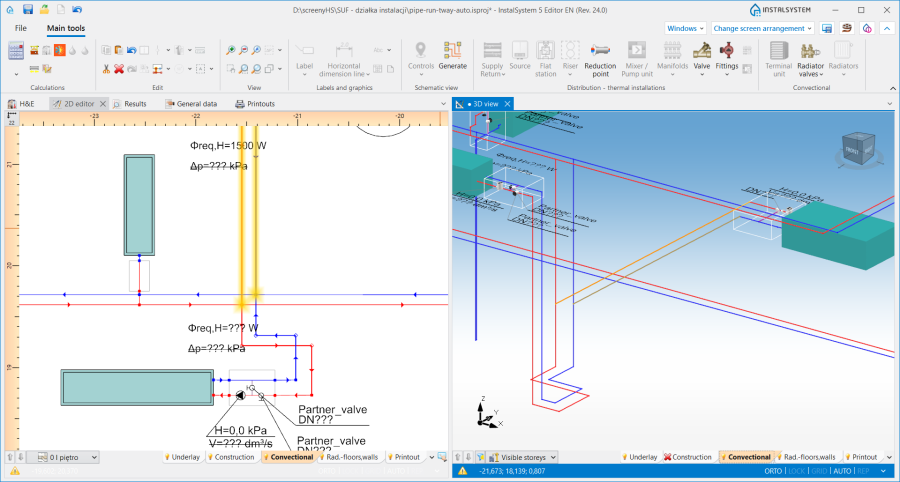
12. Podłączenie do działek pionowych.
