How to draw a building with patio: Difference between revisions
Jump to navigation
Jump to search
| Line 25: | Line 25: | ||
</br> | </br> | ||
==== | ====Method 1: using a closed C-shaped <IS_TS id=rsPomieszczenie/> component==== | ||
# | # Insert a closed C-shaped ''<IS_TS id=rsPomieszczenie/>'' surrounding an interior patio in a building so that the edges of the room do not overlap.</br>[[File:C_room.png|900 px|left|thumb|1. Closed C-shaped <IS_TS id=rsPomieszczenie/>.]]<br clear="all"/> | ||
# | # Add a ''<IS_TS id=ObrysBud/>'' component to the design. | ||
# | # In order to verify whether the edges of the ''<IS_TS id=rsPomieszczenie/>'' do not overlap, launch ''<IS_TS id=BuildingStructureCalculation/>''. | ||
# | # Insert a ''<IS_TS id=rsPomieszczenie/>'' ''<IS_TS id=PomieszczenieReczne/>'' component to cover the area of the patio in the building. | ||
# | # Launch ''<IS_TS id=PartitionsGenerator/>''. | ||
# | # Remove the ''<IS_TS id=iNameKonstrSciana/>'' component left over after the manual C-shaped room. | ||
# | # Over the patio area cut out an ''<IS_TS id=rpOtworWdachu/>'' and connect it using any two edges with the outer edge of the ''<IS_TS id=Roof/>''. | ||
# | # Optionally cut out an ''<IS_TS id=rpOtworWstropie/>'' that covers the patio area. | ||
# | # Run ''<IS_TS id=BuildingStructureCalculation/>'' again.</br>{{#ev:youtube|ccEVsyren8w|900||||rel=0}} <br clear="all"/> | ||
====Sposób 2: obrys patio ręcznie wstawionymi ścianami==== | ====Sposób 2: obrys patio ręcznie wstawionymi ścianami==== | ||
Revision as of 20:04, 10 July 2022
| Product | InstalSystem 5 |
| Type of article | TIP&TRICK |
| Source for translation | 2022-06-24 |
Problem description
In InstalSystem 5 there are several ways to design a building with a patio, allowing for optimal adaptation to the method of creating the building structure chosen in the project. Steps leading to create a building with a patio are described in detail further on in this article.
Solution
Using the Room and Building contour components
Information on creating the building structure with the use of Room Manual and Building contour components is provided in the article: Preparation of building structure - Rooms layout.
Method 1: using a closed C-shaped Room component
- Insert a closed C-shaped Room surrounding an interior patio in a building so that the edges of the room do not overlap.
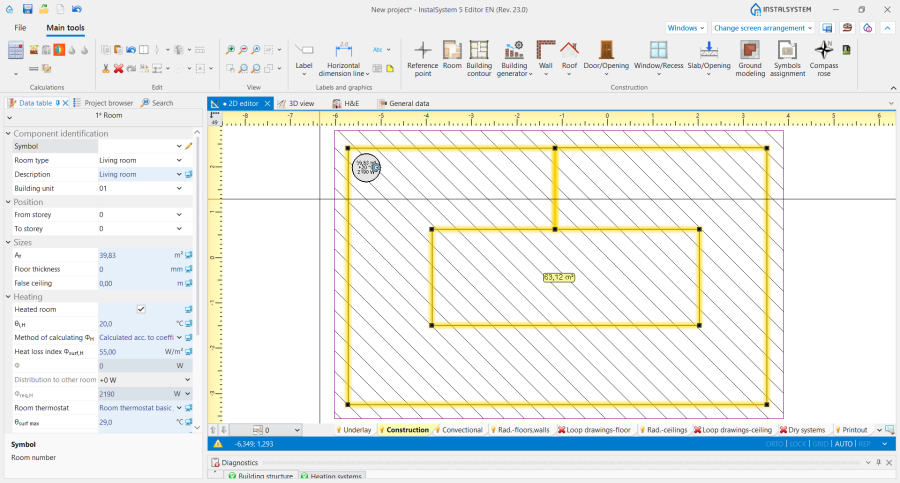
1. Closed C-shaped Room. - Add a Building contour component to the design.
- In order to verify whether the edges of the Room do not overlap, launch Computation of building structure .
- Insert a Room Manual component to cover the area of the patio in the building.
- Launch Automatic walls, slabs and roofs.
- Remove the Wall component left over after the manual C-shaped room.
- Over the patio area cut out an Opening in roof and connect it using any two edges with the outer edge of the Roof.
- Optionally cut out an Opening in slab that covers the patio area.
- Run Computation of building structure again.

Sposób 2: obrys patio ręcznie wstawionymi ścianami
- Wstawić Room.
- Uzupełnić projekt o element Building contour.
- Wywołać operację Automatic walls, slabs and roofs.
- Wykonać Computation of building structure .
- Z wykorzystaniem elementów Wall, wrysować patio w istniejące Room i ponownie wywołać Computation of building structure .
- Nad powierzchnią patio wyciąć Opening in roof i połączyć go dwiema dowolnymi krawędziami z zewnętrzną krawędzią elementu Roof.
- Opcjonalnie wyciąć Opening in slab pokrywający powierzchnię patio.
- Ponownie wykonać Computation of building structure .
Z wykorzystaniem ręcznie narysowanych ścian
Informacje o tworzeniu struktury budynku w oparciu o elementy Wall, Roof i Slab są dostępne w artykule: Przygotowanie struktury budynku - Pełna struktura budynku.
- Obrysować kształt pomieszczenia i patio przy pomocy elementów Wall.
- Uzupełnić projekt o elementy Roof i Slab.
- Wykonać Computation of building structure .
- Nad powierzchnią patio wyciąć Opening in roof i połączyć go dwiema dowolnymi krawędziami z zewnętrzną krawędzią elementu Roof.
- Opcjonalnie wyciąć Opening in slab pokrywający powierzchnię patio.
- Ponownie wykonać Computation of building structure .
- Uwaga! Można od razu zostawić pustą przestrzeń ponad powierzchnią patio i narysować Roof jako dwie idealnie styczne ze sobą połacie dachowe.
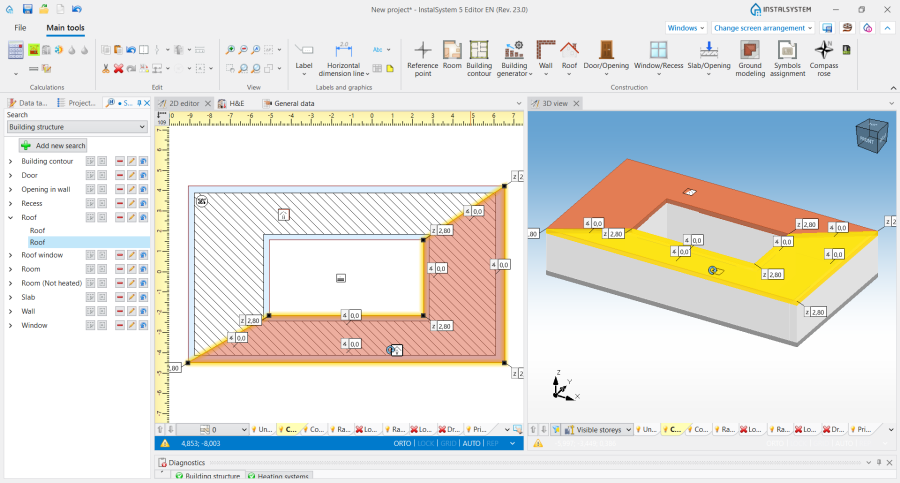
2. Połacie dachowe w budynku z patio.
