Creating network profiles: Difference between revisions
Jump to navigation
Jump to search
Klintsevicho (talk | contribs) |
Klintsevicho (talk | contribs) |
||
| Line 33: | Line 33: | ||
#** (Optional) Change the scale, reference level, spacing between profiles for the worksheet, and profile table width, | #** (Optional) Change the scale, reference level, spacing between profiles for the worksheet, and profile table width, | ||
#** (Optional) Select the profile appearance configuration for the worksheet.<br/>{{#ev:youtube|OlbOSjZSwzk|900||||rel=0}} | #** (Optional) Select the profile appearance configuration for the worksheet.<br/>{{#ev:youtube|OlbOSjZSwzk|900||||rel=0}} | ||
* Open ''<IS_TS id=ProjectBrowser/>'' and select ''<IS_TS id=rpProfiles/>'' ''<IS_TS id=PH_NS5_SAN_T/>'' scope; | #* Define profiles routs: | ||
* Choose ''<IS_TS id=ProfileGroupAutomatyczne/>'' / ''<IS_TS id=DefinicjeTrasProfilu/>''; | #** Open ''<IS_TS id=ProjectBrowser/>'' and select ''<IS_TS id=rpProfiles/>'' ''<IS_TS id=PH_NS5_SAN_T/>'' or ''<IS_TS id=rpProfiles/>'' ''<IS_TS id=PH_NS5_SAN_S/>'' scope; | ||
#** Choose ''<IS_TS id=ProfileGroupAutomatyczne/>'' / ''<IS_TS id=DefinicjeTrasProfilu/>''; | |||
#** ''<IS_TS id=NetDodajTraseProfilu/>'', specifying in the ''<IS_TS id=DataEditorTable/>'' window: | |||
#*** ''<IS_TS id=strDefProfiluZArkRys/>'' - the ''<IS_TS id=sNazwa/>'' of ''<IS_TS id=ArkuszeMap/>''from which the profile will be generated, | |||
#*** ''<IS_TS id=strDefProfiluNaArkRys/>'' - the ''<IS_TS id=sNazwa/>'' of ''<IS_TS id=ArkuszeProfili/>'' to which the profile will be generated, | |||
#*** ''<IS_TS id=strDefProfiluOznPocz/>'', | |||
#*** ''<IS_TS id=strDefProfiluOznKon/>'', | |||
[[Category:NetSystem 5]] | [[Category:NetSystem 5]] | ||
[[Category:FUNCTIONS AND TOOLS]] | [[Category:FUNCTIONS AND TOOLS]] | ||
Revision as of 12:20, 22 April 2026
| Product | NetSystem 5 |
| Type of article | Functions and tools |
| Source for translation | 2026-04-13 |
Description
This article describes the methods of creating Profiles of Water supply networks and Sewage networks.
The profile creation feature allows to:
- automatically generate network profiles based on the prepared network. Profiles are created according to user-defined routes. The appearance can be manually configured.
- manually create network profiles without performing calculations.
Location in the program
- Icons of components and functions for the Profiles creation are available on the Main tools bar in the Profiles section when Water supply networks or Sewage networks scope is active:
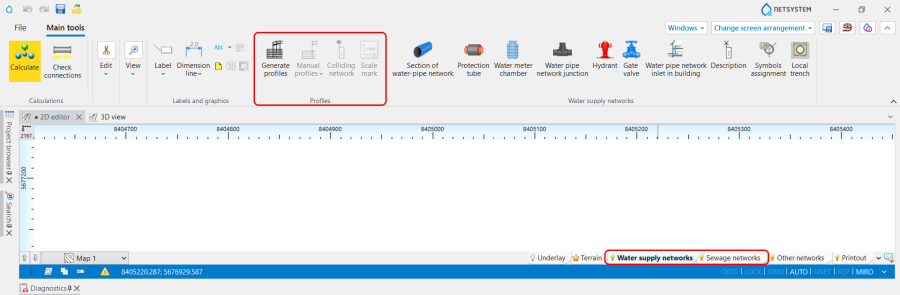
1. Profiles icons of components and functions. - List of all created in a project Profiles is displayed in the graphic view management window.

2. Profiles list.


Examples of use
Basic scenario - generating Automatic profiles
The path for generating Automatic profiles is the following:
- Define required network profiles:
- Add to the project and configure the Automatic profiles worksheets in the General data window:
- (Optional) Change the scale, reference level, spacing between profiles for the worksheet, and profile table width,
- (Optional) Select the profile appearance configuration for the worksheet.
- Define profiles routs:
- Open Project browser and select Profiles Water supply networks or Profiles Sewage networks scope;
- Choose Automatic profiles / Profile route definitions;
- Add a profile route, specifying in the Data table window:
- From worksheet - the Name of Worksheets with mapsfrom which the profile will be generated,
- On the worksheet - the Name of Worksheets with profiles to which the profile will be generated,
- Start des.,
- End des.,
- Add to the project and configure the Automatic profiles worksheets in the General data window: