Import of building model from BIM compatible formats: Difference between revisions
Jump to navigation
Jump to search
No edit summary |
|||
| (47 intermediate revisions by 6 users not shown) | |||
| Line 1: | Line 1: | ||
<IS_HELP id="HS65"/> | |||
{{Article table | {{Article table | ||
|commercial_product1=InstalSystem 5 | |commercial_product1=InstalSystem 5 | ||
| Line 5: | Line 6: | ||
|p4 =<!--gdy jest kolejny produkt handlowy, zamienić na->"produkt_handlowy3="--> | |p4 =<!--gdy jest kolejny produkt handlowy, zamienić na->"produkt_handlowy3="--> | ||
|category1 =InstalSystem 5#Funkcjonalności | |category1 =InstalSystem 5#Funkcjonalności | ||
|category_name1 = | |category_name1 = FUNCTION AND TOOL | ||
|c2 =<!--Jest kategoria -> zamienić na: "category2=" i uzupełnić link do sekcji kategorii na stronie głównej produktu--> | |c2 =<!--Jest kategoria -> zamienić na: "category2=" i uzupełnić link do sekcji kategorii na stronie głównej produktu--> | ||
|category_name2 =<!--podać nazwę kategorii--> | |category_name2 =<!--podać nazwę kategorii--> | ||
|c3 =<!--Jest kategoria -> zamienić na: "category3=" i uzupełnić link do sekcji kategorii na stronie głównej produktu--> | |c3 =<!--Jest kategoria -> zamienić na: "category3=" i uzupełnić link do sekcji kategorii na stronie głównej produktu--> | ||
|category_name3 =<!--podać nazwę kategorii "ZASTOSOWANIE"/"FUNKCJONALNOŚĆ"/...--> | |category_name3 =<!--podać nazwę kategorii "ZASTOSOWANIE"/"FUNKCJONALNOŚĆ"/...--> | ||
|version1 = | |version1 =2018-02-08 | ||
|v2 =<!--Jest wersja -> zamienić na: "version2=" i uzupełnić link do sekcji RN danego produktu--> | |v2 =<!--Jest wersja -> zamienić na: "version2=" i uzupełnić link do sekcji RN danego produktu--> | ||
|v3 =<!--Jest wersja -> zamienić na: "version2=" i uzupełnić link do sekcji RN danego produktu--> | |v3 =<!--Jest wersja -> zamienić na: "version2=" i uzupełnić link do sekcji RN danego produktu--> | ||
| Line 18: | Line 19: | ||
==Description== | ==Description== | ||
The article describes how to import data on building structure from the following file formats: | |||
* '''IFC''', | * '''IFC''', | ||
* '''gbXML'''. | * '''gbXML'''. | ||
The following elements of building structure included in the '''IFC''' format are recognized and supported: | |||
* | * storeys, | ||
* | * vertical partitions: walls and related components - windows, doors, openings, etc., | ||
* | * horizontal partitions: roofs and related components - roof windows, | ||
* | * dormers, etc., | ||
* | * floor slabs and openings, | ||
* | * columns, | ||
* | * beams, | ||
* | * stairs. | ||
The following elements of building structure included in the '''gbXML''' format are recognized and supported: | |||
* | * storeys, | ||
* | * vertical partitions: walls and related components - windows, doors, openings, etc., | ||
* | * dormers, etc., | ||
* | * columns, | ||
* | * beams, | ||
* | * stairs. | ||
==Location in the program== | ==Location in the program== | ||
=== | ===Viewing and handling diagnostic messages=== | ||
* | * The icon of the import of building model from BIM compatible formats is accessible in the 2D Editor window in the ''<IS_TS id=NarzedziaGlowne/>'' bar, section ''<IS_TS id=lystrFloors/>'' when ''<IS_TS id=lystrFloors/>'' editing scope is enabled.<br/>[[File:TB-BIM-data-exchange-location.png|900 px|left|thumb|1. ''<IS_TS id=ImportgbXMLName/>'']]<br clear="all"/> | ||
==Example of use== | ==Example of use== | ||
=== | ===Importing a building model from an IFC format file=== | ||
* | * Select the scope of import in the import window if there is more than one building in the IFC file.<br/>{{#ev:youtube|WVNf7NUD8mI|900||||rel=0}} <br clear="all"/> | ||
=== | ===Importing a building model from a gbXML format file=== | ||
* | * Building model is imported from a gbXML format file in a similar way to that from an IFC format file. | ||
[[Category:InstalSystem 5]] | [[Category:InstalSystem 5]] | ||
[[Category: | [[Category: FUNCTION AND TOOL]] | ||
<!-- Do not write text below this tag --> | |||
<br class="iwlinks"/>[[zh-cn:从BIM兼容的格式文件中导入建筑模型|从BIM兼容的格式文件中导入建筑模型]][[bg:Внос на сграден модел от съвместим формат BIM|Внос на сграден модел от съвместим формат BIM]] | |||
Latest revision as of 16:01, 23 February 2026
| Product | InstalSystem 5 |
| Type of article | FUNCTION AND TOOL |
| Source for translation | 2018-02-08 |
Description
The article describes how to import data on building structure from the following file formats:
- IFC,
- gbXML.
The following elements of building structure included in the IFC format are recognized and supported:
- storeys,
- vertical partitions: walls and related components - windows, doors, openings, etc.,
- horizontal partitions: roofs and related components - roof windows,
- dormers, etc.,
- floor slabs and openings,
- columns,
- beams,
- stairs.
The following elements of building structure included in the gbXML format are recognized and supported:
- storeys,
- vertical partitions: walls and related components - windows, doors, openings, etc.,
- dormers, etc.,
- columns,
- beams,
- stairs.
Location in the program
Viewing and handling diagnostic messages
- The icon of the import of building model from BIM compatible formats is accessible in the 2D Editor window in the Main tools bar, section Construction when Construction editing scope is enabled.
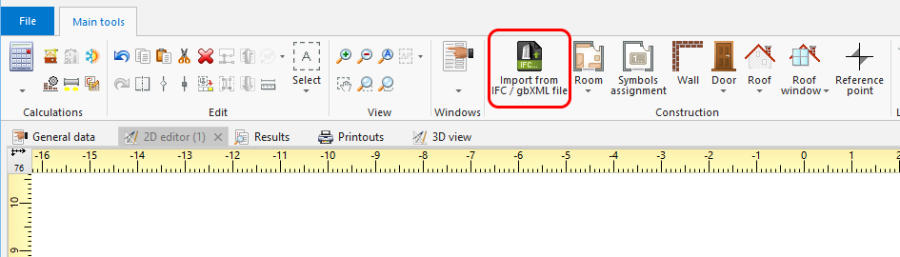
1. Import from gbXML

Example of use
Importing a building model from an IFC format file
- Select the scope of import in the import window if there is more than one building in the IFC file.
Importing a building model from a gbXML format file
- Building model is imported from a gbXML format file in a similar way to that from an IFC format file.